What should you look for when buying?
First consider how often you’ll need to reposition the screens. Then check your monitor and desk specifications against the details for the model you’re considering.
| Buying criterion |
What to check |
Who is this important for? |
| Screen positioning when comparing text |
Check whether each screen can be adjusted independently, and whether the height and reach suit your setup. |
If I often change the viewing angle or position when comparing versions, independent adjustment is essential. Around 33% of consumers have this as their main concern. |
| Monitor and desk compatibility |
Check the VESA pattern, the weight of each screen, the supported screen size, and your desk thickness or mounting method against the model specifications. |
If you want to make sure both monitors and the mounting system are suitable for your desk, these limits deserve particular attention. Around 27% of consumers prioritise this compatibility. |
| Clear desk space |
Measure the base, the space at the desk edge and the arms’ range of movement. |
If you need room for paperwork as well as your screens, the type of stand makes a difference. Around 20% of consumers say desk space is their main concern. |
| Warranty and complaints |
Check what’s included, the mounting accessories and the terms of any voluntary warranty. Remember that these are separate from your statutory rights if a product is faulty. |
If you want to factor in the total cost and what to do if something goes wrong, read the warranty and seller information carefully. Around 20% of consumers focus on this. |
Joybuy products for different desk setups
These Joybuy products range from dual monitor arms to monitor stands with shelves. For each model, check that it can support both your screens and will fit the available desk space.
 No image available
AOKCOS monitor stand for 2 monitors, 12–27 inches, with shelf
For two screens you want to reposition regularly: the product description specifies independently tilting, swivelling and rotating arms, plus a shelf.
For monitors measuring 12–27 inches with VESA 75 × 75 or 100 × 100 mm; according to the description, each arm supports up to 10 kg.
View at Joybuy
 No image available
AOKCOS monitor stand for 2 monitors, 12–27 inches
For two document views that need different positions: the product description specifies two adjustable arms and a shelf.
For monitors measuring 12–27 inches with VESA 75 × 75 or 100 × 100 mm; according to the description, the shelf supports up to 5 kg.
View at Joybuy
 No image available
Floordirekt monitor stand for 2 monitors, 80–108 cm, black
A raised stand for one or two monitors, with adjustable width and independently swivelling side sections.
The specified width can be adjusted from 80–108 cm; the height is 10,4 cm. The product title lists MDF as the material.
View at Joybuy
 No image available
Floordirekt gas-spring dual monitor arm, 15–32 inches
For two screens you want to position independently: the description specifies separately adjustable arms and rotation for portrait or landscape viewing.
For monitors measuring 15–32 inches, with VESA 75 × 75 or 100 × 100 mm and weighing 2–10 kg each. According to the description, it can be fitted using a C-clamp or grommet mount.
View at Joybuy
 No image available
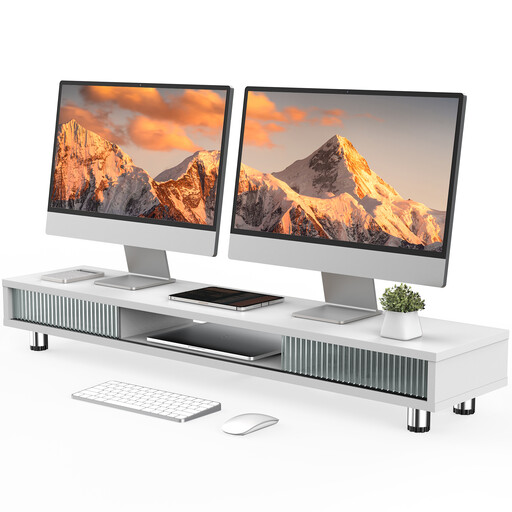
Monitor stand with two glass doors, 108 cm, white
A monitor stand with extra storage. The product description mentions a raised shelf for one monitor, not a mount for two screens.
The product title specifies a width of 108 cm and an adjustable-height design. The description lists three compartments and a drawer.
View at Joybuy
Frequently asked questions
What should I consider if my two monitors are different sizes?
For each monitor, compare its weight without the stand and its VESA pattern with the arm’s specifications. Also check the actual screen widths and adjustment range. A screen-size rating alone doesn’t guarantee that both monitor cases will fit side by side.
How should I adjust the arm when comparing different document versions?
Start by positioning the version you read most often, then adjust the second screen to make direct comparisons easier. In a small laboratory study, the IFA/DGUV found that results varied by task and screen configuration. It did not identify one universally best position or monitor arm.
Do I need to drill holes to fit a dual monitor stand?
Not necessarily. The freestanding StarTech.com ARMDUALSS sits on a base; according to the manufacturer, the DURABLE SELECT 5095 is available with a desk clamp or grommet mount. Check the mounting method for the specific model and make sure it suits your desk edge, any existing hole or the available space.
What should I know about faults and buying online?
If a product is faulty, your statutory rights against the seller are separate from any voluntary warranty. According to Verbraucherzentrale, online purchases of goods generally come with a 14-day right to cancel from the date of receipt; you must notify the seller that you wish to cancel. Specific circumstances and exceptions may apply.
Does German occupational safety law require a particular dual monitor arm?
ASR A6 does not specify a particular brand or type of monitor arm. The Federal Institute for Occupational Safety and Health (BAuA) describes ASR A6 as setting out requirements for display screen workplaces within its scope; employers are responsible for implementing them. The fact that a workspace is in a private home does not, by itself, mean those employer obligations apply there.


