Reading scripts during video calls
If you want to keep a script easy to read alongside your call and move it when needed, independently adjustable arms can help. You’ll also need to consider the best camera position for your setup.


If you often need to reposition your script during a video call, a dual arm with independently adjustable arms is a good option. If you only change positions occasionally, a simpler dual monitor mount may be enough. The key factors are the weight and VESA mounting pattern of both monitors, along with your desk surface and available movement space – screen size alone won’t confirm that a mount will fit.
If you want to keep a script easy to read alongside your call and move it when needed, independently adjustable arms can help. You’ll also need to consider the best camera position for your setup.
When choosing a mount, consider the weight and VESA mounting pattern of each screen, as well as the space available. Manufacturers’ screen-size guidance only applies alongside the other conditions for the specific model.
As well as checking that the monitors are compatible, make sure the clamp or grommet mount suits your desk and that there’s enough room behind the screens for them to move. Neomounts and ARCTIC highlight these mounting and clearance considerations for their respective models.
First, check that both monitors and the desk fixing are compatible with the specific model. Then choose the range of movement and any extras according to how often you change your screen positions and which connections or additions you actually need.
| What you need | What to check before buying | Who it matters most to |
|---|---|---|
| Position your script flexibly | Check for independent height and depth adjustment, as well as clearance on your desk. | If I want to reposition my script while preparing or during a call, flexibility matters to me. Around 29% of consumers put flexible positioning first. |
| Fit both monitors securely | Check the weight without the stand and the VESA mounting pattern of each monitor against the specifications for the exact model. For their respective models, Neomounts and ARCTIC list VESA 75 × 75 and 100 × 100 mm, among other details. | If I want to mount two screens I already own, the weight capacity and fixings must suit both. Around 29% of consumers put monitor compatibility first. |
| Mount it on your existing desk | Check the desk surface’s thickness and construction, as well as the space behind the desk. Don’t assume clamp and grommet mounts are interchangeable. | If I want to keep using my existing desk, the fixing must suit its surface. Around 24% of consumers prioritise desk mounting. |
| Balance space and extras | Check the movement clearance and desk space required. Only consider a USB hub or extension kits if you actually need them. | If desk space is limited or I need particular connections on my desk, the footprint and useful extras matter. Around 18% of consumers put desk space or additional features first. |
A monitor falling within the stated size range doesn’t confirm that the weight and mounting pattern of both screens are compatible with the mount. Curved screens may also have a different weight limit.
Check each monitor individually against the specifications for the exact mount model, including its weight without the stand and its VESA mounting pattern.
Some desk surfaces may need reinforcement or a different mounting method.
ARCTIC’s maximum monitor width for the Z2-3D (Gen 3) applies to two screens of equal width, positioned horizontally. It isn’t a guarantee for portrait or mixed-orientation setups.
If your screens are different widths or mounted in portrait orientation, check the arms’ actual dimensions and the space available.
According to Ergotron, the weight capacity per arm of the Ergotron LX Dual with tall pole decreases when you expand the mount from two to three or four monitors.
Check the weight capacity against the number of screens you plan to use, not just the standard configuration.
Additional arm and mounting kits are needed for extra screens.
The Neomounts DS70-250BL2 NEXT Slim is a dual arm that lets you position each monitor independently, including in setups close to a wall.
The ARCTIC Z2-3D (Gen 3) combines two gas-spring arms with a USB hub.
The Ergotron LX Dual with tall pole is designed for positioning screens independently, with the option to expand your setup later.
The KOORUI KR20G is described as a dual monitor stand for screens from 13 to 27 inches.
This selection includes dual arms for positioning screens independently, as well as monitor stands to help organise your desk. A single monitor stand isn’t necessarily designed for two screens, so check that its surface area and dimensions suit your monitors.
 Image unavailable
For two monitors that you want to position independently.
The product name lists tilt, swivel, rotation and height adjustment. A shelf is also included.
 Image unavailable
The two adjustable arms are designed to position the screens independently.
The product name lists tilt, swivel, rotation and height adjustment.
 Image unavailable
This gas-spring dual arm is designed for two monitors, which can be positioned in portrait or landscape orientation according to the product details.
Clamp and grommet mounting, as well as cable management, are listed for this product. Before installation, check which mounting method suits your desk surface.
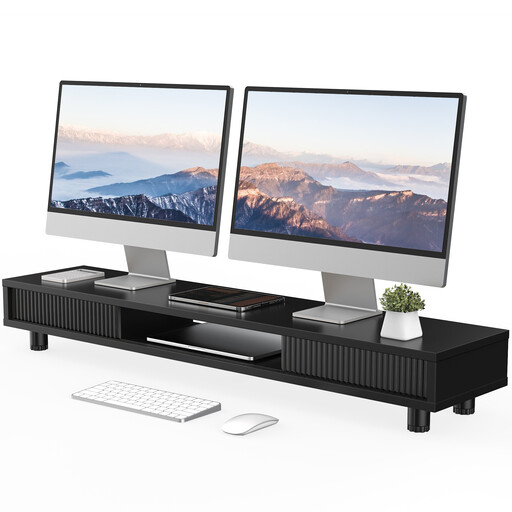 Image unavailable
This 108 cm-wide monitor stand can help organise your desk, but it isn’t specifically a dual arm. Check that its surface area is large enough for your monitors.
The product name lists height adjustment.
 Image unavailable
According to the product description, the two side platforms swivel independently, allowing you to position the monitors straight or at an angle.
The width is listed as 80 to 108 cm. The product details give a fixed height of 10.4 cm, which can’t be adjusted vertically.
No. You should also check the weight without the stand, the VESA mounting pattern and the width of both monitors. Neomounts describes the screen sizes for the DS70-250BL2 as a guide to be considered alongside weight and VESA measurements.
Check the construction of the desk surface and the instructions for the specific arm. For the Z2-3D (Gen 3), ARCTIC recommends a reinforcement plate for honeycomb or sandwich panels with hollow cores to help prevent clamp damage.
First, position the screen to suit the task you do most often, then adjust the script separately so it’s easy to see while you read. A laboratory study by the Institute for Occupational Safety and Health of the German Social Accident Insurance (IFA) found different results depending on screen configuration and task type. It doesn’t establish one setup as best for everyone or for all video calls.
No. Your statutory rights against the seller are set out by law, while a warranty is an additional voluntary service. Check the warranty terms and the relevant point of contact separately.
Yes, if the workplace falls within the scope of the Workplace Ordinance and ASR A6. The Federal Institute for Occupational Safety and Health explains that ASR A6 sets out specific requirements for screen-based workstations within this scope; it doesn’t apply generally to private screen use. This doesn’t mean you have to buy a dual arm from any particular brand.