If you often need to position a dashboard and report differently, or share your workspace with others, two independently adjustable arms are a natural choice. If desk depth is limited, a compact dual monitor stand may be a better fit. Before you buy, check the VESA mounts and weight of both monitors, the desk surface and the space available behind the screens. Manufacturers’ specifications describe what individual models can do, but they don’t prove that a monitor arm will boost productivity.
Who these monitor arms are for
Working with a dashboard and report side by side
If you need to keep an eye on two things at once and position each screen separately to suit the task, look for independently adjustable arms. The Institute for Occupational Safety and Health of the German Social Accident Insurance (IFA) studied different screen configurations and tasks; its findings don’t establish a general performance benefit for any particular monitor arm.
Shared desks with limited space
When desk depth is limited or there’s a partition behind the workspace, the design, reach of the arms and available swivel space all matter. A compact monitor arm and a stop to prevent contact with a partition solve different space-related problems.
Workstations used by different people
If several people use the same screens, adjustable height, depth and angle make it easier to suit different working positions. Also check that the cables have enough slack when the screens are adjusted repeatedly.
What to look for when buying
Two independently adjustable arms
A good fit if: you often need to position a dashboard and report separately by height, distance or angle, or several people use the workspace.
Bear in mind: adjustable arms need room to swivel, and weight, screen-size and VESA limits vary by model.
Compact dual monitor stand
A good fit if: limited desk depth is a key consideration and both monitors fall within the limits of the specific model.
Bear in mind: a space-saving design may be less flexible, so check whether you can position the two screens differently enough for your needs.
| What you need |
What to check before buying |
Who will find this especially important |
| Position a dashboard and report separately |
Check that each arm can be adjusted separately for height, depth and angle, and that there’s enough room to swivel. |
If I want to position the two screens differently for different tasks, I need independently adjustable arms. Around 33% of consumers prioritise this positioning flexibility. |
| Space on and behind the desk |
Measure the desk depth, distance to the partition, reach of the arms and space needed for the mount. |
If my shared desk is narrow or there’s a partition directly behind it, the monitor arm needs to fit within that space. Around 27% of consumers prioritise space requirements. |
| Compatibility with monitors and desk |
Check the VESA pattern and weight of each monitor without its stand. Also measure the desk thickness and check how the desk is constructed. |
If I want to keep using my existing screens and desk, both need to meet the limits of the particular model. Around 20% of consumers prioritise installation compatibility. |
| Adjusting for different users |
Look for positions that are easy to adjust, and make sure the cables have enough slack for the intended movements. |
If several people use the same workspace, I want to adjust the screens without having to dismantle and rebuild the setup. Around 20% of consumers prioritise this. |
Common selection and installation mistakes
-
Choosing by screen size alone
Screen size alone won’t tell you whether the monitor’s weight and VESA pattern are compatible with the arm. Neomounts explicitly describes the inch measurements for the DS70-250BL2 as a guideline.
Check the weight and VESA mount of each monitor against the limits of the exact model.
-
Confusing clear desk space with room to swivel
A monitor arm can free up space on your desk but still need room behind it when you move the screens. A compact design and a swivel stop are intended for different space requirements.
Measure your desk, partition and preferred screen positions before choosing adjustable arms or a compact design.
-
Clamping to a hollow-core desk as if it were solid
A clamp may leave pressure marks or damage a hollow-core desk. For the Z2-3D (Gen 3), ARCTIC recommends using a reinforcement plate with this type of desk.
Check how your desk is constructed before installation and follow the instructions for the model you choose.
A hollow-core desk may need an additional reinforcement plate.
Brands and model ranges to consider
Kensington
The K59601WW and K55513WW ranges are designed for different setups.
- Kensington says that both screens on the One-Touch Dual Monitor Arm K59601WW can be adjusted separately. The manufacturer lists support for monitors up to 34 inches and 9 kg per monitor.
- According to the manufacturer, the space-saving K55513WW is designed for monitors up to 27 inches and 8 kg. These limits apply to this specific model, so check them against your own monitors before buying.
Neomounts
The NEXT Slim DS70-250BL2 is a dual arm for setups where a nearby partition needs to be taken into account.
- Neomounts lists a 180° stop, clamp or grommet mounting, and VESA 75 × 75 or 100 × 100 mm for this model.
- The manufacturer specifies flat screens weighing 1 to 9 kg per arm. Curved or ultrawide screens have a maximum limit of 8 kg. The inch measurements are a guideline.
ARCTIC
The Z2-3D (Gen 3) combines two adjustable arms with a USB hub.
- ARCTIC lists a load capacity of 8 kg per arm, VESA 75 × 75 or 100 × 100 mm, and a desk thickness of 20 to 65 mm.
- ARCTIC recommends a reinforcement plate for hollow-core desks. According to the manufacturer, the maximum monitor width assumes two equally wide screens positioned horizontally.
Ergotron
The LX Dual Side-by-Side Arm is a range designed for two screens positioned side by side.
- Ergotron describes side-by-side and low-profile positioning as use cases for this range.
- The product description alone doesn’t establish how it performs compared with other brands. Check that the specific version is compatible with your monitors and desk.
Joybuy products for two monitors
The Joybuy products below include adjustable dual arms and monitor stands for two screens. Check each model to see whether its design suits your preferred screen positions and existing desk.
 No image available
AOKCOS monitor stand for 2 monitors, 12–27 inches, with shelf
The description says the two arms can be adjusted separately, allowing you to position a dashboard and report differently.
For monitors from 12 to 27 inches; maximum 10 kg per arm. VESA 75 × 75 and 100 × 100 mm. Listed features include height adjustment, ±40° tilt, ±80° swivel and 360° rotation.
Joybuy
 No image available
AOKCOS monitor stand for 2 monitors, 12–27 inches
The description lists separate adjustment options for the two monitors, so you can position a dashboard and report differently.
For monitors from 12 to 27 inches; maximum 10 kg per arm. VESA 75 × 75 and 100 × 100 mm. Listed features include height adjustment, ±40° tilt, ±80° swivel and 360° rotation.
Joybuy
 No image available
Floordirekt monitor stand for 2 monitors, 80–108 cm, white
According to the description, the two side platforms swivel independently, allowing you to set the screens in a straight or angled position.
The width is listed as 80 to 108 cm. The description specifies a 10.4 cm lift, while MDF is listed as the material in the product title.
Joybuy
 No image available
Floordirekt gas spring dual monitor arm, 15–32 inches
The dual arm is described as allowing two adjustable screen positions, making it an option if you regularly need to reposition your monitors.
For monitors from 15 to 32 inches and 2–10 kg. VESA 75 × 75 or 100 × 100 mm. Listed features include ±90° tilt and swivel, plus 360° rotation. Desk mounting options are a C-clamp or grommet mount.
Joybuy
 No image available
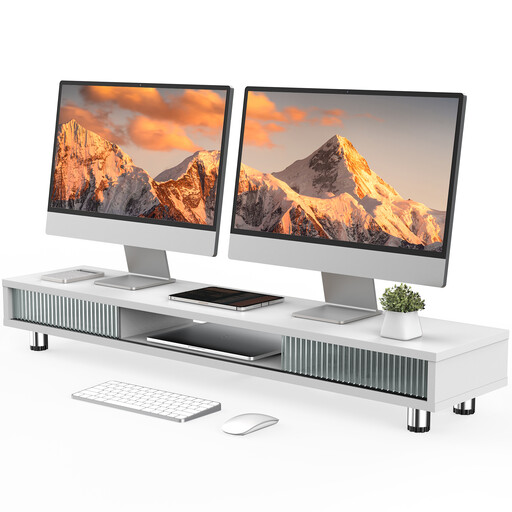
Monitor stand with 2 glass sliding doors, 108 cm, height-adjustable, white
The raised platform provides a fixed shared surface for two monitors, with extra storage underneath. It isn’t a substitute for independently adjustable monitor arms.
The platform is listed as 108 cm wide, with a load capacity of 50 kg. The description specifies adjustable feet and a platform height of 15.2 to 16.8 cm.
Joybuy
Frequently asked questions
What information do I need before placing an order?
For both monitors, note the VESA pattern and weight without the stand. Measure the desk thickness and the clear space behind it, then compare these measurements with the limits of the specific model. Neomounts points out that inch measurements alone are only a guideline.
How should I position two screens for a dashboard and report?
Position the screens to suit the tasks and the people using the workspace. A study by the Institute for Occupational Safety and Health of the German Social Accident Insurance (IFA), carried out in February 2017 with ten participants, looked at different screen configurations and tasks. It doesn’t provide a universal layout for other workstations.
What should I bear in mind when installing and maintaining the monitor arm?
Install the monitor arm according to the instructions for the specific model. After adjusting it, check that it’s secure and that the cables are routed properly. For the Z2-3D (Gen 3), ARCTIC recommends a reinforcement plate for hollow-core desks to prevent clamp damage; this recommendation doesn’t automatically apply to every desk.
Are a manufacturer’s guarantee and statutory rights the same thing?
No. Your statutory rights cover claims against the seller for faulty goods, while a guarantee is an additional voluntary promise with its own terms. For online purchases by consumers, there is generally a 14-day right to cancel, as explained by the German Consumer Advice Centre on 13 August 2026. Check the terms of your specific purchase, particularly if your employer is arranging it.


