Who is a dual monitor mount suitable for?

People who share a desk

If someone else often uses the same desk, independently adjustable arms let you reposition both screens without taking them apart. Germany’s Federal Institute for Occupational Safety and Health covers the design of display-screen workstations in ASR A6.

People who use email and calendar side by side

If you want to keep both applications in view at once, you can set up two screens side by side. The Institute for Occupational Safety and Health of the German Social Accident Insurance describes using several programmes at the same time as a reason for needing more screen space.

People without a suitable desk-clamp option

If your desk edge won’t accommodate a suitable clamp or grommet mount, a freestanding stand could be an alternative. Check that its load capacity is suitable for the weight of both monitors, and allow room for the base. According to the manufacturer, the Neomounts DS45-600BL2 is a freestanding model.

What should you look for when buying?

Two independently adjustable arms

Suitable if: different people use the desk or both screens need repositioning regularly.

Things to consider: The weight, desk construction and available clearance must all be compatible with the specific model.

Freestanding dual monitor stand

Suitable if: you can’t use a clamp or grommet mount and there’s room for a base.

Things to consider: The base sits on the desk, and load capacity varies by model.

Fixed or linked crossbar

Suitable if: both monitors will stay at the same height and rarely need adjusting for other people.

Things to consider: Check which screen adjustments can actually be made independently on the specific model.

What you need What to check Who is it important to?
Adjusting the setup when users change Check for independent height and depth adjustment, as well as clearance from the wall. If I share the desk, I want to position both screens quickly to suit me. Around 33% of consumers prioritise easy readjustment.
Compatibility with both monitors Check each monitor’s weight and VESA pattern, and any limits for curved or ultrawide screens. If I want to keep using my existing monitors, both need to be within the model’s limits. Around 27% of consumers put this compatibility first.
Mounting without a clamp Compare clamp and grommet mounting options with your desk; for a freestanding base, check the space required and load capacity. If my desk can’t accommodate a suitable clamp or hole, I need an alternative mounting option that will work. Around 20% of consumers pay particular attention to this.
Clear desk space Allow room on your desk for the base or clamp, monitor arms and cable runs. If I want space for a keyboard and documents alongside my screens, the amount of desk space taken up matters. Clear desk space is a priority for around 20% of consumers.

Common buying mistakes

  • Comparing screen size alone

    Weight limits can vary between models and may apply to each screen individually. For the Neomounts DS70-250BL2, the manufacturer specifies a lower weight limit for curved or ultrawide screens than for other screens.

    Check the weight and VESA pattern of each monitor against the specifications for the exact mount model.

  • Assuming any desk will work with a clamp

    For the ARCTIC Z2-3D (Gen 3), the manufacturer specifies a desk thickness of 20–65 mm and recommends a reinforcement plate for desks with hollow-core tops.

    Before choosing a mount, check your desk’s construction and thickness, as well as the permitted mounting method. If a clamp isn’t suitable, check how much room a freestanding model will need.

  • Confusing ‘freestanding’ with ‘takes up no space’

    A freestanding dual monitor stand still needs desk space for its base. Its load capacity also won’t necessarily match that of another dual arm.

    Plan for the base, keyboard and documents together on your actual work surface, and check the load limit of the model you choose.

Key brands at a glance

ARCTIC

The Z2-3D (Gen 3) is a dual arm with a gas spring and independently adjustable screens.

  • ARCTIC specifies VESA 75 × 75 and 100 × 100 mm, with a maximum of 8 kg per arm.
  • The specified desk thickness is 20–65 mm. The manufacturer recommends a reinforcement plate for hollow-core desk tops, so the mount won’t automatically suit every desk.

Neomounts

The DS70-250BL2 and DS45-600BL2 offer different mounting options: an adjustable arm and a freestanding stand.

  • For the DS70-250BL2, Neomounts specifies 1–9 kg per screen and a 180° stop. Curved or ultrawide screens have a lower limit of no more than 8 kg per screen.
  • The freestanding DS45-600BL2 supports a maximum of 6 kg per screen according to the manufacturer and needs space for its base. This weight limit does not apply to the DS70-250BL2.

Ergotron

The LX Dual Monitor Arm is a dual-arm option for positioning screens independently.

  • For the two-monitor configuration 45-549-026, Ergotron specifies 3,2–10 kg per arm.
  • According to the manufacturer, load capacity decreases when you expand the setup to three or four monitors; an additional kit is required for the expansion.

Invision

The MX400 is a dual arm with clamp or grommet mounting.

  • Invision specifies 2–9 kg per arm and VESA 75 × 75 and 100 × 100 mm.
  • Before ordering, check that the mounting method and specifications for the specific listing suit your desk and monitors.

Fellowes

According to the manufacturer, the Platinum range includes dual-arm and vertical dual-arm options.

  • For the range, Fellowes specifies a gas spring, clamp or grommet mounting, and VESA 75 × 75 and 100 × 100 mm.
  • Specifications for the range don’t confirm that every individual dual arm is suitable for your setup. Check the screen size and weight limits for the specific model.

Joybuy products for your workspace

The Joybuy products below are monitor arms and stands for organising your workspace. Check whether each model is suitable for both your existing screens and your specific desk.

AOKCOS dual monitor mount for 2 monitors

AOKCOS dual monitor mount for 2 monitors

According to the product description, the two arms can be adjusted independently and positioned side by side for two applications.

For 12–27-inch monitors weighing up to 10 kg per arm; VESA 75 × 75 or 100 × 100 mm.

View at Joybuy

AOKCOS dual monitor mount for 2 monitors with shelf

AOKCOS dual monitor mount for 2 monitors with shelf

The independently adjustable arms are designed for two screens, while an additional shelf provides extra storage space.

Up to 10 kg per arm and VESA 75 × 75 or 100 × 100 mm; according to the description, the central shelf supports up to 5 kg.

View at Joybuy

Floordirekt gas-spring monitor arm for 2 monitors

Floordirekt gas-spring monitor arm for 2 monitors

The description specifies adjustable arms and a clamp or grommet mounting option for your desk.

For 15–32-inch screens weighing 2–10 kg each; VESA 75 × 75 or 100 × 100 mm.

View at Joybuy
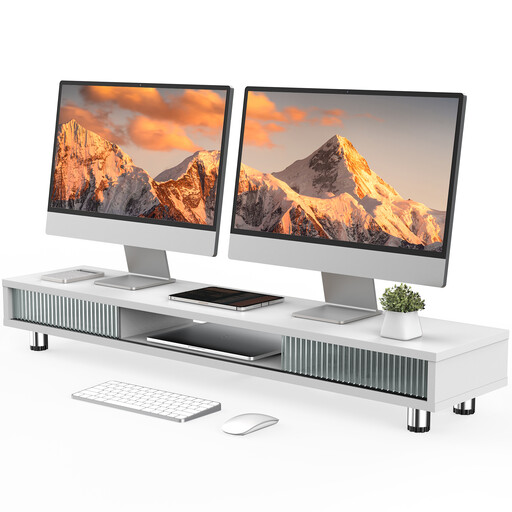
Monitor stand with 2 glass doors, 108 cm, white

Monitor stand with 2 glass doors, 108 cm, white

According to the description, the wide stand has compartments and a drawer for storing workspace accessories.

108 cm-wide shelf, adjustable screw feet and a stated load capacity of 50 kg.

View at Joybuy

Floordirekt monitor stand for 2 monitors, 80–108 cm, black

Floordirekt monitor stand for 2 monitors, 80–108 cm, black

The stand is designed for one or two monitors, according to the description; the side platforms swivel independently.

Adjustable width of 80–108 cm, MDF construction and a fixed height of 10,4 cm.

View at Joybuy

Frequently asked questions

Do my calendar and email need to be at the same height?

Not necessarily. Germany’s Federal Institute for Occupational Safety and Health takes how often each screen is used into account when arranging multiple screens under ASR A6. If they’re used equally, they should be placed as close together as possible within your field of view. Arrange your screens to suit how often you look at each application.

How do I check whether a mount will fit my desk?

Compare the mounting method of the specific model with your desk, and check the desk’s construction and thickness. For the Z2-3D (Gen 3), ARCTIC specifies a desk thickness of 20–65 mm and recommends a reinforcement plate for hollow-core desk tops. For the freestanding Neomounts DS45-600BL2, you’ll need to allow space for the base instead.

What should I check after installation and when someone else uses the desk?

Reposition both screens for each person, and check that the arms, cables and any swivel stop allow the required movement. Follow the instructions for the specific model and stay within its weight and VESA limits.

Does a longer manufacturer’s warranty replace my rights against the seller?

No. For consumer purchases in the EU, faulty goods are covered by a minimum two-year legal guarantee against the seller. An additional commercial guarantee must not reduce these rights. Check the guarantee terms and your statutory rights separately.

Does ASR A6 require a specific dual monitor arm?

No, ASR A6 doesn’t specify a particular brand or design. It sets out requirements for display-screen workstations within its scope for employers; any alternative solution must provide at least the same level of safety and health protection. You can’t judge whether a workstation is set up appropriately based solely on the monitor arm you’ve bought.