What should you look for when choosing one?
At a shared office desk, the main considerations are the range of adjustment you need, whether the mount fits both monitors and the mounting options available on the desk.
| What you need |
What to check before buying |
Who it matters most to |
| Adjust both screens independently |
Check that the height, depth and side-to-side adjustments suit your preferred positions and the distance from the partition. |
If I often need to reposition the presentation and notes separately, I need adjustable arms. Around 36% of consumers prioritise being able to adjust both screens independently. |
| Mount both monitors securely |
Compare each monitor’s VESA pattern and weight with the data sheet for the exact model. |
If my two monitors are different, I mainly want to know whether each one will fit. Around 29% of consumers focus first on whether their monitors are compatible. |
| Desk mounting and available space |
Measure the desktop thickness, desk construction, accessible desk edge and distance from the wall or partition. |
If the desk edge, desktop construction or partition makes installation tricky, the mounting method needs to suit the setup. Around 21% of consumers prioritise these desk and space considerations. |
| Set it up without a clamp or drilling |
Check that you have enough space and that the combined weight of both monitors is within the limits of the specific stand base. |
If I can’t clamp or drill into a shared desk, a stand base could work for me, provided there’s enough room. Around 14% of consumers prioritise a setup that doesn’t require fixing the mount to the desk. |
Joybuy products for a shared office space
The Joybuy products below include monitor stands and dual monitor arms for viewing presentations and notes at a shared office desk.
 No image available
AOKCOS dual monitor stand with shelf, 12–27 inches
An option if you want to position two monitors on a stand. Before buying, check the VESA fitting, weight and space required on your particular desk.
The product name specifies tilt, swivel and height adjustment for monitors from 12 to 27 inches.
Joybuy
 No image available
AOKCOS dual monitor stand, tilt and swivel, 12–27 inches
Another stand option if you want to position two screens on your desk. Check the monitor fittings and available space against the model’s specifications.
The product name specifies tilt, swivel and height adjustment for monitors from 12 to 27 inches.
Joybuy
 No image available
Floordirekt MDF dual monitor stand, 80–108 cm, black
Could be a good option if you’re looking for a raised shelf rather than a monitor arm. Measure the available width and check that the screen positions will work on your desk.
The product name specifies MDF, an adjustable width of 80 to 108 cm and a black finish.
Joybuy
 No image available
Floordirekt gas spring dual monitor arm, 15–32 inches
An option if you’re looking for a gas spring arm for two monitors. Check how much room you need to move the screens and how the arm can be mounted on the shared desk.
The product name specifies a gas spring and support for monitors from 15 to 32 inches. According to the product details, you’ll need a suitable desk edge for the clamp or a compatible hole for through-desk mounting.
Joybuy
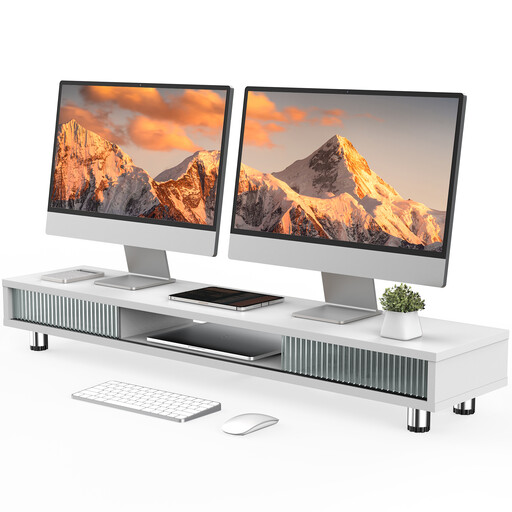 No image available
Monitor stand with two sliding glass doors, 108 cm, white
Could suit you if you’re looking for a monitor shelf with extra storage rather than an arm. Check that the width and screen positions will work on your desk.
The product name specifies a 108 cm-wide, height-adjustable white shelf with two sliding glass doors.
Joybuy
Frequently asked questions
How should I set up presentations and notes across two screens?
Position the screens to suit the task and the people using them, rather than assuming one fixed layout will work for everyone. In a laboratory study, the IFA compared three screen configurations across ten people and three standardised tasks. This doesn’t prove that one arrangement will suit every workplace.
Is ‘suitable for 32 inches’ enough to confirm compatibility?
No. For each monitor, also check the VESA pattern and weight against the full data sheet for the mount. Neomounts notes that the DS70-250BL2 has model-specific load limits, which differ for curved or ultrawide screens.
What should I check before mounting to a desktop that may be hollow?
Check the desktop construction and the installation instructions for your chosen model. For the Z2 (Gen 3), ARCTIC recommends using a reinforcement plate with honeycomb or hollow-core sandwich desktops to prevent clamp damage. This recommendation applies to the model mentioned.
Does German workplace law require a dual monitor arm?
The regulations mentioned do not impose a general requirement to buy a dual monitor arm. The German Workplace Ordinance concerns employers’ responsibility to provide a safe and healthy working environment. The ASR A6 guidelines from the Federal Institute for Occupational Safety and Health set out more specific requirements for screen-based workstations within their scope. What matters is the individual workplace setup, not a prescribed type of mount.
Can I return a stand ordered online if it doesn’t fit my desk?
According to the Verbraucherzentrale, private online purchases generally come with a 14-day right of withdrawal, although exceptions may apply and you must notify the seller that you wish to withdraw. You can’t automatically assume the same rule applies to purchases made by an employer.


