If desk depth and clear workspace are your main priorities, look for a compact mount with a shared base. Independently adjustable arms are a better fit if you often need to position your dashboard and report separately. Measure your desk and the clearance behind it first, then check the weight, VESA mounting pattern and dimensions of both monitors against the limits for the specific model. A freestanding dual monitor stand needs no desk clamp or drilling, but its base will take up space.
Which type is right for you?
Working at a small desk
If you need to see your dashboard and report at the same time, consider the mount’s footprint, desk depth and the space behind your desk. Kensington describes the SmartFit K55513WW as suitable for shallow desks. With movable arms, you’ll also need to allow room for them to move.
Comparing and repositioning screens frequently
If you want to reposition your dashboard and report independently for different tasks, check that the arms offer enough adjustment for height, depth and angle. Neomounts and ARCTIC list the adjustment options and specific model limits for their respective dual arms.
Mounting without a desk clamp
If clamping or drilling into your desk isn’t an option, a freestanding dual monitor stand could work, provided its base fits on your work surface. Kensington describes this type of stand for the SmartFit Ergo K58271WW.
What should you look for when buying?
First decide what matters most: clear desk space, independent adjustment, compatibility with your monitors or a mounting option that doesn’t attach to your desk. Then measure your available space and check the limits of the specific model.
Compact desk mount
A good fit if: shallow desk depth and clear workspace matter more to you than a wide range of independent adjustment.
Keep in mind: Kensington lists the K55513WW’s swivel range as ±10°. Check that this suits the screen position you want.
Two movable arms
A good fit if: you often want to position your dashboard and report at different heights, depths or angles.
Keep in mind: Movable arms need room to swivel. Check the clearance from your desk to the wall, as well as the width of your monitors.
Freestanding dual monitor stand
A good fit if: you’d rather avoid a desk clamp or drilling and have room for a base.
Keep in mind: The base stays on your work surface, so measure the space it takes up and check how much room will remain for your report, keyboard and documents.
| Priority |
What to check when buying |
Who is it especially important for? |
| Usable desk space |
Measure the desk depth and mount footprint, and allow space for your keyboard and documents. |
If I want to see my dashboard and report together in a small space, every bit of clear desk surface counts. Around 33% of consumers put usable desk space first. |
| Independent positioning |
Sketch out your preferred layout and check the model’s height, depth and swivel adjustments. |
If I compare different views regularly and want to bring one screen closer temporarily, I need enough adjustment. Around 27% of consumers prioritise independent repositioning. |
| Monitor compatibility |
Check the weight and VESA mounting pattern of each monitor separately, and confirm the desk thickness is within the model’s specifications. |
If I’m mounting two different screens, I want to be sure both are within the limits for the model. Around 27% of consumers make monitor compatibility their main priority. |
| Mounting method |
Check whether a clamp or grommet mount will work; if you’re using a stand, measure its footprint. |
If I don’t want to clamp or drill into my desk, a freestanding base could work for me. Around 13% of consumers prioritise a setup that doesn’t attach to the desk. |
Common buying mistakes
-
Choosing based on screen size alone
A compatible screen size doesn’t tell you whether the weight and VESA mounting pattern of both monitors are within the limits of the specific arm.
Check each monitor’s weight and VESA mounting pattern separately against the specifications for the exact model.
If the mounting pattern or weight capacity isn’t suitable, you may need an adapter or a different model.
-
Assuming movable arms always save space
An arm needs room behind and beside the screens. A nearby wall or partition can restrict its movement.
Measure the intended swivel range on your desk and, if it’s close to a wall, check the stop and the clearance required.
-
Assuming a freestanding stand solves every space problem
A freestanding base avoids a desk clamp or drilling, but takes up permanent space on your work surface.
Measure its footprint and check that you’ll still have enough room for your report, keyboard and documents.
Key brands at a glance
Kensington
The Kensington models featured here offer two different designs: a compact desk mount and a freestanding dual monitor stand.
- Kensington says the SmartFit K55513WW is designed for shallow desks and supports two monitors up to 27 inches and 8 kg each.
- For the K55513WW, the manufacturer lists a swivel range of ±10°. The freestanding K58271WW needs room for its base; Kensington lists support for two monitors up to 27 inches and 10 kg each.
Neomounts
Neomounts describes the DS70-250BL2 as a dual arm with gas spring adjustment and a 180° stop.
- According to the manufacturer, the stop limits the swivel range when the arm is mounted close to a wall or partition.
- Neomounts lists a weight range of 1–9 kg per flat screen and a maximum of 8 kg for curved or ultrawide screens. You should also check VESA compatibility, screen width and clearance for movement.
ARCTIC
The Z2-3D (Gen 3) is a dual arm that lets you position each screen independently.
- ARCTIC lists VESA 75 × 75 mm and 100 × 100 mm, up to 8 kg per arm and a desk thickness of 20–65 mm.
- According to ARCTIC, the maximum monitor width of 820 mm applies to two equally wide monitors arranged horizontally. It isn’t a general guarantee for mixed setups.
Ergotron
The LX Dual 45-549-026 is a version with a tall pole and independently positionable monitors.
- This design offers a different setup from a compact mount. Check that the pole and arms will fit in the space you have available.
- Adding support for three or four monitors requires extra arms and mounting parts, and has different weight limits from the standard two-monitor setup.
Joybuy products for a dual-monitor workspace
This selection includes dual monitor arms, as well as monitor stands and risers with extra storage. The right design for you depends on whether you’d prefer to adjust each screen independently or use a shared shelf.
 No image available
AOKCOS dual monitor stand with shelf, 12–27 inches
If you want to position your dashboard and report independently, check whether the arms’ tilt, swivel and rotation adjustments suit your preferred layout.
For both monitors, check for VESA mounting patterns of 75 × 75 mm or 100 × 100 mm, and confirm that each weighs no more than the stated limit of 10 kg per arm.
View at Joybuy
 No image available
AOKCOS dual monitor stand, 12–27 inches
If you want to position both screens independently and make use of the space underneath, check this option’s adjustable arms and shelf.
The product title lists tilt, swivel, rotation and height adjustment, as well as a wooden shelf.
View at Joybuy
 No image available
Floordirekt gas spring dual monitor arm for 2 monitors, 15–32 inches
If you want to adjust the position of two screens, check whether the gas spring arm’s adjustment options suit your space and workflow.
Check that each monitor has a VESA mounting pattern of 75 × 75 mm or 100 × 100 mm and weighs within the stated range of 2–10 kg. According to the product details, it can be fitted with a desk clamp or through a grommet hole.
View at Joybuy
 No image available
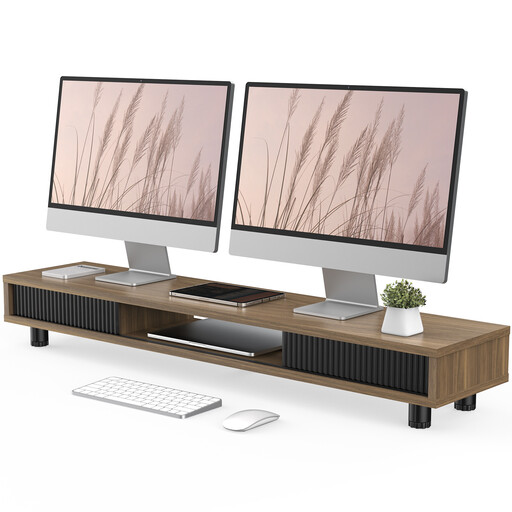
Monitor stand with 2 glass sliding doors, 108 cm, height-adjustable, brown
If you’re looking for a monitor riser with extra storage, check that it suits your planned screen setup and the dimensions of your desk.
The product description lists three compartments and a drawer.
View at Joybuy
 No image available
Floordirekt monitor stand for 2 monitors, 80–108 cm, black
If you want to place both screens on a shared shelf, check that the adjustable width works with the space available on your desk.
The product details list an adjustable width of 80–108 cm and a fixed height of 10.4 cm.
View at Joybuy
Frequently asked questions
How can I check whether two different-sized monitors will fit on an arm?
Check the weight and VESA mounting pattern of each monitor separately against the specifications for the specific model. Then compare your planned layout with the actual width of each screen. Screen size alone isn’t enough: Neomounts describes the size details for the DS70-250BL2 as a guide, while weight and VESA limits are binding product specifications.
What should I bear in mind when setting it up and adjusting it later?
Before fitting the mount, check the model’s permitted desk thickness and allow enough room for the arm to swivel. For the Z2-3D (Gen 3), ARCTIC recommends using a reinforcing plate with honeycomb or sandwich-structure desk tops to prevent clamp damage. This recommendation applies to the model mentioned.
What rules apply to workplace display screen equipment in Germany?
ASR A6 sets out specific requirements under Germany’s Workplace Ordinance for display screen work in workplaces and home offices. According to the Federal Institute for Occupational Safety and Health, it doesn’t apply to purely private use outside these settings. This doesn’t mean private buyers are generally required to buy a particular dual monitor mount.
Is a manufacturer’s guarantee the same as your statutory rights?
No. For a consumer purchase, your statutory rights are a legal claim against the seller; a manufacturer’s guarantee is a voluntary offer subject to its own terms and conditions. In its information dated 28 September 2026, the Verbraucherzentrale distinguishes between these rights. Also check who the seller is and what guarantee terms apply.


