What should you look for when buying?
Independently adjustable arms
A good choice if: you regularly adjust the height, distance or angle of each screen individually when comparing versions.
Consider: the range of movement and load capacity vary by model. The arms need space and won’t eliminate window glare on their own.
Manually adjustable pole with folding arms
A good choice if: you usually keep both documents in the same position and only adjust the height occasionally.
Consider: the NOVUS TSS Duo Faltarm II has a total load capacity of 10 kg when the weight is evenly distributed, not 10 kg per arm.
Desk-mounted base with gas spring arms
A good choice if: you want independently adjustable arms and the mounting method of the specific model suits your desk.
Consider: the base takes up space where it is installed. Check the model’s stated load capacity.
The DGUV recommends positioning your line of sight parallel to the window front where possible; also check that you can position the screens as needed at your intended workstation.
| What matters |
What to check before buying |
Who will find this important? |
| Screen visibility by a window |
The range of movement of both arms and whether you can position them in relation to the window; consider suitable glare protection separately. |
If I read two versions near a bright window, I want to be able to position the screens with the window in mind. Around 26% of consumers put visibility by a window first. |
| Independent adjustment |
Check whether you can adjust the height, distance and angle of each screen separately. |
If I often change the position of each screen while comparing versions, I need arms that can be positioned independently. Around 21% of consumers prioritise frequent individual adjustment. |
| Monitor and desk compatibility |
Check the VESA mounting pattern and weight of each monitor, as well as the desk’s thickness and construction, against the specifications for the specific model. |
If I want to keep using my existing monitors, I want to check the mounting pattern, weight and fixing method in advance. Around 26% of consumers prioritise secure hardware compatibility. |
| Usable desk space |
Check the space at the desk edge or mounting hole, along with the base shape and reach of the arms at your intended setup. |
If I want to leave room for paperwork alongside both screens, the mount needs to suit the space available. Around 16% of consumers prioritise keeping their desk clear. |
| Installation and support |
Check what’s included and whether the desk needs reinforcing; consider the terms of any voluntary guarantee separately from your statutory rights. |
If I want to understand the installation involved and what support is available if there’s a fault, I check what’s included and the guarantee terms. Around 11% of consumers prioritise reliable support. |
Joybuy products
The Joybuy products below include adjustable mounts and stands for two screens. Check that each design suits your setup and how you want to position your monitors.
 No image available
AOKCOS monitor stand for 2 monitors with shelf, 12–27 inches
For two monitors whose positions you want to adjust while comparing documents.
The product name specifies height adjustment, swivel and tilt options, and a shelf. The stated monitor size is 12–27 inches.
View at Joybuy
 No image available
AOKCOS tilting and swivelling monitor stand for 2 monitors, 12–27 inches
An option if you want to set up two screens and adjust their positions.
The product name specifies tilt, swivel and rotation options, as well as height adjustment. The stated monitor size is 12–27 inches.
View at Joybuy
 No image available
Floordirekt gas spring monitor arm with two arms for 2 monitors, 15–32 inches
For two screens whose position you want to adjust at your workstation.
The product name specifies gas spring arms and a monitor size of 15–32 inches. Before installation, choose between a C-clamp and a through-desk mount, and check that your desk top is suitable for the mounting method.
View at Joybuy
 No image available
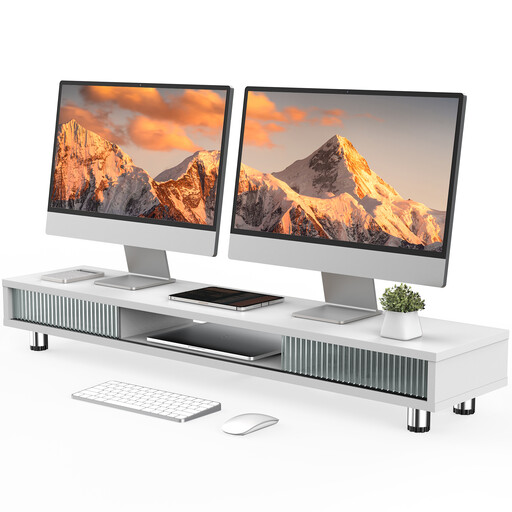
Monitor stand with two glass sliding doors, 108 cm, height-adjustable, white
For a setup where you want a wide monitor stand on your desk.
The product name specifies a width of 108 cm and height-adjustable feet. Check that the overall width will fit on your desk.
View at Joybuy
 No image available
Floordirekt monitor stand for 2 monitors, MDF, 80–108 cm, black
For a side-by-side setup where you want to adjust the width of the stand.
The product name specifies MDF and an adjustable width of 80–108 cm. The height is fixed at 10.4 cm, so bear this limitation in mind if you need to change the screen height.
View at Joybuy
Frequently asked questions
Is it enough to move the monitor arm to reduce glare from a window?
Not necessarily. Where possible, position your line of sight parallel to the window front and use suitable glare protection. A movable arm can help you position the screen, but it won’t replace glare protection.
How can I check that both monitors will fit before installation?
For each monitor, note the VESA mounting pattern, weight without the stand and width of the casing. Compare these details with the specifications for the specific mount, and check whether its load capacity is stated per arm or for the mount as a whole.
What should I bear in mind with a hollow-core desk top?
For the Z2-3D (Gen 3), ARCTIC recommends using a reinforcing plate with honeycomb or sandwich panels that have hollow cores to prevent clamp damage. This is a manufacturer recommendation for a specific model, not a general legal requirement.
What are my rights if a newly purchased mount is faulty?
For a consumer purchase from a business seller, statutory rights for faulty goods apply for at least two years. A voluntary manufacturer’s guarantee does not limit these rights; the seller is responsible for handling statutory claims.
Do the rules for display screen workstations also apply to my home desk?
The Workplace Ordinance protects employees at workplaces. For established teleworking workstations, certain provisions apply under § 1 Absatz 4, including Annex number 6 where applicable. The ASR A6 expressly excludes screen use in private homes outside workplaces and teleworking workstations. You can follow ergonomic guidance at home, but shouldn’t treat it as a workplace requirement that applies directly to you.


