If you need space for invoices alongside your keyboard and mouse, a desk clamp is usually the first option to consider. If your desk edge isn’t suitable or you’d rather not use a clamp, a freestanding dual monitor stand could work – but its base will take up desk space. Before you buy, check that the mounting method suits your desk and monitors. A USB hub provides USB ports, but it doesn’t give you an extra mains socket or power your monitors.
Which option is right for you?
Invoice checkers with limited desk space
You want to view accounts on one screen and invoices on the other, while keeping space on your desk for paperwork. First, check whether a desk clamp will fit or whether a stand will leave you with enough room.
Anyone short on mains sockets
You want to position two monitors without mistaking a USB hub for an extra mains socket. The key things to consider are the ports and power requirements of the devices you want to connect.
Anyone who regularly adjusts their screens
You often reposition your screens while working and need enough room to move both arms. Check the model’s range of movement alongside your desk and screen dimensions.
What should you look for when buying?
| What matters |
What to check |
Who is it most important for? |
| Clear space for paperwork |
Check whether a clamp will fit your desk edge. If you’re considering a stand, measure how much desk space its base will need. |
If I need to keep invoices next to my keyboard and mouse, I want to lose as little desk space as possible to monitor bases. Around 33% of consumers prioritise having clear space for paperwork. |
| Fits both monitors |
Check the VESA pattern and weight of each monitor against the model’s specifications, and check that the desk mounting method is suitable too. |
I want to make sure both monitors fit individually, rather than looking only at their screen sizes. Around 27% of consumers say compatibility is their top priority. |
| Mains sockets and ports |
Keep monitor power, video connections and USB ports separate in your mind, and check the power requirements of any USB devices you connect. |
If mains sockets are in short supply, I don’t want to mistake USB ports for a power supply for my monitors. Around 27% of consumers say their mains socket setup is their top priority. |
| Repositioning screens |
Compare the range of movement and clearance with your desk width and the width of both monitor housings. |
I want to be able to adjust both screens to suit the way I’m working. Around 13% of consumers say being able to reposition their screens regularly is their top priority. |
Common buying mistakes
-
Mistaking USB ports for spare mains sockets
A USB hub doesn’t replace the power supply for your monitors. The ARCTIC Z2-3D (Gen 3) manufacturer’s data sheet distinguishes between the hub’s power output with and without an additional power supply.
Plan separately for monitor power, video connections and USB devices. Check the connections and power requirements of the devices you want to plug into a hub.
-
Looking only at screen size
A suitable screen size alone doesn’t confirm that the VESA pattern and weight of both monitors are within the model’s limits.
Check each monitor’s specifications against the mount’s full product data sheet.
-
Assuming a stand won’t take up desk space
A freestanding dual monitor stand avoids the need for a desk clamp, but it can still take up space you need for invoices. According to the manufacturer, the base of the StarTech.com ARMDUALSS measures 300 × 520 mm.
Measure the available space and decide how much room you need to leave for paperwork.
-
Attaching a clamp to a delicate desk without checking first
For honeycomb or sandwich-structured desktops, ARCTIC recommends using a reinforcement plate to prevent damage from the clamp.
Before choosing a clamp, check the desktop’s construction and thickness, along with the mount manufacturer’s installation instructions.
Key brands at a glance
Invision
According to Invision, the MX400 is a dual gas-spring arm that can be mounted with a clamp or through the desk. It may suit you if independently adjustable screens and clear desk space are important.
- Invision specifies VESA 75 × 75 or 100 × 100 mm, 2–9 kg per arm and screen sizes of 19–32 inches.
- The mounting method you choose must suit your desktop; these specifications don’t confirm that the mount will fit every desk or monitor.
ARCTIC
The Z2-3D (Gen 3) combines two gas-spring arms with a USB hub. It’s worth considering if easy screen positioning and USB access at your desk are both important.
- According to ARCTIC, it supports VESA 75 × 75 or 100 × 100 mm and up to 8 kg per arm; the specified desktop thickness is 20–65 mm.
- The data sheet distinguishes between the hub’s power output with and without an additional power supply. The hub doesn’t provide mains connections for your monitors.
StarTech.com
The ARMDUALSS is a freestanding dual monitor stand for situations where a desk clamp isn’t an option.
- StarTech.com specifies support for two VESA monitors up to 32 inches and up to 8 kg per screen.
- The base measures 300 × 520 mm, so it takes up space on your desk.
Neomounts
According to Neomounts, the DS70-810 T-Rex range includes clamp mounts with short upper arms; the DS70-810BL2 version is designed for two monitors.
- Neomounts describes the range as having gas-spring adjustment and a 180° stop to prevent the arms hitting nearby walls.
- Check the dimensions and weight capacity of your chosen version against its full product specifications.
Joybuy products for your workspace
This selection includes freestanding stands for two monitors, a dual arm for desk mounting, and a monitor stand with a USB hub and drawer. Before you buy, check which mounting method and connections will suit your workspace.
 No image available
AOKCOS stand for 2 monitors, 12–27 inches
The shelf beneath the screens can hold work essentials if you want to keep your desk clear.
The product name specifies swivel, tilt and height adjustment, and a screen size range of 12–27 inches.
View at Joybuy
 No image available
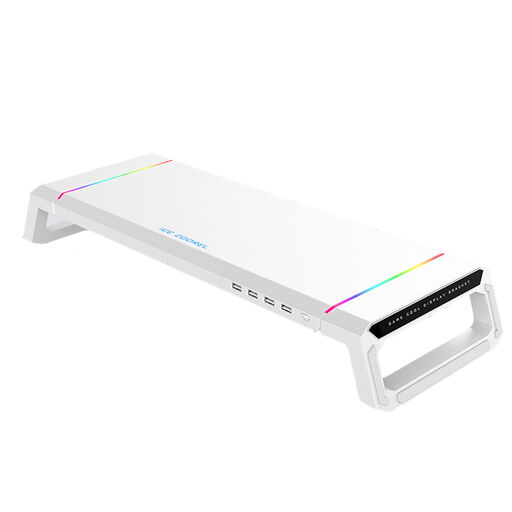
Monitor stand with USB hub, RGB lighting and drawer, white
The USB hub and drawer may come in handy if you want USB access at your desk and somewhere to keep small work essentials.
Check what power supply this model’s hub needs; USB ports aren’t extra mains sockets.
View at Joybuy
 No image available
AOKCOS stand for 2 monitors, 12–27 inches
The shelf described for this model provides space for work essentials beneath the screens.
The product name specifies tilt, swivel and height adjustment, and a screen size range of 12–27 inches.
View at Joybuy
 No image available
Floordirekt gas-spring dual arm for 2 monitors, 15–32 inches, black
A dual arm for desk mounting could be a good option if you want to attach your monitors to the desk edge and adjust their positions.
Check that the clamp or through-desk mounting option suits your desktop and can support both monitors.
View at Joybuy
 No image available
Floordirekt stand for 2 monitors, MDF, black, 80–108 cm
The adjustable width can be useful if you want to place both screens on one shelf and keep work essentials underneath.
This model has a specified fixed height of 10.4 cm. Bear this in mind if you need to adjust the height.
View at Joybuy
Frequently asked questions
Does a dual monitor mount need an extra mains socket?
The mechanical mount itself doesn’t need a mains socket. If your model has a USB hub, check its connection and power requirements separately: the ARCTIC Z2-3D (Gen 3) data sheet specifies lower available power output when the hub isn’t connected to an additional power supply. Both monitors will still need their own power connections.
What should I measure before installation?
Check the VESA pattern, weight and housing width of both monitors. For a clamp mount, measure the desktop thickness and check the mounting point; if you’re using a stand, measure the available space too. The permitted limits vary by model.
What should I bear in mind when adjusting the mount?
Adjust the joints and gas spring according to the instructions for your specific model. When repositioning the screens, make sure the cables have enough slack. Check the screws and installation guidance in the relevant manufacturer’s instructions too.
Does the German workplace rule automatically apply to my home desk?
No. ASR A6, published by the Federal Institute for Occupational Safety and Health and the Committee for Workplaces, sets out its scope for screen-based workstations in workplaces and at teleworking stations. It doesn’t cover use at home outside a teleworking arrangement; whether a particular workstation is covered depends on how it is actually classified.


