For comparing text at a shared desk, individually adjustable dual arms offer more flexibility when the monitors need repositioning for different people, provided the desk and screens are suitable for the mount. A freestanding dual monitor stand is an option if a desk clamp won’t work, but it needs space on the desk. Before you buy, check the VESA pattern, weight and dimensions of both monitors, and, for a clamp, the desk’s construction and thickness.
Who this mount is for
Check translations side by side
If you regularly switch between a source text and its translation, positioning two screens close together makes direct comparison easier. For screen-based workstations within its scope, ASR A6 recommends positioning screens as close together as possible, side by side.
Share a desk
If different people use the same desk, an adjustable mount can make it easier to reposition the screens. Whether its range of movement suits each person’s seating position depends on the model and the desk layout.
Can’t use a desk clamp
If a clamp won’t fit on the edge of your desk, or you’d rather not use one, a stand is an alternative. Make sure you have enough free desk space for it.
What to look for when buying
For screen-based workstations within the scope of ASR A6, where several people take turns using the screens on an equal basis, multiple screens should be positioned as close together as possible within the field of view. This does not automatically apply to every desk shared at home.
| What you need |
What to check before buying |
Who it matters most to |
| Read both texts side by side |
Compare the monitor widths, desk width and arm adjustment range. |
If I often compare a source text and its translation directly, I want to see both screens close together. Around 29% of consumers put this kind of text comparison first. |
| Adjust the position for different people |
Check the height and reach adjustment range, as well as the space behind the desk needed for movement. |
If you want to readjust the height or distance after changing seats, you’ll need a suitable adjustment range. Around 24% of consumers prioritise this. |
| Find the right desk mounting option |
Check the desk’s construction and thickness, and whether there’s room for a clamp or stand. |
If I can’t use a clamp on my desk, I need a mounting option that suits its construction. Around 18% of consumers put mounting options first. |
| Make sure both monitors are compatible |
Check the VESA pattern, weight without the stand and casing width of each screen. |
If you want to keep using two existing monitors, check that each one is compatible individually. Around 17% of consumers prioritise screen compatibility. |
| Allow for any extra parts |
Check what’s included, which adapters are needed and what mounting options are available. |
If I need to adapt the mount to a different VESA pattern or mounting setup, I want to know early which extra parts I’ll need. Around 12% of consumers pay particular attention to possible extras. |
Common buying pitfalls
-
Checking only the screen size
The screen size in inches alone doesn’t confirm that the weight, VESA pattern and width of both monitors are suitable for your chosen model.
Check each monitor individually for its weight, VESA pattern and width. Don’t assume that accessories mean the mount is already compatible.
-
Assuming every desk is suitable for a clamp
Clamps have specific requirements for the desk surface. ARCTIC recommends using a reinforcement plate with honeycomb or hollow-core desks. A stand avoids the need for a clamp, but takes up desk space.
Before fitting the mount, check the thickness and construction of the desk. If the edge isn’t suitable, consider a stand as a separate option.
-
Confusing a warranty with your statutory rights
A voluntary manufacturer’s warranty may have different terms from your statutory rights against the seller.
Read the terms of the specific warranty. If there’s a fault and you want to exercise your statutory rights, contact the seller. The Verbraucherzentrale distinguishes between the two.
Relevant brands at a glance
Neomounts
Worth considering when comparing an adjustable dual arm with a freestanding dual monitor stand.
- Neomounts says the DS70-250BL2 has gas springs and a 180° rotation stop. For the FPMA-D700DD, the manufacturer lists a stand and manual height adjustment from 34–44 cm.
- Weight limits and VESA compatibility vary by model; details for one model don’t apply to the whole brand.
ARCTIC
The Z2-3D (Gen 3) is an option if you want to mount and adjust two monitors using a desk clamp.
- ARCTIC lists a gas lift, cable management, a USB hub and a maximum weight of 8 kg per arm.
- The specified desk thickness is 20–65 mm. For honeycomb or hollow-core desks, ARCTIC recommends a reinforcement plate; this is the manufacturer’s advice, not the result of an independent durability test.
Ergotron
The LX Dual Side-by-Side Arm is another design for positioning two screens next to each other.
- According to Ergotron, the model described is designed for two screens up to 27 inches; the stated weight range per screen is 3.2–9.1 kg.
- The manufacturer says the stacking option isn’t available with larger screens. The product page consulted is for the US market and doesn’t confirm availability or warranty support in Germany.
Joybuy products for comparing text
This selection includes adjustable dual arms, freestanding monitor stands and a wide monitor shelf. Check that the space each option takes up and its mounting method suit your desk and the dimensions of both screens.
 No image available
AOKCOS dual monitor mount, 12–27 inches
The adjustable arms can be positioned for two screens, making it easier to adapt their position when sharing a desk.
Specifications include 12–27 inches, VESA 75 × 75 or 100 × 100 mm, and up to 10 kg per arm. Check compatibility with each monitor individually.
View at Joybuy
 No image available
AOKCOS dual monitor mount with shelf, 12–27 inches
The two adjustable arms can be repositioned when different people share the desk.
The description lists a wooden shelf, cable clips, VESA 75 × 75 or 100 × 100 mm, and up to 10 kg per arm. The stated screen size is 12–27 inches.
View at Joybuy
 No image available
Floordirekt gas spring dual monitor arm, 15–32 inches
The gas spring adjustment and two movable arms are suited to anyone wanting to adapt screen positions for different seating positions.
Specifications include 15–32 inches, 2–10 kg per monitor, and VESA 75 × 75 or 100 × 100 mm. Mounting options include a desk clamp or grommet mount.
View at Joybuy
 No image available
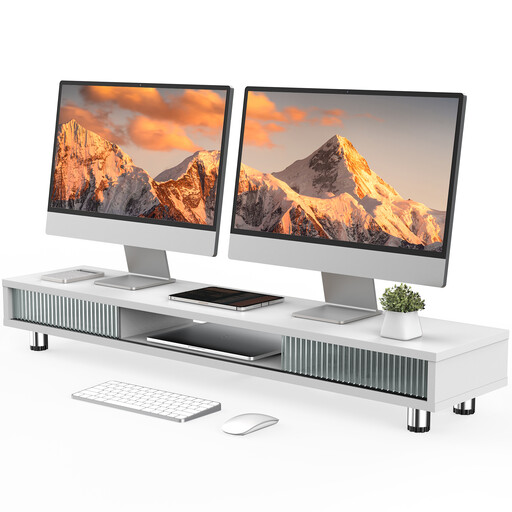
Monitor stand with 2 glass sliding doors, 108 cm
A wide shelf could be a good option if you have room on your desk for a freestanding monitor stand.
The description lists a width of 108 cm, a height of 15.2–16.7 cm, three compartments, a drawer and adjustable feet. The stated weight capacity is 50 kg.
View at Joybuy
 No image available
Floordirekt monitor stand for 2 monitors, 80–108 cm
This freestanding stand is an option if you don’t want to use a desk clamp and have a flat surface to put it on.
The width is listed as 80–108 cm, and the side sections can swivel independently. The height is fixed at 10.4 cm. The description lists MDF and a choice of black or white.
View at Joybuy
Frequently asked questions
Do a source text and its translation always need to be right next to each other?
No. For screen-based workstations within its scope, ASR A6 recommends positioning multiple screens as close together as possible within the field of view when they’re used by different people on an equal, alternating basis. This workplace regulation doesn’t automatically apply as a legal requirement to desks used only at home.
What measurements should I check before fitting the mount?
Check the VESA pattern, weight without the stand and casing width of each monitor separately. For a clamp, you’ll also need to check the desk’s thickness and construction; the specified thickness for ARCTIC’s Z2-3D (Gen 3) is 20–65 mm. ARCTIC recommends using a reinforcement plate with honeycomb or hollow-core desks.
What should I bear in mind when adjusting a gas spring arm after changing seats?
Reposition both screens within the height and reach ranges specified for your chosen model, and check whether the arms, cables or a partition restrict their movement. For the Neomounts DS70-250BL2, the manufacturer lists a 180° rotation stop.
Are a manufacturer’s warranty and statutory rights the same thing?
No. The Verbraucherzentrale distinguishes statutory rights against the seller from a voluntary manufacturer’s warranty, which has its own terms. Check the warranty terms for the specific offer separately.
Are there any specific requirements for a shared screen-based workstation?
If the desk is in a workplace or home-working environment covered by ASR A6, the regulation sets out requirements for screen-based work. Whether a particular shared desk falls within its scope depends on its classification under employment law; sharing the desk alone doesn’t determine this.


