If several people regularly use a shared desk and need to reposition a dashboard and report, two independently adjustable arms are a good option. For a mostly fixed setup, a manually adjustable mount may be enough. If clamping or drilling isn’t allowed, a freestanding dual monitor stand could work, provided its base fits on the desk. For each monitor, check its weight and VESA mounting pattern, as well as the fixing method and clearance needed for movement. Manufacturer specifications, such as those from Neomounts, apply to the model specified.
Who is the mount for?
People who share a desk
If you share a workspace, you’ll want to reposition both screens without a complicated setup every time you switch places. Manufacturer specifications for dual arms, such as those from Neomounts and ARCTIC, describe independently adjustable options.
People using dashboards and reports
If you monitor a dashboard while reading or editing a report alongside it, an easy-to-reach layout and independently adjustable viewing angles matter. The German Federal Institute for Occupational Safety and Health covers the ergonomic design of screen-based work in ASR A6.
People with limited desk-mounting options
If drilling or clamping may not be allowed on a shared desk, check which fixing methods are permitted first. A freestanding dual monitor stand could be an alternative, but it needs space on the desk.
What should you consider when buying?
Dual gas spring arm
A good fit if: Several people often reposition the dashboard and report independently.
Consider: The maximum load per arm and the space needed for movement must suit both monitors and the desk.
Manually adjustable dual arms
A good fit if: The screens usually stay in the same position and only need occasional adjustment.
Consider: Adjustments are less effortless than with a gas spring model. Neomounts specifies a maximum of 8 kg per screen for the DS60-425BL2.
Freestanding dual monitor stand
A good fit if: Clamping and drilling aren’t an option, but there’s room for a base.
Consider: The base takes up desk space. Neomounts specifies a maximum of 6 kg per screen for the DS45-600BL2.
When choosing a mount for a shared workspace, focus on the consideration that matters most for your particular setup.
| Buying priority |
What to check |
Who is it important to? |
| Fit and load capacity |
Compare the weight of each monitor without its stand and its VESA mounting pattern with the permitted load and mount on each arm. Check any requirements for curved or ultrawide screens. |
If the two monitors I already have are different weights, I’d check each one separately rather than looking only at the screen size. Around 25% of consumers prioritise getting the right fit. |
| Personal adjustment |
Check for independent height and depth adjustment, as well as space behind and beside the screens. |
If people often switch places at the desk, I want to adjust the height and distance of the dashboard and report independently. Around 25% of consumers prioritise being able to readjust the setup. |
| Viewing both screens |
Consider monitor width, possible arm positions and the distance from a wall or partition. |
I want the dashboard and report to be easy to see and access at the same time, without the screens getting in each other’s way. Around 20% of consumers prioritise being able to read both screens side by side. |
| Desk fixing method |
Check in advance whether clamping or drilling is allowed. Inspect the desk edge, the construction of the desktop and the available space for a base. |
If I share the desk, I want to know which fixing methods are allowed and whether a base will take up workspace. Around 20% of consumers prioritise how the mount attaches to the desk. |
| Cables and support |
Check the cable management and the cable length needed for the planned arm positions. Distinguish between a warranty and your statutory rights. |
With two movable screens, I want to keep the cables tidy and know what the terms of any voluntary warranty cover if something goes wrong. Around 10% of consumers prioritise cables and support. |
Common pitfalls
-
Checking only the screen size
Screen size alone won’t tell you whether each monitor’s weight and VESA mounting pattern are compatible with an arm. For the Neomounts DS70-250BL2, the manufacturer specifies different maximum loads for flat screens and curved or ultrawide screens.
Check each monitor against the specifications for the exact model, including any requirements for curved or ultrawide screens.
-
Thinking only about the clamp on a shared desk
The desk edge and the construction of the desktop can be crucial when using a clamp. For the Z2-3D (Gen 3), ARCTIC recommends a reinforcement plate for honeycomb or sandwich panels with hollow cores to help prevent damage from clamping. A freestanding stand avoids the need for a clamp, but takes up desk space.
Before choosing, check which fixing methods are allowed on the desk and consult the instructions for the specific model alongside details of the desktop construction.
An unsuitable clamping point could damage the desktop, while a base takes up space on the work surface.
-
Confusing a warranty with statutory rights
A voluntary warranty and your rights against the seller have different legal bases and terms. The consumer advice centre specifically distinguishes between a warranty and statutory rights.
Keep your proof of purchase and warranty terms, and check which basis applies when making a claim.
Brands to compare
Neomounts
The DS70-250BL2 and DS60-425BL2 are examples of dual arms with gas spring and manual adjustment respectively, while the DS45-600BL2 is a freestanding dual monitor stand.
- According to Neomounts, the arms of the DS70-250BL2 move independently. A 180° stop is designed for use near a wall or partition.
- The DS45-600BL2 doesn’t need a desk clamp, but it has a base and a stated load capacity of 6 kg per screen. These specifications apply to the model named.
ARCTIC
The Z2-3D (Gen 3) is a dual gas spring arm with an integrated USB hub.
- ARCTIC specifies a maximum of 8 kg per arm and VESA 75 × 75 or 100 × 100 mm. The maximum monitor width assumes two screens of equal width positioned horizontally.
- For desks with honeycomb or hollow-core panels, ARCTIC recommends a reinforcement plate to help prevent damage from clamping.
Invision
The MX400 is a dual gas spring arm for adjusting two screens independently.
- For the MX400, Invision specifies a load capacity of 2–9 kg per arm and VESA 75 × 75 or 100 × 100 mm.
- Compatibility with this model isn’t confirmed for a monitor below the stated minimum load of 2 kg.
HUANUO
When comparing HNDS6 models, it’s important to check the exact variant.
- The manufacturer’s page for the HNDS6 specifies two arms for screens measuring 13–32 inches.
- A different manufacturer page specifies 13–30 inches for the bundle listed as HNDS6-B. These variant specifications aren’t interchangeable.
Ergotron
Ergotron describes the LX Dual Side-by-Side as suitable for side-by-side viewing, and the Neo-Flex stand as a freestanding alternative.
- Ergotron specifies height adjustment for the Neo-Flex stand.
- You’ll still need to check the model variant and its compatibility with your monitors. The manufacturer’s descriptions don’t establish that it’s better than other brands.
Joybuy products for two screens
The Joybuy products below are designed for positioning and adjusting two screens in the same workspace. They include movable dual arms and freestanding stands or risers.
 No image available
AOKCOS dual monitor stand, 12–27 inches
The independently adjustable arms are useful if you want to position the dashboard and report separately.
The product description states that the height adjusts from 120 to 927 mm. It specifies VESA 75 × 75 or 100 × 100 mm and a maximum of 10 kg per arm. For monitors measuring 12–27 inches.
View at Joybuy
 No image available
AOKCOS dual monitor stand with wooden shelf, 12–27 inches
The two adjustable arms are designed for a setup where you can position the dashboard and report at different viewing angles.
The product description lists a wooden shelf, VESA 75 × 75 and 100 × 100 mm, and a maximum of 10 kg per arm. For monitors measuring 12–27 inches.
View at Joybuy
 No image available
Floordirekt dual gas spring monitor arm, 15–32 inches
The gas springs and adjustable viewing angles are useful if several people need to reposition the two screens independently.
The stated capacity is 2–10 kg per monitor, with VESA 75 × 75 or 100 × 100 mm. According to the product description, it can be installed with a clamp or through a desk grommet.
View at Joybuy
 No image available
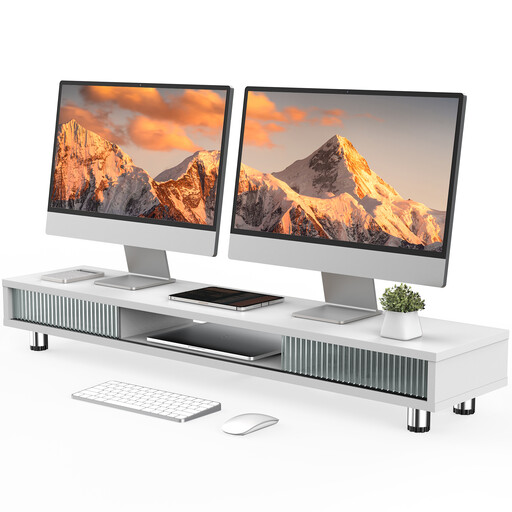
Monitor stand with two glass sliding doors, 108 cm, white
The wide shelf may be useful for placing screens side by side. Check the available desk space and the dimensions of your monitors.
The product description specifies a width of 108 cm and a height-adjustable shelf with a stated height of 15,2–16,8 cm, as well as a drawer, compartments and cable management. The load capacity is listed as 50 kg.
View at Joybuy
 No image available
Floordirekt dual monitor stand, 80–108 cm
This freestanding riser is an option if a clamp or desk hole isn’t suitable and there’s enough room for its base.
According to the product description, the width adjusts from 80 to 108 cm and the side sections swivel independently. The height is fixed at 10,4 cm.
View at Joybuy
Frequently asked questions
Do two monitors on a shared workplace desk need to be arranged ergonomically?
If the workplace falls within the scope of the German Workplace Ordinance, its annex requires several screens to be arranged ergonomically. The German Federal Institute for Occupational Safety and Health sets out more detailed requirements for screen-based work in ASR A6. This doesn’t mean you have to buy a particular brand, or even a monitor arm.
How can I check whether both monitors fit the mount?
For each screen, compare its weight without the existing stand and its VESA mounting pattern with the specifications for each arm. For the Neomounts DS70-250BL2, for example, the manufacturer specifies 1–9 kg per flat screen, a maximum of 8 kg per curved or ultrawide screen, and VESA 75 × 75 or 100 × 100 mm. These limits don’t automatically apply to other models.
What should I bear in mind with a hollow-core desktop?
Before fitting a clamp, check the instructions for your chosen mount and how the desktop is constructed. For the Z2-3D (Gen 3), ARCTIC recommends a reinforcement plate for honeycomb or sandwich panels with hollow cores to help prevent damage from clamping. This recommendation applies to that specific model.
If something breaks, what applies: the warranty or statutory rights?
For a consumer purchase, statutory rights against the seller are separate from a voluntary warranty. The European Union’s guidance states that you have at least two years of legal guarantee from the date you receive the goods; any claims under an additional warranty are subject to its terms. For a business purchase, check the specific contract terms.


