If you often need to reposition your dashboard and report when switching between sitting and standing, first look for a dual arm that lets you move each monitor independently. If you usually keep them side by side in a fixed position, a pole mount may be enough. What matters is the actual weight of each monitor, its VESA pattern, the desk fixing and the space available for the arms and cables. If a clamp won’t work with your desk, consider a freestanding stand, but bear in mind that it takes up desk space.
Who is a dual monitor mount suitable for?
Frequent sit-stand desk users
If you often change your working height, you’ll want to position your dashboard and report independently without having to rearrange everything each time. The adjustment options described include models from Neomounts and ARCTIC.
Users with monitors that differ in fit
If your screens differ in weight, size or mounting type, check that each one meets the load and VESA specifications for the specific model. Neomounts and ARCTIC’s product specifications show that these requirements vary between mounts.
People with limited desk space
If there’s little room behind your desk or a desk clamp isn’t an option, the design matters: compact arms may have less reach, while a freestanding stand takes up desk space. The Neomounts and Leitz models described here illustrate the difference.
What should you consider when choosing one?
| What matters |
What to check before buying |
Who is this important to? |
| Independent positioning |
Check whether the arms move independently and can reach the height and depth you need. |
If I need to reposition my dashboard and report when changing my working height, I want to position each screen separately. Around 33% of consumers put frequent repositioning first. |
| Fit for both monitors |
Find out the weight of each screen without its stand and its VESA pattern, then check both against the exact model. |
If my monitors weigh different amounts or have different mounting types, I want to know in advance whether both will fit the mount. Around 27% of consumers prioritise fit for both their screens. |
| Space on and behind the desk |
Measure your desk and monitors, as well as the distance from the wall. Check the arm reach and cable routing with the desk in both positions. |
If there’s little room behind my sit-stand desk, I need an arrangement that still puts my dashboard and report at the viewing distance I want. Around 20% of consumers prioritise a space-saving set-up. |
| Mounting without a clamp |
Check the desk thickness and construction to see whether a clamp will fit. If you’re considering a freestanding base, compare its footprint and load capacity per monitor. |
If my desk surface won’t take a suitable clamp, I need another way to mount the screens without overlooking the load capacity for both. Around 20% of consumers prioritise a set-up that doesn’t rely on an unsuitable desk clamp. |
Common buying misconceptions
-
Confusing total load capacity with capacity per arm
These figures aren’t interchangeable: ARCTIC specifies a total load capacity of 15 kg for the Z2 (Gen 3), but 8 kg per arm for the Z2-3D (Gen 3).
Check what each figure refers to, then compare the weight of each monitor with the specifications for the exact model you’re considering.
-
Assuming every desk surface can take a clamp
The ARCTIC Z2-3D (Gen 3) is specified for desk thicknesses of 20–65 mm. For certain hollow-core or sandwich panels, ARCTIC recommends using a reinforcing plate.
Measure your desk and check its construction, along with the mounting instructions for the desk and the mount. If a clamp won’t fit, look for a suitable alternative with a base.
-
Assuming compact arms offer plenty of reach
Shorter arms may take up less space near a wall, but they may not reach the position you want in front of your desk.
Compare the arm reach, distance from the wall and monitor dimensions with the planned positions of your dashboard and report.
Brands and models at a glance
Neomounts
The models listed include independently adjustable dual arms and freestanding stands.
- According to Neomounts, the DS70-250BL2 has two gas spring arms and a 180° stop.
- The freestanding DS45-600BL2 supports a maximum of 6 kg per monitor, according to the manufacturer.
ARCTIC
The Z2-3D (Gen 3) and Z2 (Gen 3) differ in their adjustment options and how their load capacity is specified.
- ARCTIC specifies 8 kg per arm for the Z2-3D (Gen 3), with a clamp range suitable for desk thicknesses of 20–65 mm.
- For the Z2 (Gen 3), the stated load capacity of 15 kg applies to the whole mount, not to each monitor individually.
Leitz
The Ergo Dual Monitor Arm 65370085 is an option if you want to adjust two screens independently and make the most of the space behind your desk.
- Leitz describes shorter support arms and a load capacity of up to 9 kg per monitor.
- Check whether the shorter reach gives you the viewing distance you want in your own set-up.
Ergotron
According to Ergotron, the LX Dual Monitor Arm 45-549-026 is designed for individually positioned monitors mounted on a taller pole.
- For use with two monitors, Ergotron specifies 3,2–10 kg per arm.
- If you expand the set-up to three or four monitors, the stated load ranges per arm change. The manufacturer says the expansion accessories are required separately.
Joybuy products for two screens
The following Joybuy products are for using two screens side by side, from independently adjustable arms to freestanding stands.
 No image available
AOKCOS dual monitor stand with shelf
For two screens that need independent positioning, the product description lists height, tilt, swivel and rotation adjustments for each monitor.
Compatibility: 12–27 inches, VESA 75 × 75 or 100 × 100 mm, and up to 10 kg per arm.
Joybuy
 No image available
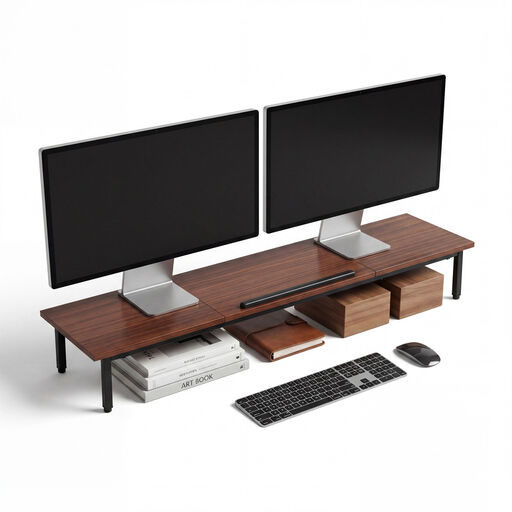
Dual monitor stand 2-in-1, 100 × 24 × 14 cm
Described as a freestanding shelf for two 24-inch screens, with a second tier for a keyboard or personal items.
The product description specifies a 5,5-inch-high shelf and height-adjustable legs.
Joybuy
 No image available
AOKCOS dual monitor stand with central shelf
The product description lists two independently adjustable arms, so you can position the screens separately.
Compatibility: 12–27 inches, VESA 75 × 75 or 100 × 100 mm, and up to 10 kg per arm. A central shelf is designed for a keyboard, notebook or accessories.
Joybuy
 No image available
Floordirekt freestanding dual monitor stand, black
A freestanding option with side platforms that, according to the product description, swivel independently.
The width is specified as 80–108 cm and the stand height as 10,4 cm. Material: MDF.
Joybuy
 No image available
Floordirekt gas spring dual monitor arm, 15–32 inches
For two screens whose position and viewing angle need adjusting. According to the product description, it can be fitted using a C-clamp or through a hole in the desk.
Compatibility: 15–32 inches, 2–10 kg per monitor and VESA 75 × 75 or 100 × 100 mm.
Joybuy
Frequently asked questions
Is the stated screen size enough to check whether a monitor will fit?
No. Also check the weight without the stand and the VESA pattern for both monitors. Neomounts lists screen sizes as a guide, but weight and VESA pattern are also important for compatibility.
What should I check before mounting one on an adjustable-height desk?
If you’re using a clamp, first check that the permitted desk thickness is suitable for your desk, and inspect the construction of the desk surface. For hollow-core or sandwich panels, ARCTIC recommends a reinforcing plate for the Z2-3D (Gen 3). Also plan how to route the cables when the desk is at its highest and lowest positions.
What should I do if a gas spring arm sags after installation?
First check that the monitor’s weight falls within the load range of the specific arm. For the DS70-250BL2, Neomounts specifies a minimum load of 1 kg per screen. Then adjust the arm according to the model’s instructions, rather than using a monitor that falls outside the stated load range.
Is a manufacturer’s guarantee the same as your statutory rights?
No. Your statutory rights cover claims against the seller for faulty goods; a manufacturer’s guarantee is an additional, voluntary service subject to its own terms. Check the cover and who to contact for the specific offer.
Does German workplace law require a particular dual monitor arm?
No. The regulations mentioned do not require you to buy a particular model. Requirements for screen-based workstations apply in workplaces and to the home-working arrangements covered by the rules; ASR A6 sets out further details within its scope. This does not create a blanket product requirement for a private desk.


