A dual monitor mount can free up space on a small desk, provided both monitors meet the mount’s mounting and weight limits and the desk surface is suitable for installation. For a mostly fixed setup, a crossbar mount could be a good option. Two adjustable arms offer more flexibility if you want to position your calendar screen separately, but you’ll need enough room to move them.
Who is a dual monitor mount suitable for?
If you want to free up desk space
If you want to keep an eye on your email and calendar at the same time, two monitor stands can take up a lot of workspace. So check whether your desk edge, desktop thickness and available space are suitable for a mount. The German Social Accident Insurance’s Institute for Occupational Safety and Health (IFA/DGUV) describes using multiple screens to run programmes needed at the same time.
If you want to position your screens differently
If you sometimes want to rotate your calendar screen or move it to a different position, independently adjustable arms could be the answer. Make sure the model you choose allows the positioning you want and that there’s enough room around your desk to move the arms. DURABLE and Invision describe product ranges with flexible or adjustable arms.
If your desk is tricky to fit
If the edge is hard to reach, the desktop is delicate or there’s little space behind your desk, the mounting method is especially important. Check that the clamp or through-desk mount is compatible with your desk’s construction and dimensions. ARCTIC recommends considering extra reinforcement for hollow-core desktops.
What should you look for when buying?
| Priority |
What to look for when buying |
Who is it important for? |
| Clear workspace |
Measure the desk’s width and depth, the distance from the wall and the width of both screens in your planned setup. |
If I want to use two screens but still have space on my small desk, the whole setup needs to fit. Shoppers whose main priority is saving space make up around 36% in this scenario. |
| Compatible monitors |
Check each monitor’s VESA pattern and weight without its stand against the limits of the specific model. |
If I want to attach both of my existing monitors to the same mount, the size, mounting pattern and weight must be suitable for each one. Shoppers whose main priority is device compatibility make up around 29%. |
| Positioning email and your calendar |
Decide in advance whether you want your calendar screen in portrait orientation or to move independently; check the model’s rotation and reach. |
If I want to position my calendar differently next to my email or rotate it from time to time, the relevant arm needs enough freedom of movement. Shoppers whose main priority is a flexible setup make up around 21% in this scenario. |
| Attaching the mount to your desk |
Check the desktop’s thickness and construction, the available edge and access underneath; follow the manufacturer’s guidance for hollow-core desktops. |
If my desk edge is hard to reach or the desktop is delicate, the mounting method needs to be suitable. Shoppers whose main priority is desk mounting make up around 14%. |
Common buying mistakes
-
Choosing by screen size alone
Screen size in inches alone won’t tell you whether a monitor is compatible with a mount. The VESA pattern, weight and actual width of both screens matter too. According to the manufacturer, the ARCTIC Z2 (Gen 3)’s maximum width specification applies only to two monitors of equal width positioned horizontally.
Check each monitor’s specifications against the limits of the complete mount model and measure how the setup will fit on your desk.
-
Overlooking the minimum weight for a gas spring arm
For the Invision MX400, the manufacturer specifies 2–9 kg per arm. A monitor that weighs less than the stated minimum is therefore outside the specified weight range.
Check the weight of each monitor without its stand for every arm you plan to use.
-
Assuming a clamp will work with any desktop
A suitable desktop thickness alone doesn’t mean every desk construction can be clamped securely. For honeycomb or sandwich panels with hollow cores, ARCTIC recommends using a reinforcement plate.
Check the desktop’s construction, the available edge and access underneath, and follow the mounting instructions for the specific manufacturer.
Brands and relevant product ranges
ARCTIC
The Z2 (Gen 3) is a dual monitor mount with a USB 2.0 hub, designed for a mostly fixed setup.
- ARCTIC specifies VESA 75 × 75 mm and 100 × 100 mm, and a desktop thickness of 20–60 mm.
- The maximum monitor width applies to two screens of equal width positioned horizontally. For hollow-core desktops, the manufacturer recommends a reinforcement plate.
DURABLE
The PRO 508523 uses a crossbar for a largely fixed setup, while the SELECT PLUS 509723 has two flexible arms.
- According to DURABLE, the PRO 508523 is designed for monitors measuring 21–27 inches and weighing 3–8 kg each, and desktops measuring 14–44 mm thick. The screens can be moved along the crossbar.
- For the SELECT PLUS 509723, DURABLE specifies monitors up to 32 inches and 8 kg each, with either a desk clamp or through-desk mounting. Check the mounting dimensions for the specific model before choosing.
Invision
The MX400 has two gas-assisted arms for more flexible positioning.
- Invision specifies 19–32 inches, VESA 75 × 75 mm and 100 × 100 mm, and 2–9 kg per arm.
- The specified maximum reach is 530 mm, so make sure you leave enough room behind and beside your desk.
Ergotron
The LX Dual Side-by-Side, model number 45-491-216, is designed for two screens positioned side by side on independently adjustable arms.
- Ergotron specifies screens up to 27 inches, weighing 3,2–9,1 kg each, and VESA 75 × 75 mm or 100 × 100 mm.
- According to the manufacturer, the arm extends up to 64 cm. Bear in mind how much room you’ll need for it on a small desk.
StarTech.com
The ARMDUAL is a dual monitor mount for smaller screens, with desk clamp or through-desk mounting.
- StarTech.com specifies two screens measuring 12–24 inches and weighing up to 13,6 kg each. According to the manufacturer, the mount supports both portrait and landscape orientation.
- These specifications apply to the ARMDUAL and shouldn’t be assumed to apply to other mounts from the brand.
Joybuy products for two monitors
This selection includes desk stands and dual arms for two monitors, including models with adjustable arms or extra storage space.
 No image available
AOKCOS dual monitor stand, 12–27 inches
The description specifies two independently adjustable arms and a storage shelf for use with two screens.
VESA 75 × 75 mm and 100 × 100 mm; tilt, swivel and rotation.
View at Joybuy
 No image available
AOKCOS dual monitor stand, 12–27 inches
The description specifies two adjustable arms and a storage shelf, so you can position your screens individually.
VESA 75 × 75 mm and 100 × 100 mm; tilt, swivel and 360° rotation.
View at Joybuy
 No image available
Floordirekt dual monitor stand, 80–108 cm, black
The raised shelf leaves space underneath the screens; according to the description, the side platforms swivel independently.
Width: 80–108 cm; fixed height: 10,4 cm; material: MDF.
View at Joybuy
 No image available
Floordirekt gas spring dual monitor arm, 15–32 inches, black
The dual arm is designed for two monitors, which can be positioned independently according to the description.
VESA 75 × 75 mm or 100 × 100 mm; 2–10 kg per monitor; desk clamp or through-desk mounting; portrait and landscape orientation.
View at Joybuy
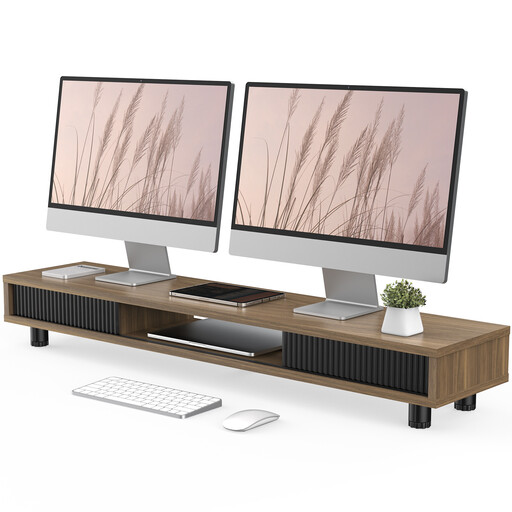 No image available
Monitor stand, 108 cm, brown, with two glass sliding doors
The 108 cm-wide shelf provides space for desk accessories underneath the monitor, according to the description.
Three compartments, one drawer, height-adjustable feet and integrated cable management.
View at Joybuy
Frequently asked questions
Does my calendar screen need to be in portrait orientation?
No. Choose the setup that works best for how you view your calendar, your screen format and the width of your desk. If you want portrait orientation, check that the specific model can rotate and that there’s enough room for the turned screen. A compatible VESA mount alone doesn’t guarantee that every setup will avoid collisions.
How should I set up two screens after mounting them?
First, position the email screen you use most often for your usual working position, then place the calendar where you can see it clearly. Next, check the spacing, viewing angles and cable routing in the positions you’ll actually use. A small laboratory study by the German Social Accident Insurance’s Institute for Occupational Safety and Health (IFA/DGUV), involving ten participants, found task-dependent differences between single- and dual-screen setups. This doesn’t mean there’s one layout that works for everyone.
What’s the difference between a complaint and a return?
A voluntary manufacturer’s warranty is not the same as your statutory rights against the seller. When shopping online in Germany, consumers generally have a 14-day right to cancel their purchase. Check the specific terms and any exceptions that may apply to your purchase.
Does German occupational health and safety law require a specific dual monitor mount for private use?
ASR A6 does not establish a general requirement to buy a particular mount for a desk used at home. The Federal Institute for Occupational Safety and Health excludes display screen equipment used in private settings outside workplaces from the scope of ASR A6. For a suitably equipped workplace, you should consider the applicable workplace requirements separately.


