What should you look for when buying?
Independently adjustable gas spring arms
A good choice if: you often position the two document views separately.
Things to consider: You’ll need enough space on your desk for the arms to move.
Pole mount
A good choice if: your monitors usually stay in a fixed arrangement and one initial adjustment is enough.
Things to consider: The DURABLE SELECT 509523 product information does not specify ongoing height adjustment; check that the set position works for you both sitting and standing.
For comparing documents at a height-adjustable desk, the main considerations are how much adjustability you want, whether both monitors are compatible, and whether the mount stays secure throughout the desk’s full height range.
| Priority |
What to check before buying |
Who is this particularly important to? |
| Position documents flexibly |
Check for independent height, depth and rotation adjustment, as well as enough room for the arms to move on your desk. |
If I regularly reposition two versions, I want to be able to position each view independently. Around 36% of consumers put this flexibility first. |
| Compatibility with both monitors |
Check each monitor’s weight without its stand and VESA mounting pattern against the specifications for the relevant arm. |
If you use two different monitors, you’ll want to check that each one can be mounted individually. Around 29% of consumers prioritise compatibility with both screens. |
| Fitting to a standing desk |
Check the desktop’s thickness and construction, the clamp edge or grommet hole, and the cable routing and clearance throughout the desk’s full height range. |
If I’m fitting the mount to my height-adjustable desk, it needs to attach securely to the desktop without restricting movement. Around 21% of consumers pay particular attention to desk mounting. |
| Simple initial adjustment |
Check in advance whether one set position will work for you both sitting and standing. |
If you usually keep your monitors side by side, you may not need to adjust each one separately very often. Around 14% of consumers prioritise a suitable fixed position. |
Joybuy products
The products below include adjustable dual monitor arms and monitor stands. If you’re considering a stand, check in particular whether it actually attaches two screens separately or simply provides a shared platform.
 No image available
AOKCOS dual monitor stand, 12–27 inches, height-adjustable, with shelf
For two monitors arranged side by side, provided both are within the specified size range.
The product name specifies tilt, swivel, rotation and height adjustment, as well as a shelf. Before buying, check the weight and VESA mounting pattern of both monitors against the product information.
View at Joybuy
 No image available
AOKCOS dual monitor stand, 12–27 inches, height-adjustable
An option for two monitor views, provided both screens are within the size range stated in the product name.
The product name specifies tilt, swivel, rotation and height adjustment. Check each monitor’s weight and VESA mounting pattern against the product information.
View at Joybuy
 No image available
Floordirekt gas spring dual monitor arm, 15–32 inches, black
For positioning two monitors using a gas spring dual arm.
The product name specifies a size range of 15–32 inches. Check the weight limit and VESA mounting pattern for each monitor, as well as the desk mounting requirements, against the product information.
View at Joybuy
 No image available
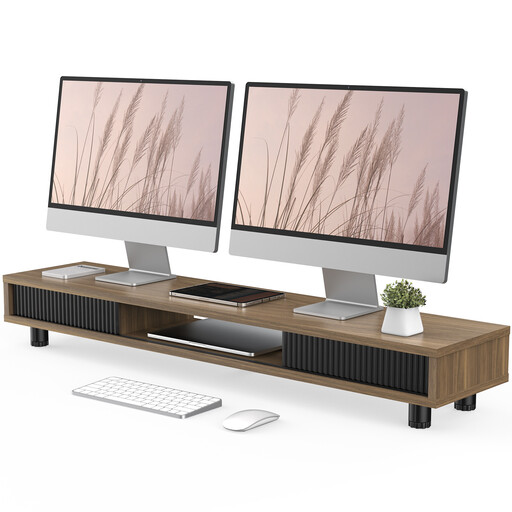
Monitor riser with two glass sliding doors, 108 cm, height-adjustable, brown
A shared platform for your monitors, if a riser is enough and you don’t need two separately mounted arms.
The product information describes a monitor riser with two glass sliding doors. It doesn’t confirm that it can mount two monitors separately, so check whether this design suits your preferred setup.
View at Joybuy
 No image available
Floordirekt monitor stand for two monitors, 80–108 cm, black
A shared platform for two monitors arranged side by side, if a fixed height of 10.4 cm suits you.
The product information states that the height is not adjustable. Check that the monitor arrangement and fixed raise work for you when switching between sitting and standing.
View at Joybuy
Frequently asked questions
Do both monitors need to be the same size?
Not necessarily. Check the weight and VESA mounting pattern for each arm individually, and make sure both screens will fit in your preferred arrangement. The maximum monitor width specified for the ARCTIC Z2-3D (Gen 3) applies to two monitors of equal width positioned horizontally.
Can I clamp a mount to a hollow-core desktop?
Desktop thickness alone isn’t enough to make that decision. For the Z2-3D (Gen 3), ARCTIC recommends a reinforcement plate for hollow-core or sandwich desktops to prevent damage from the clamp. Also check the desk manufacturer’s guidance.
What should I check after installation when raising the desk?
Test the desk’s full range of adjustment with the monitors in place. Check the distance from the wall, make sure the arms can move freely, and ensure the power and signal cables aren’t under tension. Whether the setup is compatible with a particular desk depends on its construction and range of movement.
Is a manufacturer’s guarantee the same as your statutory rights?
No. When you buy as a consumer in Germany, statutory liability for defects lies with the seller; a guarantee is an additional voluntary promise subject to its own terms. For ordinary purchased goods, the limitation period for claims relating to defects is generally two years from delivery (§ 438 BGB); the circumstances of an individual case may also be relevant. The Federal Ministry of Justice and the Federal Office of Justice publish the legal text, while Verbraucherzentrale explains the difference between statutory rights and a guarantee.
Does German health and safety law require a particular dual monitor arm?
The ASR A6 rules on display screen work do not specify a particular mount in the requirements relevant here. The Federal Institute for Occupational Safety and Health explains that, within its scope, the rules set out requirements for display screen work; they do not apply across the board to every form of private use.


