People who share a desk
If several people compare document versions and need to reposition the screens after each changeover, it’s worth considering a mount with two independently adjustable arms. Neomounts and DURABLE both offer suitable models.


If several people regularly need to reposition both screens, two independently adjustable arms are a good option. For a setup that stays mostly fixed, a pole-mounted holder may be enough. If neither a clamp nor a desk grommet mount is suitable, a freestanding dual stand is an alternative, although it takes up desk space. Before you buy, check the VESA mounting pattern and weight of each monitor, as well as the mounting options available on your desk.
If several people compare document versions and need to reposition the screens after each changeover, it’s worth considering a mount with two independently adjustable arms. Neomounts and DURABLE both offer suitable models.
If the two screens usually sit side by side and are only moved occasionally, a pole-mounted holder may be enough. DURABLE lists a 45 cm pole height for the SELECT 509523.
If a clamp or desk grommet mount isn’t suitable for your shared workspace, you could consider a freestanding dual stand. LogiLink offers the BP0045 as a freestanding option, but its base takes up desk space.
A good fit if: several people regularly need to adjust the height, distance or angle of each document view separately.
The trade-off: the desk mounting method and available movement space need to suit your setup. The Neomounts DS70-250BL2 has separate weight limits for curved or ultrawide screens.
A good fit if: the screens usually stay in the same side-by-side layout and are only adjusted occasionally.
The trade-off: with the DURABLE SELECT 509523, check that the pole height and adjustment range work for everyone using it.
A good fit if: you can’t use a desk clamp or grommet mount and have room for a stand base.
The trade-off: the base takes up workspace, and the monitor compatibility and footprint need to suit the specific model.
| Priority | What to check before buying | Who it matters most to |
|---|---|---|
| Reposition each screen independently | Check for separate height and depth adjustments, and make sure there is room to move the arms behind the desk. | This flexibility matters if several people want to position each document view separately after changing over; around 36% of consumers prioritise being able to reposition the screens individually. |
| A fixed comparison layout | Check the pole height, sideways movement and monitor size compatibility. | If you usually keep two versions side by side and only adjust them occasionally, a pole-mounted option may be worth considering; around 29% of consumers prioritise a mostly fixed layout. |
| Mounting without a clamp | Compare the footprint required with the space available for your keyboard, documents and screens. | If a clamp or desk grommet mount isn’t an option at your workstation, a freestanding stand may work; around 21% of consumers prioritise mounting without these fittings. |
| Compatibility with your monitors | Check the weight and VESA mounting pattern of each screen separately; don’t combine the weight limits for the two arms. | If you first need to check whether at least one of your existing monitors is compatible, compare the model limits carefully; around 14% of consumers make monitor compatibility their main priority. |
The screen size in inches doesn’t tell you whether the monitor’s weight and VESA mounting pattern are compatible with the holder. Neomounts lists weight limits for each screen on the DS70-250BL2, with separate limits for curved or ultrawide screens.
Check the weight, shape and mounting pattern of each monitor individually rather than relying on screen size alone.
You may need a separate compatible adapter if the VESA mounting pattern doesn’t match.
Weight limits apply to each monitor on its respective arm. For the DS70-250BL2, Neomounts also sets different limits according to screen shape.
Compare the weight of each screen with the limit for the arm it will be attached to.
A freestanding dual stand avoids the need to attach anything to the desk, but its base takes up space on the desktop.
Measure the available space and check that you can still arrange your keyboard, documents and both screens in a practical way.
The DS70-250BL2 NEXT Slim is a dual arm with a gas spring and swivel limiter. Neomounts says it can be fitted with a clamp or desk grommet mount.
The SELECT PLUS 509723 has two arms, while the SELECT 509523 has arms mounted on a pole. DURABLE says both models can be fitted with a clamp or desk grommet mount.
The range includes the freestanding BP0045 dual stand and the BP0041 dual mount with gas springs, which can be fitted with a desk clamp or grommet mount.
Ergotron describes the LX Dual Side-by-Side Arm as suitable for two side-by-side screens or a shallow angle.
According to Fellowes, the Platinum range also includes a dual monitor option with gas spring adjustment.
This selection includes adjustable dual arms and monitor stands with shelves. Decide whether you want to position each screen separately or place both on a shared shelf, then check that the mounting method or footprint will work with your desk.
 No image available
Suitable if you want to position two screens independently.
The product specifications list monitors from 12–27 inches, tilt, swivel and rotation, as well as VESA 75 × 75 or 100 × 100 mm. Check that each monitor is within the stated maximum weight limit of 10 kg per arm.
 No image available
A good option if you want to position each screen separately for comparing documents.
The product specifications list tilt, swivel, rotation and VESA 75 × 75 or 100 × 100 mm. Check that each monitor is within the stated maximum weight limit of 10 kg per arm.
 No image available
An option if you want to position both screens separately on a shared desk.
The product specifications list VESA 75 × 75 or 100 × 100 mm, 2–10 kg per monitor, and either a desk clamp or grommet mount. Check whether either mounting method will work with your desk.
 No image available
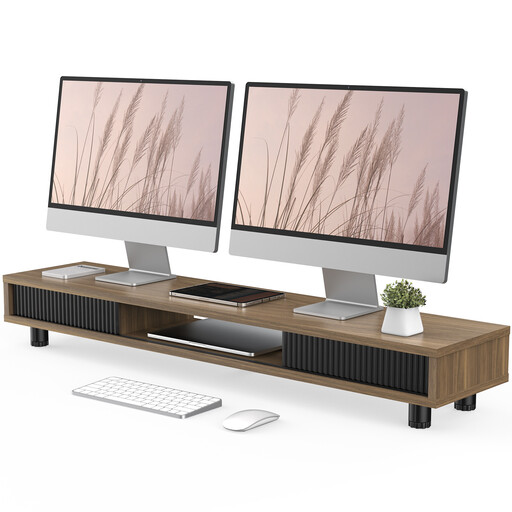
An elevated shelf instead of two separately mounted arms. Check that there’s enough space for your screens and preferred layout.
The product name specifies a width of 108 cm and two glass sliding doors.
 No image available
A good option if you want to place two monitors on a shared shelf, side by side or at an angle.
The product specifications list an adjustable width of 80–108 cm, independently swivelling platforms and a height of 10.4 cm. Check that this shelf height suits your preferred screen position.
Not necessarily, but each monitor must fit the mount on its own arm. The Neomounts DS70-250BL2 and DURABLE SELECT PLUS 509723 are both listed as compatible with VESA 75 × 75 and 100 × 100 mm. Check the mounting pattern on the back of each monitor separately.
Start with both views clearly visible at the same time, then adjust their positions to suit the task and the person using them. A laboratory study by the German Social Accident Insurance (DGUV) compared, among other things, two 22-inch screens arranged horizontally for text comparison. This doesn’t mean that a particular mount is guaranteed to reduce errors.
Check the weight limit for each arm, the VESA mounting pattern and the mounting method for the specific model. After a changeover, you should be able to reposition the screens to suit the next person. With a freestanding model, also make sure the base fits on your desk.
Check whether any VESA adapter you need is included and what warranty applies to the exact model variant. Neomounts lists optional adapters for non-standard mounting patterns and a five-year manufacturer’s warranty for the DS70-250BL2. These details don’t automatically apply to other models.
The ASR A6 doesn’t impose a general requirement to buy a dual monitor arm specifically. Workplace screen setups are subject to the requirements of the German Workplace Ordinance. The ASR A6 guidance from the Federal Institute for Occupational Safety and Health explains how those requirements can be met, while allowing other solutions that provide at least equivalent protection. Choosing a product doesn’t replace an assessment of the specific workstation.