For comparing texts at a standing desk, independently adjustable dual arms are a good choice if you often position the source text and translation differently; if you always keep them side by side, a crossbar may be enough. A freestanding stand is an alternative if you’d rather not use a clamp or desk grommet. For both monitors, check the VESA pattern, weight and dimensions, as well as the desk fixing, clearance for movement and cable management. The text-comparison scenarios described by DGUV and manufacturers’ information about adjustability do not promise to improve translation performance.
Which design suits whom
For comparing texts in changing layouts
If you switch between checking the source text and the translation, arms that adjust independently can be useful. The DGUV Institute for Occupational Safety and Health describes text comparison as an application for dual-screen setups; how each arm can be adjusted depends on the model.
For users of height-adjustable desks
With a standing desk, the fixing, monitor position and cable route all need to suit your particular desk. The permitted clamping range varies by mount model.
For readers with a fixed two-text layout
If you usually keep the source text and translation side by side, a sliding crossbar may be a good option. DURABLE lists this adjustment for model PRO 508523.
What to look for when buying
Two independently adjustable monitor arms
A good fit if: You often position your screens differently or sometimes want to read one in portrait orientation.
Consider: Adjustable arms need room to swivel. The desk edge, fixing and cable route all need to suit your particular workspace.
Crossbar with two monitor mounts
A good fit if: You usually keep both texts side by side and mainly want to adjust their distance or their position together.
Consider: The adjustment range and permitted monitor sizes depend on the model; check that you can position both screens as needed.
Freestanding dual monitor stand
A good fit if: You’d rather not use a clamp or desk grommet and have enough desk space for a base.
Consider: The base takes up desk space. Also check the permitted monitor sizes and weights for the specific model.
| Priority |
What to check when buying |
Who it matters most to |
| Positioning two texts to suit your needs |
Check whether each mount can be adjusted independently or whether a shared crossbar will work for your layout. |
When I regularly compare the source text with the translation, I want to arrange both views so I can switch between them comfortably. Around 33% of consumers put text alignment first. |
| Fixing to a standing desk |
Measure the desktop at the mounting point and check the mounting instructions, edge shape, obstacles and cable route throughout the desk’s full range of movement. |
If you change the desk height, you need a fixing and cable route that suit your particular desk. For around 27% of consumers, desk mounting is a priority. |
| Compatibility with both monitors |
For each monitor, compare its weight without the original stand, screen size and VESA pattern with the specifications for the exact model. |
If my two screens weigh different amounts, I want to check that the size, weight and mount are right for each one. Around 27% of consumers prioritise monitor compatibility. |
| Desk space and setup effort |
Allow space for the base or swivel range, and make sure the cables are long enough when the desk is both low and raised. |
If you want to keep your desk as uncluttered as possible, you’ll need to weigh up the footprint against the space needed for movement. For around 13% of consumers, desk space and setup effort are the main concerns. |
Common buying mistakes
-
Looking only at the maximum screen size or load capacity
For the MX900, Invision specifies 2 to 15 kg per arm. The minimum weight and VESA pattern also need to suit each monitor.
Check the weight and mounting pattern of both screens separately, using the exact model and excluding the original stand.
-
Assuming different models have the same clamping range
DURABLE specifies a desktop thickness of 14–44 mm for the PRO 508523 and 10–50 mm for the SELECT PLUS 509723; StarTech.com specifies 40–85 mm for the ARMDUAL3. These measurements apply only to the model stated.
Measure the desktop at the planned mounting point and check that the chosen type of fixing can be used there.
-
Assuming a freestanding base will automatically save space
Ergotron’s Neo-Flex Dual avoids the need for a clamp, but its base still takes up desk space. Adjustable arms, on the other hand, need room to swing out.
Compare the space available with the base’s footprint or the clearance needed for your text layout.
Key brands at a glance
DURABLE
The PRO 508523 and SELECT PLUS 509723 offer two different approaches to dual monitor setups.
- DURABLE says the monitors on the PRO can slide along the crossbar, while the SELECT PLUS has independently adjustable arms.
- Size, weight and desktop limits apply only to the specific model.
Ergotron
The LX Dual is described as suitable for side-by-side views, while the Neo-Flex Dual is a freestanding stand.
- Ergotron describes the Neo-Flex Dual as having height adjustment at the base.
- Check the load capacity and dimensions of the specific version before choosing it for your monitors.
Invision
According to the manufacturer, the MX900 is designed for monitors measuring 24–35 inches.
- For the MX900, Invision specifies 2–15 kg per arm, VESA 75 × 75 or 100 × 100 mm, and clamp or desk grommet mounting.
- These specifications refer to the MX900 and do not set out German purchasing or warranty terms.
StarTech.com
The German product page describes the ARMDUAL3 as a dual monitor arm with a height-adjustable pole.
- StarTech.com specifies monitors up to 32 inches, up to 8 kg per monitor and integrated cable clips.
- The stated clamping range is 40–85 mm, so check that it suits your desktop at the mounting point.
ICY BOX
The IB-MS314-T is described as a dual monitor arm.
- For this model, RaidSonic specifies two monitors up to 32 inches, VESA 75 × 75 or 100 × 100 mm, and up to 8 kg per monitor.
- The manufacturer’s information is not entirely consistent about the number of monitors; check the binding specification sheet for the version before buying.
Joybuy products for this setup
The products below include adjustable mounts for two monitors and a monitor stand with extra storage. Compare the details on adjustment, mounting and dimensions with your two screens and standing desk.
 No image available
AOKCOS dual monitor stand with shelf, 12–27 inches
For two screens whose positions you want to adjust independently when comparing texts.
The product description specifies 12–27 inches, ±40° tilt, ±80° swivel, 360° rotation, VESA 75 × 75 and 100 × 100 mm, and height adjustment from 120 to 927 mm.
View at Joybuy
 No image available
AOKCOS tilting dual monitor stand, 12–27 inches
For two screens you want to tilt, swivel or rotate independently.
The product description specifies ±40° tilt, ±80° swivel, 360° rotation, VESA 75 × 75 and 100 × 100 mm, and up to 10 kg per arm.
View at Joybuy
 No image available
Floordirekt monitor stand, MDF, 80–108 cm, black
For a side-by-side or angled layout, if a stand with swivelling side platforms suits your workspace.
The product description specifies an adjustable width of 80 to 108 cm, a height of 10.4 cm and MDF construction.
View at Joybuy
 No image available
Floordirekt gas spring dual monitor arm, 15–32 inches
For two screens whose position or orientation you want to change independently when comparing texts.
The product description specifies 15–32 inches, 2–10 kg per monitor, VESA 75 × 75 or 100 × 100 mm, clamp or desk grommet mounting, and integrated cable management.
View at Joybuy
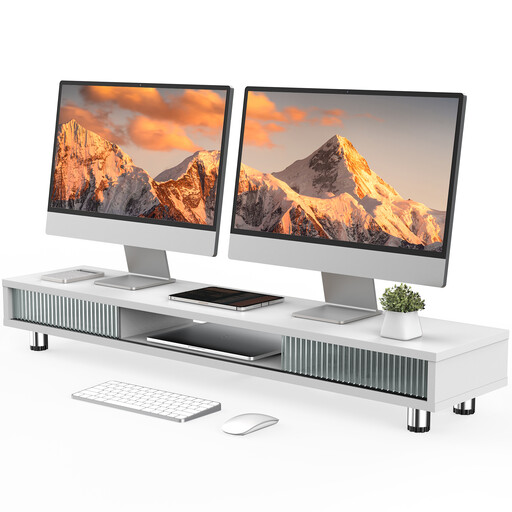 No image available
Monitor stand with two glass sliding doors, 108 cm, white
For a workspace where a wide monitor stand also needs to provide storage.
The product description specifies three compartments, a drawer, integrated cable management, adjustable feet and a load capacity of 50 kg.
View at Joybuy
Frequently asked questions
Do both screens need to be at the same height?
No, there’s no general requirement for them to be at the same height. In its 2016 study of text comparison, the DGUV Institute for Occupational Safety and Health looked at both two landscape screens and a combination of landscape and portrait screens. Arrange yours to suit your task and give you a comfortable viewing position.
How do I fit a mount to a height-adjustable desk?
First, check the desk’s mounting instructions and the clamping range of the exact mount model. Route the cables so they won’t become taut throughout the desk’s full range of movement or in the arm positions you plan to use. Then check that everything is secure, following the relevant instructions.
In Germany, what’s the difference between a defect, a warranty and a return?
The statutory rights you have against the seller are separate from a voluntary manufacturer’s warranty, which is subject to its own terms. According to the Verbraucherzentrale, consumers generally have a 14-day right to cancel online purchases, although statutory exceptions may apply.
Does German workplace safety law require a particular dual monitor arm?
No, ASR A6 does not require a particular brand or type of mount. The Federal Institute for Occupational Safety and Health describes its scope as covering screen-based work in workplaces and home-based teleworking environments; whether the rule applies to a specific workplace depends on the employment context.


