If you often compare accounts and invoices side by side and want to reposition your screens as the daylight changes, a dual arm with independently adjustable arms is a good fit. For an arrangement that will mostly stay put, a simpler mount may be all you need. Before buying, check the weight and VESA pattern of both monitors, along with your desk surface, mounting options and available swivel space. A mount makes it easier to adjust your screens, but it won’t replace suitable glare control at the window.
Who is a dual monitor mount suitable for?
Working by a bright window
If daylight makes it harder to see accounts or invoices, it’s important to position your screens appropriately and have adjustable glare control. The German Social Accident Insurance (DGUV) recommends positioning your line of sight parallel to the window when working at a screen.
Frequently comparing documents
If you regularly compare two views side by side, independently adjustable arms can be useful. Whether you can position both monitors as you’d like depends on the adjustment range of the specific model.
A desk that’s difficult to mount to
If your desk has a narrow edge, an unusual surface thickness or a hollow-core top, the mount needs to suit your desk. Always follow the installation instructions for the specific model.
What should you look for when buying?
Dual arm with independently adjustable arms
Suitable if: You want to reposition each screen separately when comparing documents or when the light changes throughout the day.
Bear in mind: The arms need room to swivel. Depending on the model, gas spring arms have minimum and maximum weight limits for each screen.
Mount for an arrangement that will mostly stay put
Suitable if: Both screens will usually stay in the same position and can be placed there to suit the window.
Bear in mind: Check that you can adjust the height and spacing of both monitors enough. Less flexibility can be a drawback when reflections change.
Freestanding dual monitor stand
Suitable if: A desk clamp or grommet mount isn’t an option for your desk.
Bear in mind: The base takes up desk space. Check that the stand suits both monitors and that you have enough room for it.
When comparing accounts and invoices, reach and independent adjustment are key. The DGUV also recommends considering screen position alongside adjustable glare control at the window.
| Buying criterion |
What to check before buying |
Who is this particularly important to? |
| Readability in window light |
Check the screen position and swivel range where you plan to use the mount, and consider adding glare control at the window. |
If I need to read accounts and invoices in changing daylight, I want to reduce distracting reflections by positioning my screens and using suitable glare control. Around 36% of consumers put readability in window light first. |
| Keeping both views side by side |
Compare your monitor widths and preferred arrangement with the reach and width adjustment of the model. |
If I regularly compare two views side by side, I need an arrangement that keeps both screens easy to see. Around 29% of consumers prioritise comparing views side by side. |
| Mounting to your desk |
Measure the desk surface thickness and check its construction, edge access and the installation instructions. |
If the desk edge or surface construction limits installation, the mount needs to suit my desk. Around 21% of consumers prioritise desk mounting. |
| Compatibility with both monitors |
Check the weight and VESA hole spacing of each screen. For gas spring arms, also check the minimum weight. |
If I want to mount two existing screens, both must be within the model’s weight and VESA limits. Around 14% of consumers put monitor compatibility first. |
Common buying and installation mistakes
-
Assuming a moving dual arm provides complete glare protection
An adjustable arm helps you position your screens, but it won’t automatically reduce daylight or reflections from the window.
Plan your screen positioning and adjustable window glare control together.
-
Choosing based on screen size alone
For the Neomounts DS70-750BL2, the manufacturer gives screen size in inches as a guide. The weight and VESA pattern must also fall within the limits of the specific model.
Check each monitor’s weight and VESA hole pattern against the arm’s full specifications.
-
Ordering a clamp without checking the desk surface
An unsuitable desk surface can cause problems during installation. ARCTIC warns that clamping the Z2-3D (Gen 3) to honeycomb or sandwich panels with hollow cores may cause damage.
Check the desk surface thickness and construction, as well as the installation instructions for the specific model. ARCTIC recommends using a reinforcement plate with the hollow-core surfaces mentioned.
Brands to consider
ARCTIC
The Z2-3D (Gen 3) is a dual arm with independently adjustable gas spring arms and a USB hub.
- According to the manufacturer, it supports 75 × 75 and 100 × 100 mm VESA patterns and holds up to 8 kg per arm.
- ARCTIC specifies a desk surface thickness of 20–65 mm for the Z2-3D (Gen 3). The manufacturer recommends a reinforcement plate for hollow-core surfaces.
Neomounts
According to the manufacturer, the DS70-750BL2 is a dual arm for independently adjustable screens.
- Neomounts specifies 2–7 kg per screen, 75 × 75 and 100 × 100 mm VESA patterns, and a choice of clamp or grommet mounting.
- The stated screen size is a guide; weight and VESA measurements determine whether it will fit.
Invision
The MX400 is a dual arm for two independently adjustable monitors.
- Invision specifies 2–9 kg per arm, 75 × 75 and 100 × 100 mm VESA patterns, and clamp or grommet mounting.
- The specifications for this model don’t prove that it’s generally better than other brands.
Hama
The range includes height-adjustable dual monitor stands and fully articulating dual arms with gas springs.
- The manufacturer’s range includes, for example, models 00220903/00220904 and gas spring arms 00220907/00220908.
- Check the weight capacity and mounting options for each version against your desk.
Ergotron
The LX range includes dual arms that let you position each screen independently.
- Depending on the version, you can arrange the screens side by side or stack them.
- Specifications for one LX item can’t necessarily be applied to other models or colours.
Joybuy products for two screens
This selection includes adjustable dual arms and desk stands for two screens. The key question is whether you want to position the monitors independently or prefer a shared platform that will mostly stay in place.
 No image available
AOKCOS dual monitor stand, 12–27 inches
Suitable if you want to position two monitors independently and adjust them whenever you need to.
According to the product description: 75 × 75 and 100 × 100 mm VESA patterns; up to 10 kg per arm. The arms tilt, swivel and rotate.
View at Joybuy
 No image available
AOKCOS dual monitor stand with shelf, 12–27 inches
For a workspace where you want to adjust two monitors separately and make use of a shelf.
According to the product description: 75 × 75 and 100 × 100 mm VESA patterns, and up to 10 kg per arm. The arms can be adjusted for height and viewing angle, and a shelf is included.
View at Joybuy
 No image available
Floordirekt monitor stand, 80–108 cm, white
An option if you want to place two screens on a shared platform and adjust the distance between them.
According to the product description: adjustable width of 80–108 cm, independently swivelling side platforms and MDF construction.
View at Joybuy
 No image available
Floordirekt dual monitor arm with gas spring, 15–32 inches
Suitable if you want to adjust two screens flexibly and choose a mounting option to suit your desk.
According to the product description: 75 × 75 and 100 × 100 mm VESA patterns, weight range of 2–10 kg, and clamp or grommet mounting. Tilt, swivel and rotation are also listed.
View at Joybuy
 No image available
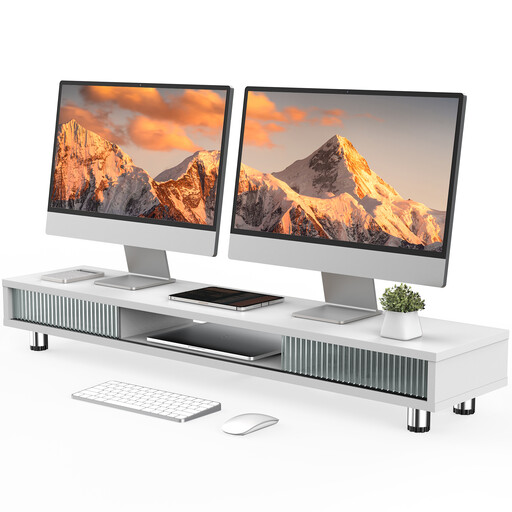
Monitor stand with two glass sliding doors, 108 cm
For a setup that will mostly stay in place on a shared platform. Check that the monitor stands fit on the surface.
According to the product description: 108 cm-wide platform, height-adjustable feet, compartments, drawer and cable management.
View at Joybuy
Frequently asked questions
Can a monitor arm on its own prevent glare from a window?
No, you shouldn’t rely on it to do that. The DGUV recommends positioning your line of sight as parallel to the window as possible when working at a screen, and being able to control the light coming in through the window. A movable arm makes it easier to adjust your screens, but it doesn’t replace these measures.
What information do I need before mounting two monitors?
Check the weight and VESA hole pattern of each monitor, then compare both with the specifications for the arm. Gas spring models may also have a minimum weight: Neomounts specifies 2–7 kg per screen for the DS70-750BL2.
What should I consider when clamping a mount to a lightweight desk?
Check the desk surface construction and thickness, as well as the installation instructions for the specific model. ARCTIC specifies 20–65 mm for the Z2-3D (Gen 3) and recommends a reinforcement plate for honeycomb or sandwich panels with hollow cores to help prevent clamp damage.
What accessories or warranty terms should I check?
Check whether installation requires extra reinforcement or other accessories, and read the warranty terms for the specific version. Neomounts gives a five-year warranty for the DS70-750BL2; this doesn’t automatically apply to other models or brands.
What are the glare-control requirements for workplace screen setups in Germany?
For workplaces covered by the workplace regulations, ASR A6 sets out requirements under the Workplace Ordinance. The DGUV explains that it must be possible to control the amount of daylight reaching the screen-based workstation. This relates to the design of the individual workspace; it is not a blanket labelling or approval requirement for every monitor mount bought for private use.


