Who is a dual monitor stand suitable for?

Using your calendar and email side by side

If you want to keep your appointments visible alongside your inbox, you can position both screens to suit the tasks you’re working on. According to BG BAU, the arrangement of multiple monitors depends on the task.

Frequently repositioning your screens

If you switch between portrait and landscape orientation or often change the distance between your monitors, look for separate adjustment options for each arm. The range of movement varies by model.

A desk without a suitable clamping point

If you can’t or don’t want to use a clamp or grommet mount, a freestanding stand could be an option. Make sure you allow enough room on your work surface.

What should you look for when buying?

Two independently adjustable arms

Suitable if: You want to adjust the height, depth or orientation of your calendar and email screens independently.

Keep in mind: Both monitors must be within the model’s weight and VESA limits. Check your desktop and the installation requirements too.

Dual mount with a central pole

Suitable if: Your screens will mostly sit side by side and you want to adjust their height and horizontal position on a central pole.

Keep in mind: The range of movement depends on the joints and pole design of the specific model.

Freestanding dual monitor stand

Suitable if: A clamp or grommet mount isn’t an option for you.

Keep in mind: The base takes up desk space. This design is also subject to the weight and VESA limits of the specific model.

What you need What to check before buying Who it matters most to
Positioning your screens Check that you can adjust the height and depth of each screen separately, and rotate the VESA mounts. If I use my calendar and emails side by side, I want to position both views to suit the task. Around 29% of consumers are likely to have this as their main priority.
Mounting both monitors Check the VESA mounting pattern and weight of each monitor against the specifications for each arm; look out for any minimum weight limit. If I want to mount two monitors I already own, each one needs to meet the VESA and weight requirements. Around 29% of consumers are likely to care most about this compatibility.
Keeping desk space free Compare the footprint of the base or the space needed for the clamp with the desk space you can actually use. If I need room for my keyboard and other work essentials as well as two screens, the amount of desk space taken up matters. Around 24% of consumers are likely to have this as their main concern.
Choosing the right mounting method Check the desktop thickness and whether the desk edge is accessible; if you’re choosing a stand with a base, allow space for it. If a clamp or grommet mount isn’t suitable for my desk, I need an alternative that works. Around 18% of consumers are likely to be mainly looking for a mount that doesn’t attach to the desk.

Avoid common buying mistakes

  • Choosing based only on screen size

    The screen size in inches alone won’t tell you whether a monitor will fit the arm. The VESA mounting pattern and weight may differ between your two screens. Gas-spring arms may also have a minimum weight limit.

    Check each monitor’s specifications against the limits of the specific stand model.

    If the VESA mount isn’t compatible, you may need a suitable adapter or a different stand.

  • Assuming “freestanding” means “space-saving”

    A freestanding stand doesn’t need a clamp, but its base still takes up space on your work surface.

    Before choosing this type of mount, measure the usable desk space, including room for your keyboard and other work essentials.

    The base takes up part of your work surface.

  • Checking your desk edge only after buying

    The permitted desktop thickness and whether the desk is suitable depend on the model. A clamp can damage some types of desktop.

    Check the desktop thickness and construction, and follow the installation instructions. For the Z2-3D (Gen 3), ARCTIC recommends using a reinforcement plate with hollow-core or sandwich desktops.

    Depending on your desk and stand, you may need a different mounting method or a suitable protective or reinforcement plate.

Brands to consider

Neomounts

The DS70-250BL2 and DS45-600BL2 represent two different designs: an adjustable dual arm and a freestanding stand.

  • According to Neomounts, the DS70-250BL2 supports flat screens weighing 1 to 9 kg each. For curved or ultrawide screens, the manufacturer specifies a maximum of 8 kg per arm. It supports VESA 75 × 75 and 100 × 100 mm.
  • For the freestanding DS45-600BL2, Neomounts specifies a maximum of 6 kg per screen. These figures apply to the models listed, not to every product from the brand.

DURABLE

The SELECT desk mount 509523 combines two jointed arms with a height-adjustable pole. According to the manufacturer, it can be attached with a clamp or grommet mount.

  • DURABLE specifies that the model supports standard monitors up to 27 inches and 8 kg each, with VESA 75 × 75 or 100 × 100 mm.
  • The pole design differs from a gas-spring dual arm. These specifications apply only to the SELECT 509523.

ARCTIC

The Z2-3D (Gen 3) is a gas-spring dual arm for screens that need to be repositioned frequently.

  • ARCTIC specifies a maximum of 8 kg per arm, VESA 75 × 75 or 100 × 100 mm, and a desktop thickness of 20 to 65 mm.
  • For two monitors of the same width arranged horizontally, the manufacturer specifies a maximum monitor width of 820 mm. This condition doesn’t apply to other arrangements.

Invision

The MX400 is a gas-spring dual arm that can be attached with a clamp or grommet mount.

  • Invision specifies 2 to 9 kg per arm, VESA 75 × 75 or 100 × 100 mm, and a maximum extension of 530 mm.

StarTech.com

The ARMDUALSS is a freestanding dual monitor stand for desks where you don’t want to use a clamp or grommet mount.

  • StarTech.com specifies support for up to 8 kg per screen and VESA 75 × 75 or 100 × 100 mm.
  • The base measures 300 × 520 mm, so you’ll need to allow enough space for it on your work surface.

Joybuy products

This selection includes freestanding stands, dual arms that attach to your desk and monitor stands with a raised shelf. For each model, check that its design, dimensions and mounting method work with your screens and desk.

AOKCOS freestanding monitor stand for two monitors

AOKCOS monitor stand for 2 monitors, 12–27 inches

The separate adjustment options may suit you if you want to position each screen independently.

VESA 75 × 75 or 100 × 100 mm; up to 10 kg per arm.

Tilt, swivel and 360° rotation are specified for each screen.

View at Joybuy

Floordirekt gas-spring dual monitor arm

Floordirekt gas-spring dual arm, 15–32 inches

This dual arm may suit you if you want to position two screens independently and attach them with a clamp or grommet mount.

VESA 75 × 75 or 100 × 100 mm; 2–10 kg per monitor.

Tilt, swivel and rotation are specified. Check that the desk mount is suitable and that both monitors are within the weight limits.

View at Joybuy
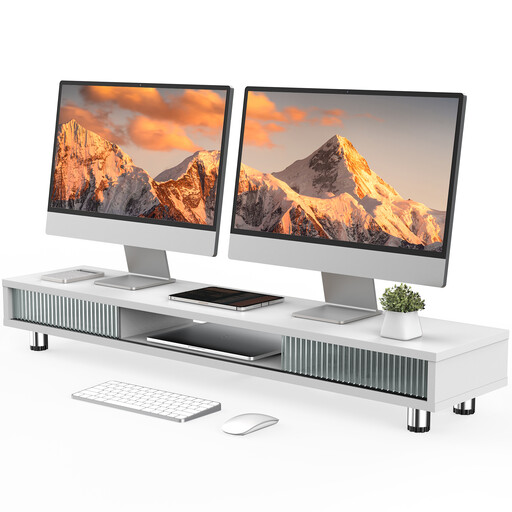
White monitor stand with two sliding glass doors, 108 cm wide

Monitor stand with two sliding glass doors, 108 cm, white

The raised shelf, with compartments and a drawer, may appeal if you’d like storage beneath your monitor stand.

The width is specified as 108 cm; the adjustable feet are described as 15,2 to 16,8 cm.

Before buying, check that the shelf is large enough for your screens and the arrangement you want.

View at Joybuy

Floordirekt monitor stand for one or two monitors, black

Floordirekt monitor stand for 1 or 2 monitors, black

The independently swivelling side platforms may suit you if you want to position your screens straight or at an angle.

The width is adjustable from 80 to 108 cm. The fixed height is 10,4 cm.

Check that the fixed height gives you the screen position you want.

View at Joybuy

Frequently asked questions

Is it enough for both monitors to fit the stated screen size?

No. You should also check the VESA mounting pattern and weight of each monitor against the limit for each arm. For example, Invision specifies 2 to 9 kg per arm for the MX400. The Neomounts DS70-250BL2 has different maximum weight limits for curved or ultrawide screens than for flat screens.

How should I position my calendar and emails across two screens?

Position your screens to suit the task you’re doing. According to BG BAU, the arrangement of multiple monitors depends on the task. BG BAU also recommends positioning the screen as low as possible, with the top line no higher than eye level, and a viewing distance of at least 50 cm, depending on the visual task.

What should I check before installation?

Check the desktop thickness against the requirements for the specific model and follow its installation instructions. For example, ARCTIC specifies 20 to 65 mm for the Z2-3D (Gen 3) and recommends a reinforcement plate with hollow-core or sandwich desktops to prevent clamp damage.

Is a manufacturer’s guarantee the same as statutory consumer rights?

No. In Germany, statutory consumer rights apply against the seller; a manufacturer’s guarantee is an additional, voluntary benefit subject to its own terms. For a specific offer, check who the seller is and what guarantee terms apply.

Do display screen workplace rules automatically apply to every home office?

No. The German Workplace Ordinance covers a home-based teleworking workstation set up by an employer under specific conditions. Occasionally working remotely from home doesn’t, by itself, make a workstation a teleworking workstation. ASR A6 also applies to teleworking workstations, but not automatically to every use of a screen in a private home. The specific working arrangement and setup determine what applies.