If you regularly compare source text with a translation, a freestanding dual monitor stand is a good choice if you can’t use a desk clamp or prefer a more fixed setup. A clamp-on or through-desk arm can free up the space beneath your screens and make positioning easier, but it needs a suitable mounting point. For either option, check the VESA measurements, monitor weight and dimensions, desk-mounting requirements and available range of movement.
Who would benefit from a dual monitor mount?
Comparing text across two screens
If you want to keep the source text and translation visible at the same time, look for a setup that lets you position both screens so you can switch between them comfortably. In 2016, the German Social Accident Insurance Institution for Occupational Safety and Health conducted a laboratory study with ten participants that included comparing text across two screens. The study was not a survey of shoppers and did not assess monitor mounts.
Working from home with limited desk space
If you need space beside your screens for a keyboard, documents or notes, choosing between a stand and a desk mount can help. A stand takes up desk space, while a clamp or through-desk mount needs a suitable position for installation.
Frequently changing your text layout
If you switch between landscape and portrait orientation or often reposition your screens, check the range of adjustment and make sure there’s enough room for both monitors in the position you want.
What should you look for when buying?
When comparing source text with a translation, the key things to consider are how you can position both screens, whether they’re compatible with the mount, how it attaches to your desk and the range of adjustment you need.
| What you need |
What to check before buying |
Who should pay particular attention? |
| Positioning text side by side |
Check the width of both monitors, their side-by-side positions, tilt and the landscape or portrait orientation you want against the product diagrams. |
If you want to read the source text and translation at the same time, you’ll need a suitable layout for both screens. Around 29% of consumers would put text alignment first when buying. |
| Making sure the monitors can be mounted |
For each monitor, compare its weight without the stand and its VESA mounting pattern with the specifications of the exact mount. |
If both of your existing screens need to fit the mount, check the specifications of each monitor individually. Around 29% of consumers would name compatibility as their most important buying consideration. |
| Desk and mounting |
Check the desk edge, desktop construction, space behind the desk and whether you need a grommet hole against the installation instructions. |
If you work at a particular desk, you’ll need a mounting option that suits it. Around 24% of consumers would put desk compatibility first. |
| Changing position frequently |
Check rotation, height and depth adjustment, and make sure there’s room to move both monitors once mounted. |
If you regularly change the position or orientation of your screens while proofreading, the usable range of adjustment matters. Around 18% of consumers would put adjustability first. |
Common buying and installation mistakes
-
Comparing screen size alone
A suitable screen size doesn’t necessarily mean the VESA mounting pattern, weight and combined arrangement of both monitors will work with the mount.
For both screens, compare the specifications without the stands against the limits for the exact model variant. Also check whether any required adaptor plates are included.
If a monitor has a different VESA mount, you may need a suitable adaptor plate.
-
Buying a desk clamp without checking the desk edge
Freestanding models and clamp-on or through-desk arms have different requirements. Even products in the same range can vary in their mounting method and range of adjustment.
Check the shape of the desk edge, desktop thickness, space underneath and behind the desk, and the permitted mounting method in the instructions for the exact model.
An unsuitable mounting point may mean you need different mounting accessories or another mount.
-
Confusing the manufacturer’s guarantee with your statutory rights
A guarantee is a voluntary promise with its own terms and conditions. Your statutory rights for faulty goods are against the seller and are separate from the guarantee.
Keep the guarantee terms for the exact variant, and if something is faulty, first check what rights you have against the seller.
Brands to consider
Neomounts
Worth considering if you’re choosing between a freestanding dual stand and a clamp-on or through-desk option.
- Neomounts lists both the FPMA-D550DDBLACK and FPMA-D550DBLACK as supporting two screens, with VESA 75 × 75 and 100 × 100 mm.
- The stand and clamp-on versions differ in their mounting method and range of adjustment, so check the specifications for the exact model.
Ergotron
The LX Dual Side-by-Side is designed for two screens positioned next to each other.
- Ergotron gives an individual monitor weight range of 3,2 to 9,1 kg for this version.
- The weight range applies to the version listed. Also check the desk mounting and whether your specific monitors will fit.
ARCTIC
The Z2 (Gen 3) may suit buyers considering wider monitors and looking to check VESA measurements.
- ARCTIC lists VESA 75 × 75 and 100 × 100 mm, as well as a maximum monitor width, for this model.
- Check the actual dimensions of your two wider screens to make sure they’ll fit side by side in the position you want.
Dell
The Pro Dual Monitor Arm MDA20 may be worth considering if you have compatible Dell monitors with Quick Release.
- Dell says compatible monitors from its own range can be attached with little need for tools.
- Dell lists optional VESA adaptor plates for other monitors. Check in advance which adaptor plate is right for your model.
Duronic
Duronic’s German product range includes dual monitor mounts such as the DM152 and DM252 BK.
- Duronic lists both the DM152 and DM252 BK as supporting two monitors sized 13–27 inches.
- Check the mounting method and what’s included separately for the exact variant.
Joybuy product picks
The Joybuy picks below include freestanding monitor stands, including models for two monitors, as well as a dual arm for desk-clamp or through-desk mounting.
 No image available
AOKCOS dual monitor stand, 12–27 inches
For two monitors you’d like to reposition while comparing text.
Product details list VESA 75 × 75 and 100 × 100 mm. The arms swivel, tilt and rotate through 360°. The height adjustment is listed as 120 to 927 mm.
Joybuy
 No image available
AOKCOS dual monitor stand with shelf, 12–27 inches
For two monitors you want to position side by side, with an extra shelf for your workspace.
The listed specifications include VESA 75 × 75 and 100 × 100 mm, and up to 10 kg per arm. The shelf supports up to 5 kg; the arms swivel, tilt and rotate.
Joybuy
 No image available
Floordirekt stand for two monitors, 80–108 cm, black
A freestanding option if you’d like to adjust the width of the monitor platforms to suit your workspace.
The width is adjustable from 80 to 108 cm, according to the description. The side platforms swivel independently, and a flat surface is recommended for setup.
Joybuy
 No image available
Floordirekt gas-spring dual monitor arm, 15–32 inches, black
For two monitors if you want to free up the space beneath them and adjust their position.
The listed specifications give a weight of 2–10 kg per monitor and VESA 75 × 75 or 100 × 100 mm. It can be installed with a desk clamp or through-desk fitting, so you’ll need a suitable desk edge or hole.
Joybuy
 No image available
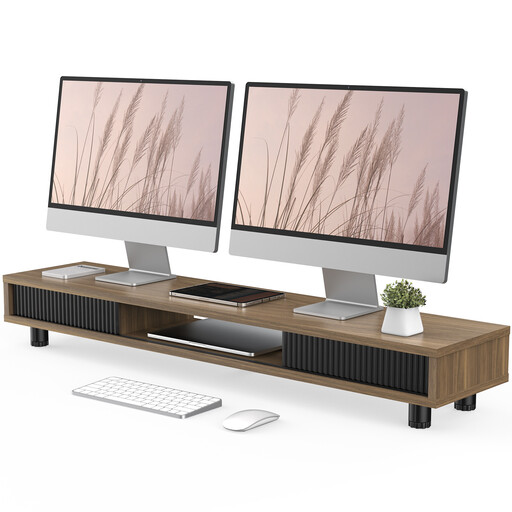
Monitor stand with two glass sliding doors, 108 cm, brown
A freestanding shelf option if you’d like extra storage in your workspace alongside your monitor.
The product title gives a width of 108 cm. The description lists adjustable feet, three compartments, a drawer and cable management.
Joybuy
Frequently asked questions
Is portrait orientation a useful consideration for displaying source text?
Yes. If you want to display full pages of text in portrait orientation, look for a rotatable screen mount and make sure there’s enough room for both monitors in that position. A rotation specification alone doesn’t confirm that the specific screens won’t get in each other’s way.
How can I check the mounting requirements before buying?
Find out the weight of each monitor without its stand and its VESA mounting pattern. Then compare these details with the exact mount variant and its installation instructions. If you’re using a desk clamp, desktop thickness matters too.
How should I plan my cables if I might reposition the monitors later?
Choose cable lengths that allow for the arm movement you want and any screen rotation. The Neomounts models mentioned include cable management, but you’ll still need to check that your cables are long enough for your setup.
Which rights and guarantees should I distinguish when shopping online?
The German consumer advice centre explains that online purchases usually come with a 14-day right to cancel, and distinguishes your statutory rights against the seller from a voluntary guarantee. Check the specific purchase and guarantee terms, especially if you need adaptors or other mounting accessories.
Does Germany’s ASR A6 automatically apply to every home office desk set up for private use?
No. The German Federal Institute for Occupational Safety and Health includes teleworking workplaces within the scope of ASR A6, but expressly excludes screen use in private settings outside such workplaces. Whether a workplace counts as a teleworking workplace depends on how it is set up and the arrangements actually in place; calling it a home office alone doesn’t determine this.


