For a small desk, a dual monitor stand is a good fit if the desk attachment, monitor weight limits and VESA mounts are compatible with both screens. Two independently adjustable arms are useful if you often position your accounts and invoices differently, but they need room to move. A stand with a shared post is better suited to a layout that stays mostly the same. Before you buy, measure the desk edge, desktop thickness, distance from the wall and space you need for paperwork.
Who would benefit from a dual monitor stand?
People who need space for paperwork
If you want to file invoices alongside your account views, consider how much room your current monitor stands take up on your small desk. The DGUV covers workstations with multiple screens; ARCTIC notes that certain width specifications for its stand assume a particular monitor layout.
People with a narrow desk against a wall
If you want to move both screens but have little space behind your desk, measure how far the arms extend and how much room they need to swivel. Neomounts specifies a 180° rotation stop for the DS70-250BL2; still, check that its range of movement suits your setup.
People with two different monitors
If your screens have different weights or VESA mounts, check each one against the stand’s specifications. Neomounts and Invision publish model-specific weight ranges and VESA details.
What should you look for when buying?
First, measure the space you need for invoices, the desk attachment and the arms’ range of movement. Then compare the specific weight and VESA specifications for each monitor with those of the stand you’re considering.
| What matters |
What to check before buying |
Who should consider this? |
| Clear space for invoices |
Measure the footprint of your current stands, as well as the desk width, usable depth and clearance needed for the arms to move. |
If I want to put invoices directly in front of the screens, the stand mustn’t block the workspace I need. Around 29% of consumers put clear space for paperwork first. |
| Compatibility with both monitors |
Check the weight without the stand and the VESA hole pattern for each monitor against the specifications for the model. |
If I use two different screens, both must be within the stated mounting and weight limits. Around 29% of consumers prioritise monitor compatibility. |
| Desk attachment |
Check the desktop thickness, edge shape and any obstacles underneath. If the desktop is hollow-core, follow the manufacturer’s guidance. |
If the desk edge or desktop construction makes fitting difficult, I need a suitable mounting method. Around 24% of consumers first check whether the stand can be securely attached to their desk. |
| Positioning the screens |
Decide on the height and orientation you need, then check the adjustment range and space required with the screens fitted. |
If I often position my account and invoice views differently, I should be able to adjust each screen to suit. Around 18% of consumers prioritise being able to change the screen positions. |
Common buying mistakes
-
Comparing only the advertised screen size
A compatible screen size doesn’t guarantee that both monitors’ weight and VESA hole patterns are within the stand’s limits. Neomounts also distinguishes between flat and curved screens for the DS70-250BL2.
Check the weight and mounting specifications for each monitor against the details for its exact model.
-
Assuming ‘space-saving’ means ‘needs no room behind the desk’
An arm can free up the space taken by monitor stands while still needing room to extend or move.
Measure the distance from the wall and desk edge with the monitors fully installed. If your desk is close to a wall, check whether a specified rotation stop suits your setup.
-
Treating a hollow desktop like solid wood
Tightening a clamp can damage a hollow-core desktop. ARCTIC recommends using a reinforcement plate with honeycomb and hollow sandwich panels.
Check the desktop’s construction where you plan to attach the clamp, and follow the manufacturer’s installation instructions.
Brands to consider
ARCTIC
The Z2 (Gen 3) is a dual stand with a shared post, designed for a layout that stays mostly the same.
- The manufacturer’s data sheet specifies VESA 75 × 75 and 100 × 100 mm, and a desktop thickness of 20 to 60 mm.
- The stated width assumes two monitors of the same width, positioned horizontally. ARCTIC recommends using a reinforcement plate with hollow-core desktops.
Neomounts
The DS70-250BL2 NEXT Slim is designed for independently adjustable screens on a desk that may be close to a wall.
- According to the manufacturer, the model has a 180° rotation stop and can be mounted with a clamp or desk grommet.
- The manufacturer specifies 1–9 kg per flat screen and a maximum of 8 kg per curved screen. Measure the available space even with the stated depth adjustment.
Invision
The MX400 is a dual stand with separately adjustable arms, provided your desk edge or cable grommet is suitable for installation.
- Invision specifies 2–9 kg per arm, VESA 75 × 75 or 100 × 100 mm, and clamp or grommet mounting.
- Compare the minimum weight with the weight of each monitor, and check that your desk allows one of the mounting methods.
HUANUO
The HNDS6 is described by the manufacturer as a dual arm with clamp and grommet mounting.
- For this version, the US manufacturer’s website specifies 13–32 inches and 4.4–19.8 lb per arm.
- These specifications don’t automatically confirm that the German listing is for an identical version. Check the exact variant before buying.
ICY BOX
The IB-MS314-T is listed mainly as a dual stand on the manufacturer’s English-language website.
- The website specifies VESA 75 × 75 or 100 × 100 mm and a maximum load of 8 kg.
- Further down the same page, the product is inconsistently described as a single monitor arm. Check the exact version before buying.
Ergotron
According to Ergotron, the LX Dual Stacking Arm can hold screens side by side or stacked one above the other.
- For this model, Ergotron specifies screens up to 24 inches and a maximum outer screen height of 35 cm when stacked.
- These specifications apply to the LX Dual Stacking Arm, not the separately named LX Side-by-Side version.
Joybuy products for two screens
This selection includes independently adjustable dual arms and shared monitor stands with extra storage space. The right style for your small desk depends on how it attaches, how much room it needs and how you want to position the screens.
 No image available
AOKCOS dual monitor stand with shelf, 12–27 inches
The independently adjustable mounts are useful if you want to position the two screens differently.
The product name specifies tilt, swivel and height adjustment, as well as a shelf. VESA 75 × 75 and 100 × 100 mm are listed.
View at Joybuy
 No image available
AOKCOS dual monitor stand with riser, 12–27 inches
The riser is useful if you’d like extra storage space beneath the screens.
The product description specifies height, tilt, swivel and rotation adjustment for each arm, VESA 75 × 75 and 100 × 100 mm, and a maximum of 10 kg per arm.
View at Joybuy
 No image available
Floordirekt dual monitor stand, adjustable width, black
A shared stand is worth considering if you’d prefer a riser for two monitors to separate desk-mounted arms.
The description specifies an adjustable width of 80 to 108 cm, a height of 10.4 cm and independently swivelling side platforms. The selected version is black.
View at Joybuy
 No image available
Floordirekt gas-spring dual arm, 15–32 inches
This dual arm is an option if you want to mount two monitors to your desk and adjust each one independently.
The product details specify VESA 75 × 75 or 100 × 100 mm and 2–10 kg per monitor. Mounting options are a desk clamp or desk grommet.
View at Joybuy
 No image available
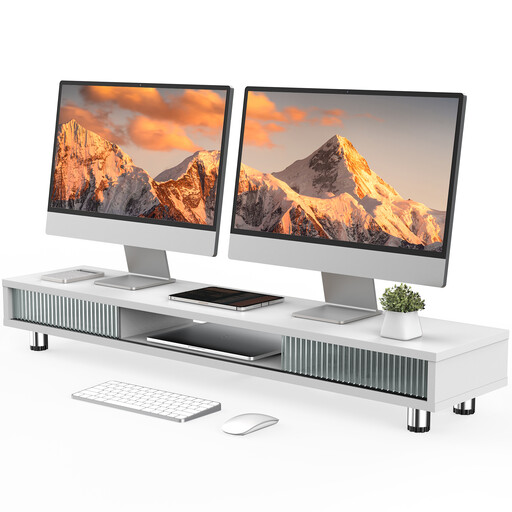
Monitor stand with two glass sliding doors, 108 cm
This shared monitor stand is worth considering if you need storage on your desk as well as space for your screens.
The product description specifies a 108 cm-wide platform, height-adjustable feet and a load capacity of 50 kg. It includes three compartments, a drawer and integrated cable management.
View at Joybuy
Frequently asked questions
What should I check with a thin or hollow desktop?
Measure the desktop at the exact point where you’ll attach the clamp, and check how it’s constructed. The ARCTIC Z2 (Gen 3) is specified for desktops measuring 20–60 mm thick. For honeycomb or hollow sandwich panels, ARCTIC recommends a reinforcement plate to help prevent clamp damage. This is the manufacturer’s guidance for this model, not a general legal requirement.
How should I position two screens for accounts and invoices?
First, decide which view you use most and where you want to keep your paperwork. The DGUV says that its ergonomic recommendations for office workstations with screens are largely also applicable to setups with two screens. However, its older laboratory comparison doesn’t prove a general performance benefit for every task or layout.
Does ASR A6 also apply to a home desk?
ASR A6 sets out requirements under the Workplace Ordinance for workplaces and teleworking setups within its scope. According to the Federal Institute for Occupational Safety and Health, it doesn’t apply to display screen equipment used privately outside a teleworking setup. Whether a home workspace counts as a teleworking setup depends on the specific circumstances; simply working from home doesn’t automatically qualify.
Who should I contact if a monitor arm I bought online is faulty or doesn’t fit?
For a fault, the seller is generally responsible under the statutory guarantee; this is separate from any voluntary manufacturer’s guarantee. For online purchases by consumers, you’ll usually have a 14-day right to cancel, which you must notify the retailer about. The Verbraucherzentrale gives the contract date or the date you receive the goods as the usual start of the cancellation period. Check the terms of your specific purchase, and distinguish cancelling because you’ve changed your mind from making a claim about faulty goods.


