What should you look for when buying?
For reading novels while camping, first decide which books you want to read and whether you can rely on having somewhere to charge your device. Then weigh up the display, lighting and protection for the conditions you’ll be using it in.
| What matters to you |
What to check |
Who is this most important to? |
| Reading in daylight and in the evening |
Check the display technology, front light and text size against a typical page from the edition you’ll be reading. |
If I want to read novels outdoors and later in the evening, choosing a screen that suits me is my top priority. Around 28% of consumers prioritise clear, easy-to-read novel text. |
| Limited charging opportunities |
Check the charging port and what’s included; factor in your daily reading time and lighting when planning when to charge. |
If I’m camping for a while without a reliable socket, I want to plan charging around how I’ll use my device. Limited power for charging is a top concern for around 22% of consumers. |
| Access to the books you want |
Check the specific edition, its file format and any copy protection. If you use Onleihe, check the software and device too. |
If I want to read classics I’ve bought or borrowed, that specific edition needs to work on my device. Around 22% of consumers put the source of their books first. |
| Rain and damp conditions |
Check the water protection rating of the exact model and follow the instructions on drying it before charging. |
If I expect rain or damp conditions at my pitch, I want to know the limits of my device’s protection. Around 17% of consumers prioritise protection from moisture. |
| More apps and larger pages |
Check which apps are supported, as well as the screen size and weight. Try a sample page or PDF on the device you’re considering. |
If I want to use apps, illustrated pages or other media as well as novels, extra flexibility matters to me. Around 11% of consumers focus on using other media. |
Joybuy products for reading and camping
This selection includes e-readers and tablets for reading novels, as well as options for using additional reading apps and media. Before buying, check that your specific book source works on the device and that its instructions suit the conditions you’ll use it in while camping.
 No image available
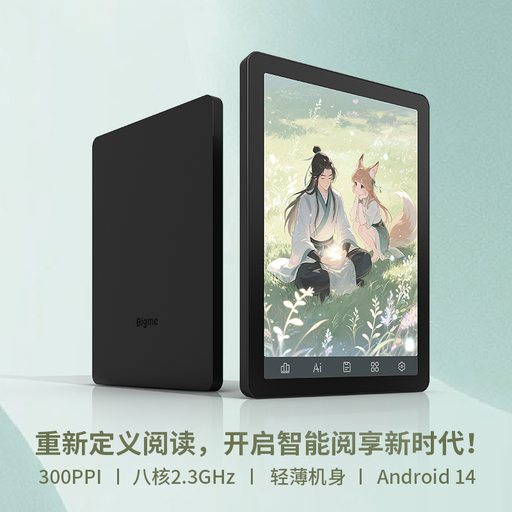
Bigme HiBreak Pro Color, 8 GB + 256 GB
The E Ink display is an option for reading novels if you’d also like a device that supports apps.
6.13 inches; 300 ppi for black-and-white content and 150 ppi for colour content; Android 14; 8 GB + 256 GB.
Joybuy
 No image available
Bigme B6 e-book reader, 4 GB + 64 GB
This e-book reader is suited to novels if you’re looking for a device with a front light and Android features.
6 inches; 36 front-light brightness levels; Android 14; built-in Google Play Store.
Joybuy
 No image available
Apple 11-inch iPad Air (M4, 2026), Wi-Fi, 128 GB, Blue
This tablet could suit you if you want to use reading apps and view larger pages as well as read novels. Check that your chosen app works offline before you leave.
11-inch IPS display with anti-reflective coating and 500 nits; 464 g for the Wi-Fi model. The product description states that this device isn’t water-resistant and should be kept away from liquids.
Joybuy
 No image available
iFLYTEK AINOTE 2, 10.65 inches, including protective case
This E Ink tablet combines reading and handwritten notes if you’d like to do both on one device.
10.65-inch E Ink display with reading and writing features. The product description notes that the display has no front light.
Joybuy
 No image available
TECLAST ArtPad Pro, 12.7 inches, 2K, 2025 Edition
This tablet is worth considering if you want to use other tablet content as well as read novels. Check the guidance on using it outdoors.
Android 15; 12.7-inch 2K display; 8 GB RAM + 12 GB virtual RAM and 256 GB storage; 10,000 mAh battery. The product name lists a stylus, protective case and English Bluetooth keyboard as included. The safety information advises against prolonged exposure to direct sunlight and use in damp environments.
Joybuy
Frequently asked questions
Can I read Onleihe classics on a Kindle e-reader?
According to the divibib GmbH Onleihe help pages, copy-protected Onleihe 3 e-books can’t be opened on Kindle e-readers. EPUB support for suitable personal documents doesn’t remove this DRM restriction.
How can I get borrowed books ready for camping without reliable internet?
Download a specific title before you leave and test it on the device you plan to use while offline. In August 2026, the Onleihe help pages reported that offline access in the Onleihe 3 app didn’t work reliably on all devices. As a temporary solution, they recommended briefly going online to sync about every two days, so you’ll need internet access from time to time while away.
What should I do before charging my device after it’s been rained on?
For the 5th-generation tolino shine, the USB port must be dry before you connect the charger. Its stated water protection applies to specific freshwater conditions and isn’t a blanket guarantee for every camping situation.
Can I always use a classic novel as a free file?
No. Under § 64 UrhG, copyright in a work generally expires 70 years after its author’s death. A scholarly edition with its own copyright may have additional protection, so check the rights and terms for the specific file or translation.
What legal rights do I have if a device is faulty?
Under the EU rules outlined by Your Europe, when you buy from a trader you have at least two years of legal guarantee from the date you receive the goods. Your Europe distinguishes this from any additional manufacturer’s guarantee.
Is a CE mark a quality seal for camping equipment?
No. For electrical and electronic devices that require CE marking, the manufacturer uses it to declare that the product meets the relevant EU requirements. According to EU Your Europe, the mark doesn’t mean that readability, battery life or water protection has been independently tested for your camping needs.


