What should you look for when buying?
For a product explainer video in a noticeably echoey room, first decide how close the microphone can stay to you throughout the recording.
A lavalier worn on your body
Best if: you move around while presenting. The supplied lavalier on the Zoom F2 records your voice from your person.
Consider: the microphone and cable need to be secured properly. Check your test recording for fit and cable noise.
Wireless system with onboard transmitter recording
Best if: you want a separate close-miked recording as well as audio for a compatible camera. RØDE says the Wireless PRO transmitters can record audio themselves.
Consider: the transmitter recording and camera audio are separate files. According to RØDE, 32-bit float applies to recordings made on the transmitters, not automatically to the camera file.
Handheld recorder with built-in microphones
Best if: you usually speak from a fixed position and can place the recorder nearby. The Zoom H1essential has built-in microphones.
Consider: if the device needs to be further away to keep it out of shot or make room for your demonstration, it will record your voice from a greater distance.
Recorder with XLR/TRS inputs
Best if: you want to position compatible external microphones precisely or connect several audio sources. The Zoom H4essential and Tascam DR-40XP each have two XLR/TRS inputs.
Consider: your microphone, mount and cables all need to suit your setup. Having the inputs alone will not improve microphone placement.
| What you need |
What to check before buying |
Who is it important to? |
| Clear single-voice recording |
Check whether you can position the microphone close to you throughout the explanation. Test the same passage at your intended filming location. |
If I want to capture one clear voice in an echoey room, I focus on microphone distance and the recording area. Around 36% of consumers give the highest priority to room echo and single-voice recording. |
| Consistent distance while moving |
Check that the microphone and recorder stay secure as you move as planned, and can record independently of the camera’s position. |
If I move around while presenting, I want a consistent microphone distance without being tied to a tabletop device. Around 29% of consumers prioritise freedom of movement and consistent distance. |
| The right inputs |
Decide how many separate sources you want to record and which connections your chosen microphones need. |
If I want to record a speech microphone and other audio sources separately, I plan the inputs and microphone setup together. Around 21% of consumers prioritise multiple audio sources and compatible connections. |
| A straightforward recording and editing workflow |
Check whether you want to combine separate audio files with the video later, and whether the storage and power supply suit your recording workflow. |
If I want to keep the setup and post-production straightforward, I consider whether I’ll need extra files and synchronisation. Around 14% of consumers prioritise a simple workflow. |
Joybuy products for close-miked speech
This selection from Joybuy includes standalone voice recorders, lavalier microphones and camera microphones. In an echoey room, microphone placement remains crucial for recording speech.
 No image available
Mobvoi TicNote Lite AI Voice Recorder, 4GB, Black
This standalone voice recorder could be used to make a separate speech recording. At your filming location, check whether you can place it close enough to achieve the microphone position you want.
The product title lists 4GB of storage, support for 120+ languages, and GPT-5 and Claude Sonnet 4.1 integration.
Joybuy
 No image available
Lark M2 Wireless Lavalier Microphone System
This close-worn wireless lavalier system could suit you if you move around while presenting. Test the speech recording at your intended filming location.
The product title lists 48 kHz/24-bit audio, a 9-g transmitter microphone and a transmission range of 300 m.
Joybuy
 No image available
SYNCO P1XT USB-C Wireless Microphone
This USB-C wireless microphone could suit video recording with a compatible USB-C device. Check the connection and setup before filming.
The product description lists noise reduction and audio monitoring. OTG must be enabled on Android devices.
Joybuy
 No image available
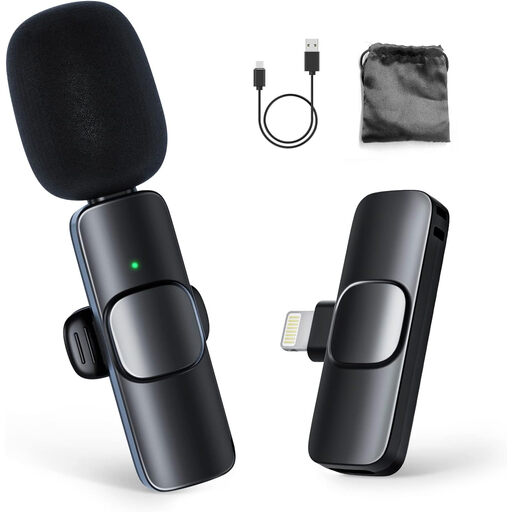
Moman CP1A Wireless Lavalier Microphone for iPhone (1TX&1RX)
This wireless lavalier system could suit you if you’re filming with a compatible iPhone or iPad and want to wear the microphone.
The description lists an omnidirectional microphone and a noise-reduction function. Check your device is compatible before filming.
Joybuy
 No image available
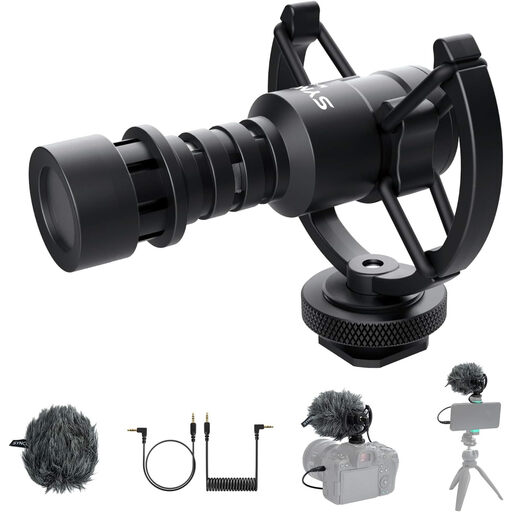
SYNCO M1S External Video Microphone
This external directional microphone could suit a fixed camera or smartphone recording, provided you can position it close to the person speaking.
The listed contents include TRS and TRRS cables and a shock mount. Your recording device needs a compatible 3.5 mm TRS or TRRS connection.
Joybuy
Frequently asked questions
Can 32-bit float reduce audible room echo?
No. It is no substitute for good microphone placement or measures to reduce room reflections. RØDE notes that placing the microphone too far away can make your voice sound more distant and echoey. Move the microphone closer and test the room you’ll be recording in.
What can I change in the room before recording?
Start by moving the microphone closer and choosing a less reflective area for recording. Shure suggests options such as rugs and heavy curtains to help reduce unwanted reflections. Compare a few short test recordings before filming the full explainer video.
What should I allow for in a complete recording setup?
Check whether you need an external microphone, a mount or cables, and whether the connections are compatible with your recorder. For the Zoom F2, the manufacturer specifies AAA batteries and microSD cards for recording. Check what’s included with the specific offer too.
Can I simply record other people while filming in Germany?
Recording someone’s non-publicly spoken words without authorisation may be a criminal offence under Section 201 of the German Criminal Code (StGB); filming a product is not a blanket exception. Before you start, clarify whether other people will be audible and obtain their agreement to being recorded. If you later process personal data, you’ll also need to check that you have an appropriate legal basis. The BfDI lists consent as one possible basis.


