If all the eggs go into the water at the same time, a single countdown is usually enough. If you start different batches at staggered times, independent timers are more useful, as the product information for the TFA Dostmann TRIPLE TIME 38.2020 and ADE TD2100 shows. The Federal Centre for Nutrition recommends placing the eggs in vigorously boiling water and timing them from that point. Also check that you’ll be able to hear or see the alert where you’re working, and that any saved time suits the size of the eggs and your preferred level of doneness.
Who is a digital kitchen timer for?
Class leaders managing several batches of eggs
If you’re keeping an eye on pots started at different times, it helps to be able to match each group with its remaining cooking time. TFA Dostmann and ADE both describe models with several timers running at once.
Leaders running repeated cooking sessions
For batches started one after another, a saved time or one that’s quick to set again can come in handy. TFA Dostmann lists a memory function for the Timer 38.2021.01, while ADE describes programmable times on the TD1902.
Those who need a particular alert or placement option
If you use the timer at a specific workstation, consider the alert type and where you’ll place it together. Depending on the model, the features described include sound, an LED, vibration or different ways to position the timer.
What should you look for when buying?
For a weekend cookery class, the main things to consider are how many times you can track at once, how easily you can set the timer again for another round, and whether the alert and placement options suit your needs.
Single countdown with memory
Best for: cooking one group at a time and restarting a frequently used time.
Keep in mind: A saved time is no substitute for several independent countdowns, and it needs to suit the size of the eggs and your preferred level of doneness.
Dual or triple countdown
Best for: starting several groups at different times, each with its own remaining cooking time.
Keep in mind: Before the class starts, make sure you know which countdown belongs to each pot or group.
Single timer with selectable alert
Best for: situations where an audible alert isn’t enough or a loud alarm would be disruptive during the class.
Keep in mind: An LED alert requires you to be able to see the display, while vibration needs to be noticeable where you’ve placed the timer. These features don’t automatically mean you can run several independent countdowns.
| What you need |
What to check before buying |
Who needs it? |
| Several cooking times at once |
Does the product information explicitly say that two or more countdowns can run independently at the same time? |
When several pots start at staggered times, I want to give each group its own remaining time. That’s why around 36% of consumers put independent countdowns first. |
| Timing for further rounds |
Does it have a memory function, or is it easy to set a different time? |
When groups cook one after another, I want to be able to restart or adjust the timer quickly. Around 29% of consumers prioritise being able to set the timer again for further rounds. |
| An alert you can notice |
What types of alert are available, and will you be able to notice your chosen one at the workstation? |
If a sound would disrupt the class or I can’t keep looking at the display, I need an alert that works for me. Around 21% of consumers prioritise an alert they can notice at their workstation. |
| Placement and readiness to use |
Will the fixing suit where you want to place it, and are the required batteries included? |
I want to check both placement and power so the timer is easy to see and ready to use when the class starts. Around 14% of consumers focus on these points. |
Common misconceptions
-
Confusing a stopwatch with a second countdown
If you’re cooking two groups that start at different times, you need two separate remaining times you can keep track of. The word ‘stopwatch’ alone doesn’t mean there’s a second countdown display.
Check the product description to see exactly how many countdowns can run independently at the same time.
-
Using one saved egg-cooking time for every round
The right cooking time depends, among other things, on the size of the eggs and your preferred level of doneness. The Federal Centre for Nutrition recommends timing from the moment the eggs go into vigorously boiling water.
Use a saved time as a regular starting point, and adjust it for different eggs or a different result.
-
Focusing only on the audible alarm
A visual alert is only helpful if the display is within your line of sight; you also need to be able to hear an audible alert where you plan to use the timer.
Choose the alert type and placement together, and check both before the class starts.
-
Assuming the required batteries are included
The batteries supplied vary between specific TFA Dostmann models.
Before the class, check the battery type and what’s included with the model you’ve chosen.
Key brands to consider
TFA Dostmann
Depending on the model, the range includes a single countdown with memory, several timers running in parallel, or a single timer with sound and LED settings.
- TFA Dostmann says the TRIPLE TIME 38.2020 can run three timers at once, while the 38.2021.01 has a memory function.
- According to TFA Dostmann, the two AAA batteries required for the 38.2056.04 are not included; one battery is included with the 38.2021.01.
ADE
ADE describes the TD2100 as a timer for two parallel countdowns and the TD1902 as a timer with preset and individually programmable times.
- ADE lists two parallel countdowns for the TD2100. The TD1902 has preset times of 1, 3 and 5 minutes, as well as programmable individual times.
- Features vary by model: the TD1902 is listed with sound and/or vibration, while the TD2100 has a visual alert.
PEARL
The PEARL timer ZX7139 is described as a digital single timer with a choice of alert types.
- The supplier’s description lists sound, a flashing LED or vibration, and a time range of up to 99 minutes and 59 seconds.
- According to the supplier, the two AAA batteries required must be purchased separately. The alert types described don’t confirm that several independent countdowns can run at once.
Hama
According to Hama, the 00002949 combines a single countdown with a magnet, stand, hanging hook and adjustable alarm modes.
- Hama lists both an audible and a visual alarm for this model.
- The placement options and alarm functions described apply to model 00002949 and shouldn’t be assumed to apply to other Hama timers.
Joybuy product selection
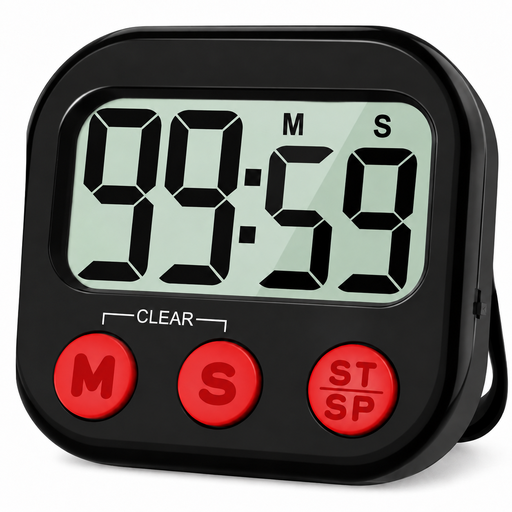
The selection below covers digital timers for timing eggs as they cook; the listed model is described as an egg timer for the kitchen.
 No image available
Digital interval timer with stopwatch, 99 min. 59 sec.
Described as an egg timer for the kitchen; when timing individual batches of eggs, it’s important to set the time to suit your preferred level of doneness.
The product name lists a stopwatch, adjustable volume and a time of 99 min. 59 sec.
Joybuy
Frequently asked questions
When should I start the countdown for boiled eggs?
For the method described by the Federal Centre for Nutrition, place the eggs in vigorously boiling water and start timing from that point. The size of the eggs and your preferred level of doneness affect the cooking time, so a saved time won’t necessarily suit every round.
Can a stopwatch and a countdown keep track of two batches of eggs?
Not necessarily: what matters is the stated number of independent timers that can run at the same time. ADE lists two parallel countdowns for the TD2100, while TFA Dostmann lists three for the TRIPLE TIME 38.2020. The inclusion of a stopwatch alone doesn’t confirm there’s a second countdown.
What should I check before the first class?
Place or attach the timer where you plan to use it, check the display and alert, and make sure you have the batteries you need. TFA Dostmann says one AAA battery is included with the 38.2021.01; for the 38.2056.04, TFA Dostmann lists two AAA batteries as required but not included.
How should I dispose of a battery-powered kitchen timer when it’s no longer needed?
Take electrical equipment to a separate collection point rather than putting it in mixed household waste. The Federal Environment Agency also recommends removing any batteries that can be taken out easily and disposing of them separately at an appropriate collection point.


