
Lieferung heute & morgen

Qualitätsgarantie

Willkommens-Angebote freischalten: KOSTENLOSE Lieferung | Bis zu 80 % RABATT | Kostenlose 30-Tage-JoyPlus-Testphase
App herunterladen
An electric height-adjustable desk measuring 140 x 60 cm suits many studies, home offices and student flats. Its width leaves room for a monitor, keyboard and paperwork, while the 60 cm depth remains practical where space is limited. Before buying, though, it’s worth taking a closer look at the desk’s construction, controls and load capacity.
The term ‘height-adjustable’ doesn’t tell you much on its own. What matters is whether the desk suits your height, office chair and intended way of working. A desk with a height range of around 72 to 120 cm lets you switch between sitting and standing. The ideal position will still depend on your height, chair height and the equipment you use.
A memory function is only useful if you can quickly reach your preferred heights. If you switch frequently between sitting and standing, the controls should be easy to access. Four saved positions offer more flexibility than simple up-and-down controls. Extra reminder functions can prompt you to take breaks, but they’re no substitute for a work routine that suits you.
An electric height-adjustable desk moves not only the desktop, but also any connected cables. Without cable guides, power adaptors, monitor leads or extension leads could be pulled tight. The desk should also have clearance from the wall when you adjust its height. Any fixed obstacles need to be detectable by the built-in sensor.
The 140 x 60 cm dimensions are a good starting point for a monitor setup with a keyboard and mouse. However, the depth may feel limited if you use two large monitors, speakers and lots of paperwork. So check that:
A steel frame can help with stability, but the whole frame, its joints and its stated load capacity are what matter. The following JOYFURNOS models have a maximum static load capacity of 70 kg. This refers to a stationary load and shouldn’t be treated as the dynamic load capacity while the desk is being raised or lowered.
Also look for adjustable feet. They can help compensate for minor unevenness and protect your floor from scratches. A sit-stand desk should remain as steady as possible even at its highest setting.
A quiet motor is particularly useful in a bedroom, shared office or during video calls. Other practical features include:
The models described here are stated to activate overheat protection after more than two minutes of continuous height adjustment. After that, they need to rest for 18 minutes. Bear this in mind when setting up the desk and adjusting its height regularly.

Why it suits this profile: With its 140 x 60 cm desktop, electric height adjustment and four memory settings, this desk covers the essentials for getting started with a sit-stand workstation.
Four memory presets make it easier to find your preferred height than adjusting the desk manually each time. Cable management, an organiser and three hooks help tackle common clutter problems.
Four memory settings, a USB-C port, steel frame and stated static load capacity of 70 kg.
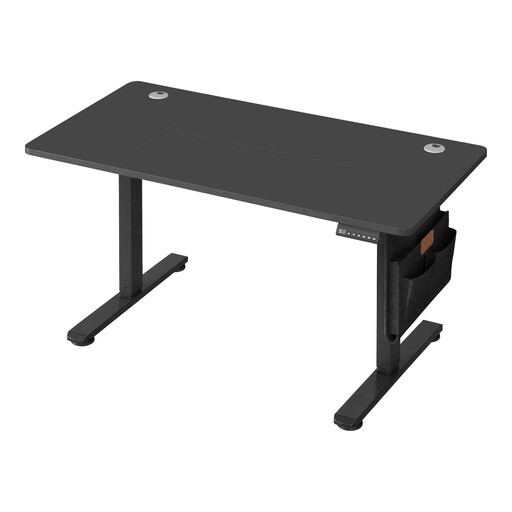
Why it suits this profile: The black finish pairs clean styling with features that help keep your workspace organised over the long term, whether at home or in the office.
Two cable ports, a fabric organiser and a large hook help keep loose cables and other items off the desktop. The control panel’s lock function helps prevent accidental input.
Memory function, USB-C port, adjustable feet, steel tube frame and stated height range of 72 to 120 cm.
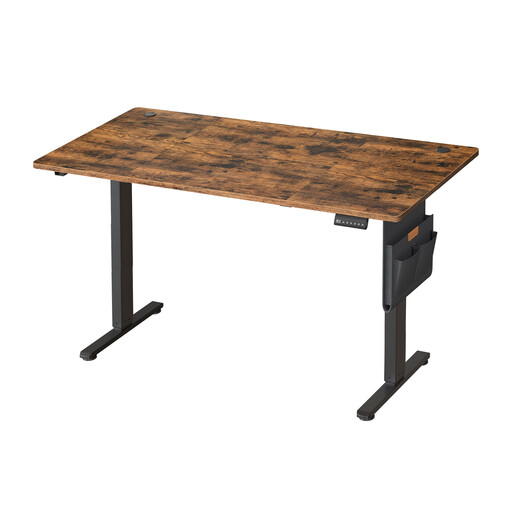
Why it suits this profile: The brown desktop is a good fit if you want to bring an electric sit-stand desk with extra storage organisation and a USB-C port into a more homely setting.
Integrated cable management with two ports helps accommodate cables as the desk moves. The sensor, lock function and overheat protection are useful features for frequent use.
USB-C port with stated fast-charging function, memory function, adjustable feet and a maximum static load capacity of 70 kg.
Before assembly, check that there’s enough room for the desk to move through its full range. The desktop shouldn’t hit the wall or trap any cables as it moves up and down. Keep electrical components away from liquids; these desks are designed for indoor use.
For a tidy home office, follow these steps:
We’ve put together a complete, regularly updated list of products that meet these strict selection criteria and fully comply with the safety regulations in force in the EU.
When sitting, your forearms should rest as close to horizontal as possible on the desktop, with your shoulders relaxed. When standing, set the desk height so you can use your keyboard and mouse without raising your shoulders. As everyone’s proportions are different, there’s no single height in centimetres that will suit everyone.
Its lifespan depends on factors including the motor, frame, load, assembly and how often you use it. Without a relevant statement from the manufacturer, it isn’t possible to give a reliable estimate of its lifespan. Regular overloading, blocked movement and incorrectly routed cables can all affect how it operates.
The exact cost depends on the motor’s power consumption, how often you adjust the desk and your electricity tariff. As typical power consumption isn’t stated for every model, it’s not possible to give a general figure. To estimate the cost for your own setup, use the power consumption of the adaptor, your daily usage time and your current price per kilowatt-hour.