
Lieferung heute & morgen

Qualitätsgarantie

Willkommens-Angebote freischalten: KOSTENLOSE Lieferung | Bis zu 80 % RABATT | Kostenlose 30-Tage-JoyPlus-Testphase
App herunterladen
An electric height-adjustable desk can make your home office, workplace or study area more flexible. But to make sure it works for you day to day, you should look beyond design and price. Claims such as “quiet motor”, “ergonomic” or “sturdy” only tell you so much without specific technical details.
Three common issues can lead to a poor purchase:
An electric desk measuring 120 x 60 cm is often enough for a small home office or study area. It can accommodate a laptop, a monitor and your writing materials. If you use two screens, speakers or paperwork, consider an electric desk measuring 140 x 60 cm instead.
An electric desk measuring 160 x 70 cm gives you more room for a larger setup, but naturally takes up more space. Before ordering, check the distance from the wall, the door area and the space you need to move around. The models in this selection offer a height range of around 72 to 120 cm. You can check whether it suits your height at a desk or with a tape measure, both sitting and standing.
Ideally, the load capacity should be listed as a maximum static load. For several JOYFURNOS models, this is 70 kg. This figure shouldn’t be taken as a recommendation to overload the desk over a prolonged period. The weight of the desktop, frame and everything placed on it must remain within the stated limit.
A steel frame can help improve stability, but how firmly the desk stands also depends on the floor, assembly, desk width and height setting. Adjustable feet are useful on slightly uneven floors. Before use, check the screws and connections in line with the instructions.
A height-adjustable desk with a memory function lets you save several preferred positions. This is particularly useful if several people share the desk or you regularly switch between sitting and standing. The JOYFURNOS models mentioned here have four memory settings.
A desk with a USB-C port can make it easier to charge compatible devices at your workstation. Check the stated charging power to see what it can actually deliver. A USB-C port isn’t a substitute for a mains extension lead for high-powered devices.
Built-in cable management, such as cable openings, a bag, organiser or hooks, helps keep loose wires under control. Make sure cables don’t become taut as the desk moves up or down. Keep the desk clear of the wall while it’s moving. Several of the models described have overheating protection that activates after two minutes of continuous movement, followed by a required 18-minute pause.
The recommendations below group the models by space requirements, features and typical use. The details are based on the respective product descriptions and technical specifications.

Why this product suits this profile: The compact desktop is ideal for laptop workstations, smaller home offices and study areas. Four memory settings and a USB-C port are useful features at this size.
The product details specify the dimensions, height range and a maximum static load of 70 kg. This makes it easier to check whether the desk will suit your workstation before you buy.
120 x 60 cm, four memory settings, USB-C port, cable openings and steel frame.
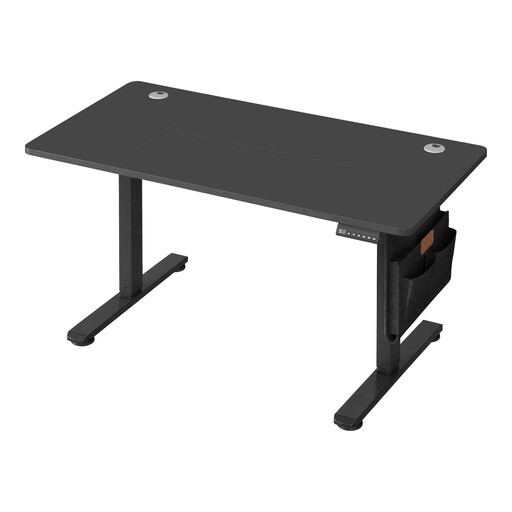
Why this product suits this profile: The 140 cm width gives you extra room for a monitor, laptop and work documents. With its memory function, cable openings and USB-C port, it’s a good fit for people who use their workstation regularly and like to keep it organised.
The specifications state a maximum static load of 70 kg, along with details about a sensor and locking mechanism. This helps you assess stability and safety features based on more than just marketing claims.
140 x 60 cm, four memory settings, USB-C port, organiser and adjustable feet.
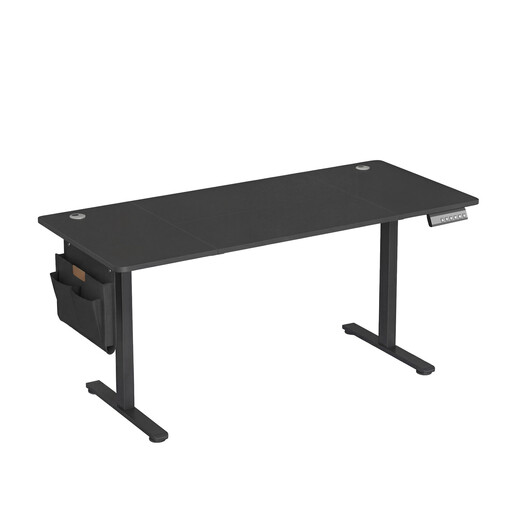
Why this product suits this profile: The larger work surface is suitable for multiple monitors, gaming accessories or a comprehensive office setup. It’s a good option if you use your sit-stand desk frequently and have a lot of devices.
The product description lists a maximum static load of 70 kg, two cable openings, adjustable feet and overheating protection. Even with the larger desktop, you shouldn’t exceed the stated weight limit.
160 x 70 cm, USB-C port, four memory settings, cable openings and a steel frame.
We’ve put together a complete, regularly updated list of products that meet these strict selection criteria and fully comply with the safety regulations in force in the EU.
First, place the desk on a level surface. Adjust the sitting height so that your forearms rest comfortably on the desktop. When standing, the desktop should be roughly level with your elbows. You can then save your preferred positions using the memory function. Before moving the desk, check the cables, wall clearance and surrounding area for obstacles.
Its lifespan depends on factors such as the motor, frame, assembly, load and how often it’s used. The available product details don’t provide enough information to estimate a specific lifespan. For everyday use, it’s important to stay within the stated maximum load, follow the overheating protection guidance and regularly check the screws and connections.
Most of the electricity is used when adjusting the height. When the desk is stationary, the controls may still draw a small amount of power in standby mode, depending on the model. The product details available don’t specify exact consumption figures. To measure usage, you can use a suitable meter between the socket and the power supply, and check standby consumption separately.