
Lieferung heute & morgen

Qualitätsgarantie

Willkommens-Angebote freischalten: KOSTENLOSE Lieferung | Bis zu 80 % RABATT | Kostenlose 30-Tage-JoyPlus-Testphase
App herunterladen
An electric height-adjustable desk can make it easier to switch between sitting and standing throughout the working day. Before you buy, though, it’s worth taking a closer look at the technical specifications. Terms such as ‘stable’, ‘quiet’ or ‘ergonomic’ aren’t enough on their own to help you make an informed choice.
The stated load capacity usually refers to static load capacity. It describes how much weight the desk can support while stationary. So it’s important to make sure the combined weight of the desktop, monitors, computer, speakers and other equipment stays within the stated limit.
An electric standing desk with a static load capacity of 60 or 70 kg may be suitable for typical office equipment. However, avoid putting extra strain on it by leaning on the desk or moving heavy equipment across it.
An electric desk measuring 120 x 60 cm takes up relatively little space and is suitable for a laptop, monitor and standard accessories. However, 60 cm may not be deep enough if you have two large monitors, a printer or document storage.
Before buying, you should also check:
A memory function saves preset heights and makes it easier to switch between positions. However, it doesn’t replace careful setup. A USB-C port is useful for charging compatible devices, but it says nothing about the quality of the motor or the load capacity of the frame.
When choosing an electric height-adjustable desk, look for specific details about the height range, lifting speed, load capacity, motor noise and operating intervals. Any claims about collision detection should be clearly explained in the product description or manual.
A sit-stand desk should adjust low enough when you’re sitting for your forearms to rest roughly horizontally on the desktop. When standing, the work surface should allow you to keep your arms in a relaxed position. As body proportions vary, a clearly stated height range is more useful than a general claim that a desk is ergonomic.
The models below cater to different needs. Some product details come directly from the manufacturers’ descriptions, so check the product page again before buying.
A steel frame can provide a sturdy base. Stability is also affected by the thickness of the desktop, the column design, the floor surface and the quality of assembly. The desk should stand on a level surface. Check the screws and connections after assembly and at regular intervals.
An electric desk should move smoothly and have clear operating instructions. Some models have protective mechanisms that kick in after extended continuous use. For example, according to the product details, the JOYFURNOS model measuring 140.1 cm wide requires an 18-minute cooling period after two minutes of continuous height adjustment. This operating limit is worth considering if you plan to adjust the desk several times in quick succession.
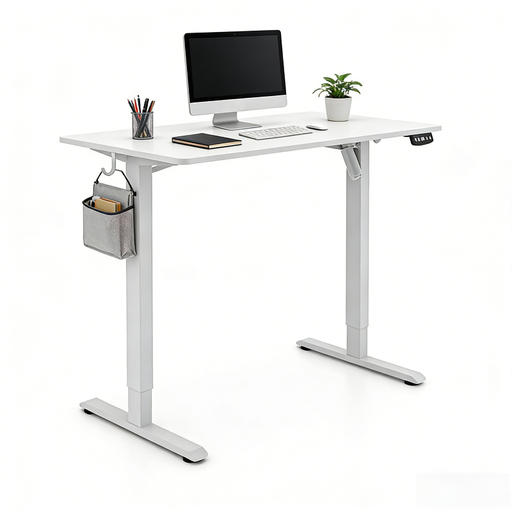
Why this product suits this profile: Its compact work surface is suitable for working from home, studying and basic office setups. The stated maximum static load capacity is 70 kg.
The product description gives specific dimensions and load capacity, as well as electric height adjustment, rather than relying solely on general promises of comfort.
120 x 60 cm, white surface, steel and aluminium components according to the product details, and a lift described as quiet.
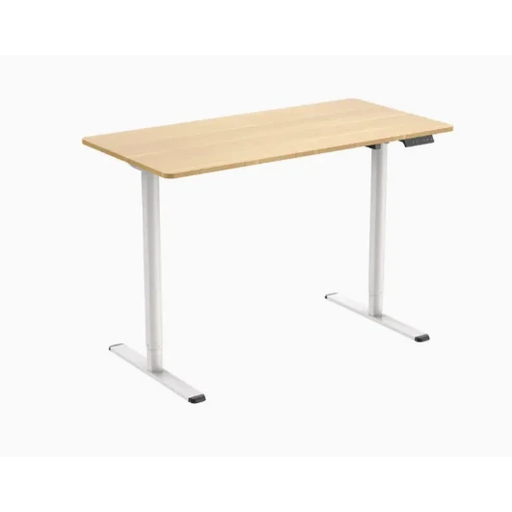
Why this product suits this profile: The model has a clearly stated height range of 730 to 1180 mm, a lifting speed of 15 mm/s and four memory presets.
You can make your choice based on measurable specifications: a frame load capacity of 60 kg, a 16 mm desktop and a defined lift range.
Four memory presets, six buttons on the control panel and delivery of the main components in one package, according to the product description.
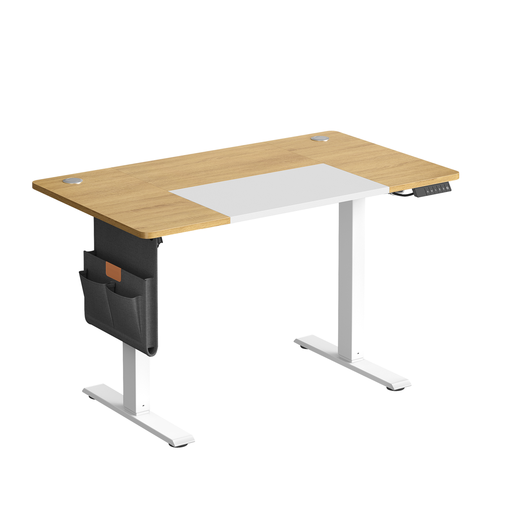
Why this product suits this profile: For anyone who regularly switches between sitting and standing, this model offers four memory presets, cable management and a USB-C port.
As well as listing the features, the product details specify a maximum static load capacity of 70 kg and include guidance on liquids, wall clearance and operating intervals.
Height range of 72 to 120 cm, USB-C port, organiser, hooks and storage bag, according to the product description.
We’ve put together a complete, regularly updated list of products that meet these strict selection criteria and fully comply with the safety regulations in force in the EU.
Start by setting your height-adjustable office desk to the lowest suitable sitting height. Keep your shoulders relaxed and your keyboard and mouse close to your body. When standing, adjust the desktop so your forearms don’t have to bend persistently upwards or downwards.
Make sure your cables are long enough, too. They shouldn’t become taut when you raise the desk. Keep electrical components dry. If your model has collision detection, set up the sensor according to the instructions. This feature doesn’t replace the need to keep the desk’s movement area clear.
Actual energy use depends on the motor, how long you use the desk and how often you adjust its height. As the motor usually only runs while the desk is moving, most of its energy use during a typical working day comes from repeated adjustments. To estimate consumption accurately, you’ll need the power consumption and standby figures for the specific model.
There’s no reliable one-size-fits-all answer. Lifespan depends on factors including load, assembly, how level the floor is, operating intervals and maintenance. Make sure you stay within the load capacity, check the screw connections regularly and follow the instructions in the manual.
When sitting, your forearms should rest as horizontally as possible on the work surface. When standing, the desktop should let you keep your arms in a relaxed position. If your desk has a memory function, save both settings. After adjusting the desk, check that the cables and accessories have enough room to move freely.