
Lieferung heute & morgen

Qualitätsgarantie

Willkommens-Angebote freischalten: KOSTENLOSE Lieferung | Bis zu 80 % RABATT | Kostenlose 30-Tage-JoyPlus-Testphase
App herunterladen
An electric height-adjustable desk can make it easier to switch between sitting and standing during the working day. To make sure your purchase works for you in the long term, don’t focus only on design, memory functions or supposedly quiet motors. The key considerations are dimensions, load capacity, controls, safety features and whether the desk is suitable for your space.
A 120 x 60 cm desk is usually a space-saving choice for a laptop or a single monitor. But if you use two screens, speakers, a keyboard and paperwork, you may find the depth restrictive. A 140 x 60 cm desk gives you more width, while a 160 x 70 cm desk may suit more extensive setups, gaming accessories or several work devices.
Before you buy, check the available floor space and the position of your power sockets. The desktop needs room to move when you adjust the height, so it shouldn’t sit directly against the wall. Otherwise, it could knock against it and cause scratches.
The stated maximum static load capacity describes how much weight the desk can support while stationary. It doesn’t automatically tell you how the desk will perform as it moves up and down with heavy equipment on it. So add up the weight of your monitor, mounts, computer, speakers, lights and accessories.
According to the product specifications, several of the JOYFURNOS models featured here have a maximum static load capacity of 70 kg. This is a technical limit and shouldn’t be exceeded. Other models may have different specifications. For example, the Loctek desk has a stated frame load capacity of 60 kg.
An electric height-adjustable desk with a memory function can be especially convenient day to day, provided the saved positions suit your height and office chair. A memory button doesn’t replace setting the desk up correctly. You should also look for:
The JOYFURNOS models are listed as having a height range of around 72 to 120 cm. The right working height depends on factors including your chair height, your own height, monitor position and the keyboard you use.
An electric standing desk should move the desktop smoothly and evenly. Product descriptions may mention a ‘quiet motor’, but this isn’t a substitute for a specific noise measurement. Even so, quiet operation is worth considering if you share an office or work from a room at home.
Several of the products use a construction with a steel frame and chipboard desktop. Look for adjustable feet, as small uneven patches in the floor can otherwise make the desk wobble. Side-to-side movement is more noticeable when the desk is raised than when it’s at a lower position.
A larger desktop needs more space and may be heavier. So check the depth of your room, door widths and the route you’ll use to move the desk before you buy.
A desk with cable management helps you route cables through cable openings and keep loose cables to a minimum as you adjust the height. Check that your cables are long enough when the desktop is fully raised. A desk with a USB-C connection can make it easier to charge compatible devices. However, check the charging output in the product specifications: a USB-C connection isn’t necessarily suitable for every laptop charger.

Why it suits this profile: Its compact surface is ideal for smaller home office workspaces, and it offers four saved height settings for easy adjustment to your preferred positions.
The product specifications mention cable openings, a storage pocket and a hook. These help keep accessories and cables organised, instead of taking up more of the limited desktop space.
Four memory height settings, a steel frame, a maximum static load capacity of 70 kg and a stated height range of 72.1 to 120.1 cm.
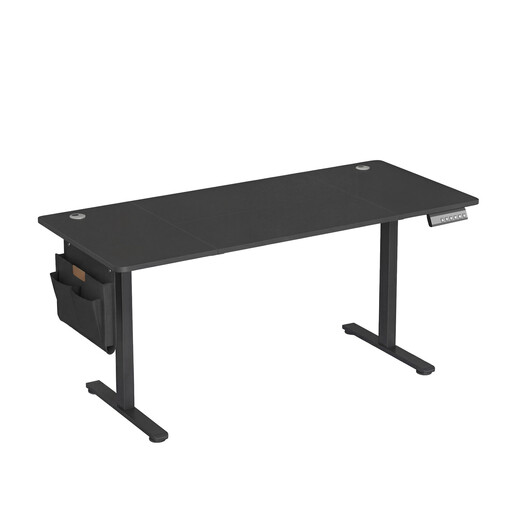
Why it suits this profile: The larger desktop is designed for more extensive workspaces with several devices and extra storage needs.
Two cable openings, an organiser and a USB-C connection address common issues when using lots of connected devices. The desk’s size helps ease a lack of space, but you’ll still need to check your room measurements.
160 x 70 cm desktop, memory function, USB-C connection, steel frame, adjustable feet and a maximum static load capacity of 70 kg.
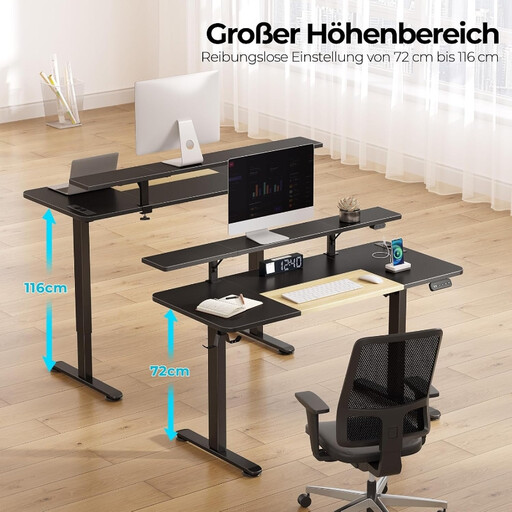
Why it suits this profile: This model is aimed at people who want to use their sit-stand desk for gaming or a tech-heavy setup, too.
The product description lists a monitor stand, two power sockets and two USB ports. Even so, check the technical specifications and the safety information in the instruction manual before you buy.
Electric height adjustment, an integrated monitor stand, RGB lighting, two power sockets and two USB ports, according to the product description.
Read the instructions before assembly and check that all the parts are included. Keep liquids away from electrical components. According to the product information provided, the desk is for indoor use only.
Several JOYFURNOS models activate overheat protection after two minutes of continuous height adjustment. A waiting time of 18 minutes is then specified. This isn’t a fault, but a usage limitation to bear in mind when planning your working day. Also set the sensitivity of the built-in sensor as instructed and keep solid objects clear of the desk’s movement area.
We’ve put together a complete, regularly updated list of products that meet these strict selection criteria and fully comply with the safety regulations in force in the EU.
Adjust your chair so your feet rest firmly on the floor. Set the desktop at a height that lets you rest your forearms as horizontally as possible while typing. When standing, make sure the top of the screen and your line of sight suit your individual posture. Your height and the accessories you use are key factors.
Its lifespan depends on the motor, frame, load, assembly and how often you use it. Without specific information from the manufacturer, it wouldn’t be possible to give a reliable general estimate in years. Stay within the maximum static load capacity, keep liquids away from the desk and check the screws and connections regularly.
The cost depends on the motor’s power, how long it runs for and your electricity tariff. As the motor usually only runs while you adjust the height, its consumption during normal office use typically isn’t comparable to that of a device left running continuously. To work out the cost accurately, you’ll need the power consumption of the specific model: multiply the power in kilowatts by the operating time in hours and the price per kilowatt-hour.