
Lieferung heute & morgen

Qualitätsgarantie

Willkommens-Angebote freischalten: KOSTENLOSE Lieferung | Bis zu 80 % RABATT | Kostenlose 30-Tage-JoyPlus-Testphase
App herunterladen
An electrically adjustable standing desk can make it easier to switch between sitting and standing throughout the working day. But the motor and memory buttons aren’t the only things that determine how practical a desk is. Unclear load limits, a desktop that’s too small or a lack of cable management can all lead to a disappointing purchase.
This buying guide explains which technical details to check before buying an electric standing desk, and which models suit different needs.
A specification such as “70 kg load capacity” usually refers to the static load capacity. It tells you how much weight the desk can support when the desktop is stationary. When the desk moves up or down, the frame and motor are also subject to movement and force. That’s why your computer, monitors, speakers and accessories should all weigh comfortably less than the stated maximum.
It’s also important to consider how the weight is distributed. A heavy monitor arm attached to the front edge can affect stability differently from an equally heavy item placed near the centre of the desktop.
Marketing phrases such as ‘whisper-quiet’ or ‘particularly quiet’ are difficult to compare. Specific figures, such as under 48 dB, are more useful, if the retailer provides them. How loud the desk seems in practice also depends on the floor, how much is on the desk and how well it has been assembled.
If you’ll be using the desk in a small room or next to a sleeping area, look for a published noise level and smooth operation.
A desk with a memory function saves your preferred positions. This is useful if several people share the same desk or you regularly switch between sitting and standing. But the actual height range still matters.
Many models in this selection adjust from around 72 to 120 cm. Before buying, check your height, office chair seat height and preferred standing position. The memory buttons can only save settings within the desk’s height range.
A model measuring 120 x 60 cm may be enough for a laptop and a few documents. If you use two monitors, a keyboard, documents and other work materials, a height-adjustable desk with a width of 140 to 160 cm gives you more room to work.
A depth of 60 cm suits compact home office spaces. If you use several monitors, a depth of 70 or 80 cm can give you more distance from the screens. You should also leave space behind the desk for cables and the frame as it moves upwards.
A steel frame provides the supporting base for many models. Look for:
A desk can wobble even if it has a high load capacity, particularly if the floor is uneven or the assembly fixings haven’t been tightened properly. Careful assembly is therefore part of checking the desk’s stability.
Memory controls with three or four saved positions make it easier to adjust the desk throughout the day. A desk with a USB-C port can charge a compatible device directly from the control panel. Check the charging power: a 15 W USB-C port is different from a 20 W port.
Cable grommets, a cable tray, a storage pouch or hooks can help keep your workspace tidy. They don’t replace cables of the right length, though. Make sure the power supply, monitor and charging cables have enough slack when the desk is raised.
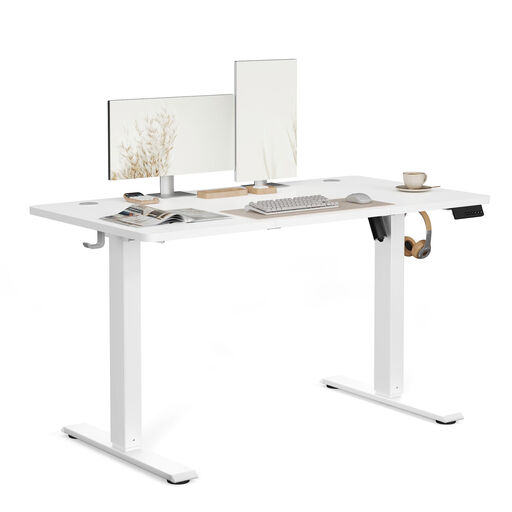
Why it suits this type of user: The compact work surface is suitable for a laptop, one monitor and typical home office paperwork. Four saved height settings make it easy to switch regularly between sitting and standing.
The retailer specifies a height range of 72 to 120 cm, a static load capacity of 70 kg and two cable grommets. This makes it easier to assess some of the key specifications before buying.
Four memory positions, steel frame, two cable grommets and side hooks.
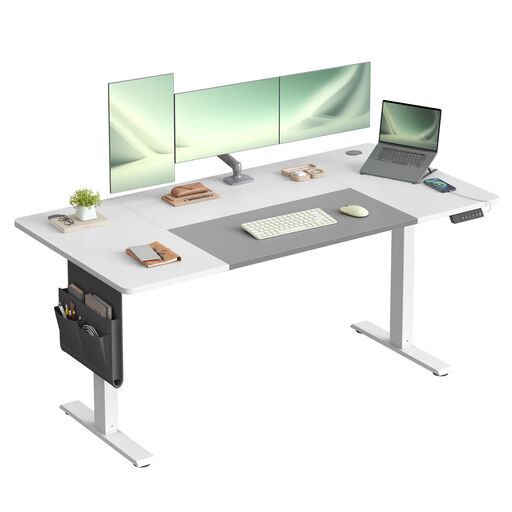
Why it suits this type of user: The 160 x 70 cm desktop offers room for several work devices. This model is aimed at people who value clearly specified extra features and a larger work surface.
The listed operating noise is under 48 dB. Four memory positions and adjustable feet are also specified, making several important selection criteria easy to compare.
160 x 70 cm, four memory settings, 15 W USB-C port, cable grommets and storage accessories.
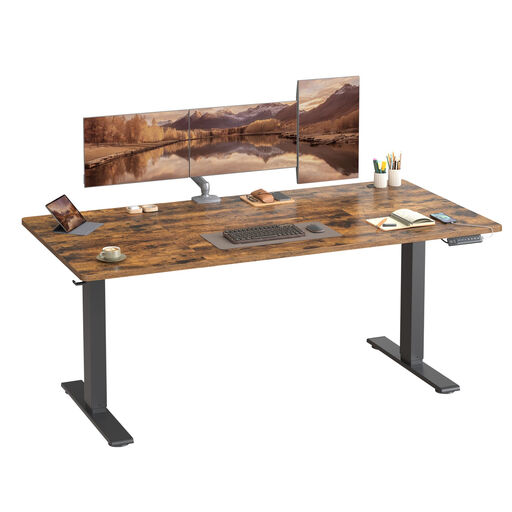
Why it suits this type of user: The 80 cm-deep desktop is suitable for several monitors and plenty of accessories. The USB-C port and integrated cable tray make it a good fit for people with lots of connected devices.
The specifications state a static load capacity of 80 kg, noise levels under 48 dB and three memory positions. The cable management box is also listed with its dimensions.
160 x 80 cm, 20 W Type-C port, three memory settings, cable tray and two hooks.
We’ve put together a complete, regularly updated list of products that meet these rigorous selection criteria and the safety regulations in force in the EU.
Before assembly, check that the desktop, frame and all electrical components are present. Don’t place the desk directly against a wall if the instructions for your model advise against it. When adjusting the height, make sure there are no objects, cables or drawers in the way.
Also bear in mind:
Set the desk height so your forearms rest roughly horizontally on the desktop and your shoulders stay relaxed. When standing, adjust the desktop so you can reach the keyboard and mouse without noticeably raising or lowering your shoulders. The right setting varies from person to person and depends on your height, chair and the devices you use.
Its lifespan depends on the motor, frame, load, how often it’s used and how well it’s assembled. Information such as the number of lift cycles a desk has been tested for can be useful, but it doesn’t guarantee how long a particular desk will last. Evenly distributing the load, keeping the movement area clear and following the operating and rest guidance can help you use the desk as intended.
The cost depends on the motor’s power, how many times you adjust the height each day and your electricity tariff. The motor usually only runs while the desk is moving. To work out an estimate for your own use, consider the power consumption in watts, the daily running time and your price per kilowatt-hour. A USB-C port may use additional power if you charge devices through it.