
Lieferung heute & morgen

Qualitätsgarantie

Willkommens-Angebote freischalten: KOSTENLOSE Lieferung | Bis zu 80 % RABATT | Kostenlose 30-Tage-JoyPlus-Testphase
App herunterladen
Setting up a functional workspace at home is a fundamental requirement for productivity and well-being. An inadequate setup can not only hinder concentration but also lead to physical discomfort. This guide provides an overview of the essential components for a solid home office setup and what to look for when making your selection to create an efficient and comfortable workspace.
Choosing the right products depends on your individual needs. However, there are general criteria that play a role when purchasing office furniture and accessories.
An ergonomic workspace is designed to support a healthy posture and minimise strain. The most important elements are a suitable chair and a desk at the correct height. Ideally, your upper and lower arms should form an angle of about 90 degrees, while your feet rest flat on the floor. An electric height-adjustable desk offers the advantage of flexible height adjustment, allowing you to switch between sitting and standing. This promotes movement and can break the monotony of a long workday.
The keyboard and mouse are central tools for daily computer work. An ergonomic mouse that fits well in your hand can help reduce wrist strain. When choosing a mouse, technical features like DPI (Dots Per Inch), which describes the sensor's sensitivity, are relevant. A higher DPI value allows for faster cursor movement with less physical movement of the mouse. For standard office applications, a value between 1000 and 1600 DPI is usually sufficient. Wired mice also offer a stable, latency-free connection without the need to change batteries.
An uncluttered desk contributes to better concentration. When setting up a PC workstation, you should also consider practical office accessories. These include cable management solutions to avoid cable clutter, adequate lighting to reduce eye strain, and storage systems for documents and office supplies. A well-thought-out organisation ensures that all necessary items are within easy reach without cluttering the work surface.
Based on functionality and user-friendliness, we have compiled a selection of products that form a solid foundation for the home office.
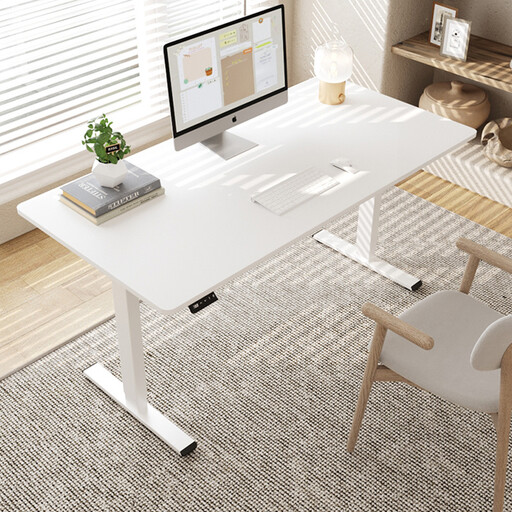
Why it stands out This model focuses on the core function of a modern workspace: flexible height adjustment. The electric mechanism allows for a seamless transition between sitting and standing. The spacious desktop provides ample room for monitors, a laptop, and other work materials.
Benefits
Who it's for This desk is an option for individuals who want to set up a dynamic and ergonomic workspace and value the ability to change their working position throughout the day.
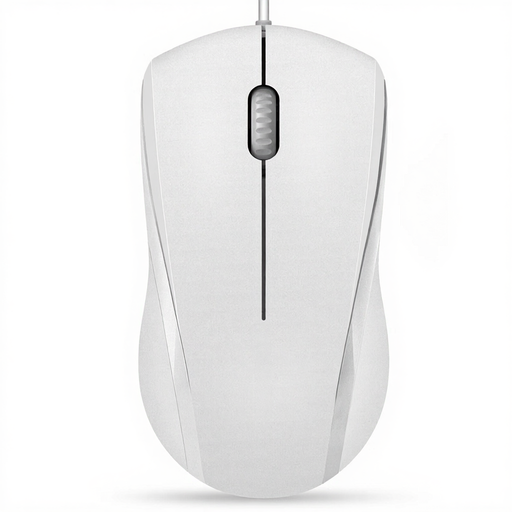
Why it stands out The RAPOO N1600 is distinguished by its quiet click. According to the manufacturer, the clicking sounds are reduced, which is advantageous in quiet work environments or shared offices to minimise distractions for yourself and others.
Benefits
Who it's for Users looking for a straightforward, quiet, and reliable mouse for daily use in the office or home office.

Why it stands out The CHERRY MC 1000 represents proven quality and reliability, underscored by its GS certification for "Geprüfte Sicherheit" (Tested Safety). As a product from an established German manufacturer, it is designed for durability in professional use.
Benefits
Who it's for Users who prefer a durable and precise mouse for professional use or demanding home use and who value certified standards.
A desk is the centrepiece of any workspace. If you are looking for more models or designs, explore our selection of white and black desks to find the perfect addition to your home office.
1. What are the essentials for a home office setup? An essential setup includes an ergonomic office chair, a desk at the proper height, a monitor, a keyboard, a mouse, and a good desk lamp. Additionally, organisers and storage systems are recommended to maintain order and structure.
2. How do I set up an ergonomic workspace? Ensure your monitor is positioned at eye level to prevent neck strain. Your arms should form a 90-degree angle at the elbow when your hands are on the keyboard. Your feet should be flat on the floor, with your knees also at a 90-degree angle. Adjustable furniture makes this setup much easier to achieve.
3. Is an electric height-adjustable desk worth it? Such a desk allows you to switch between sitting and standing. This change in posture can help mitigate the negative effects of prolonged, uninterrupted sitting. Many users report that changing their working position improves their concentration and overall well-being throughout the workday.