
Lieferung heute & morgen

Qualitätsgarantie

Willkommens-Angebote freischalten: KOSTENLOSE Lieferung | Bis zu 80 % RABATT | Kostenlose 30-Tage-JoyPlus-Testphase
App herunterladen
Long hours spent in front of the PC are a daily reality for many gamers, as well as for professionals working from home and students. Uncomfortable seating can not only disrupt concentration but also lead to muscle tension. An ergonomic gaming chair is specifically designed to support the body and promote a healthier posture.
This article serves as a guide. We'll introduce the key features to look for when making your choice and present a selection of models with various functions to help simplify your decision.
Choosing the right chair depends on your individual needs. Three key aspects will help you find the perfect model.
A chair is only truly ergonomic if it can be adapted to your body. Look for the following adjustment options:
The material affects both the comfort and the longevity of the chair. PU leather is easy to clean and durable, while fabric or mesh covers offer greater breathability. Also, pay attention to the maximum weight capacity, especially if you're looking for a chair that can support up to 150 kg or more. Certifications like BIFMA or SGS can indicate tested stability and safety.
Modern gaming chairs often offer more than just basic ergonomics. A gaming chair with a footrest allows you to put your feet up and fully relax during breaks. Some models even integrate massage functions into the lumbar cushion to specifically relieve tension. These extras can significantly enhance comfort during very long periods of use.
Based on the criteria mentioned, we have compiled a selection of chairs that stand out for their ergonomic features and functionality.
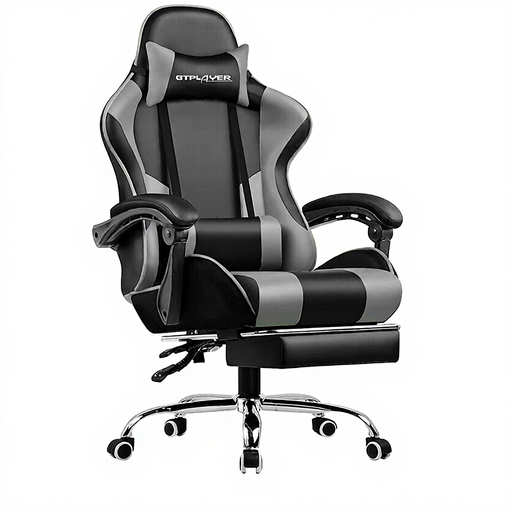
This gaming desk chair combines fundamental ergonomic features with a special extra for long sessions.
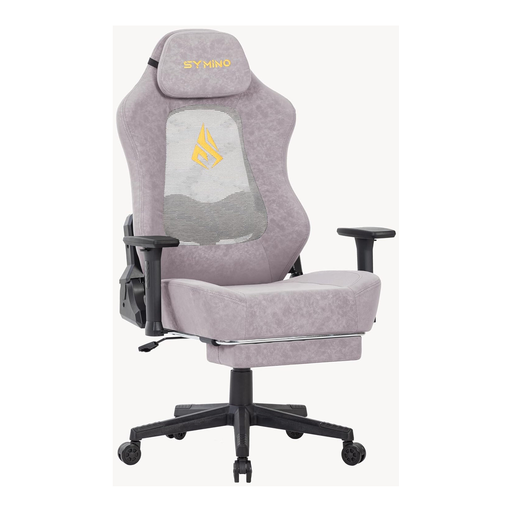
This chair features a thoughtful design for air circulation and flexible support.
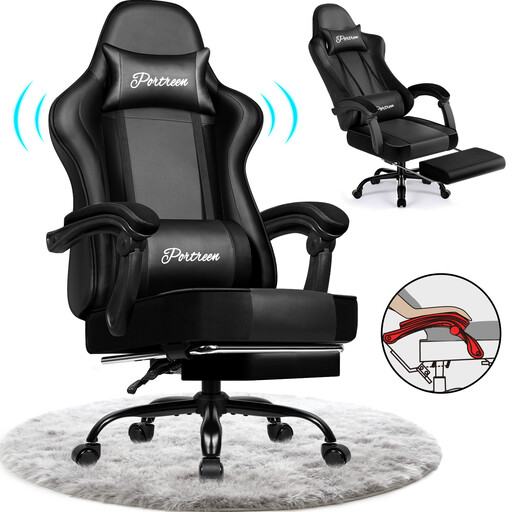
This model focuses on a robust construction and an especially deep reclining function.
The models presented here already cover a wide spectrum. However, if you prefer other designs or specific materials, you can find more alternatives in our category.
Discover our selection of grey leather swivel chairs
An ergonomic gaming chair is defined by its adjustability. Key features include an adjustable seat height, customisable armrests, a reclining backrest, and support for the lumbar region (lumbar support) and neck. These elements allow you to configure the chair to support a natural and healthy posture for many hours.
Both a good gaming chair and a high-quality ergonomic office chair can effectively support your back. The main difference often lies in the design and additional features. Gaming chairs typically have a higher backrest to support the entire back and head, as well as pronounced side bolsters. They also often offer features like a reclining function or a footrest. The decision depends on personal preference and how you plan to use it. In either case, it's crucial to pay attention to the adjustment options.
Lumbar support is a core ergonomic feature. It fills the natural curve of the lumbar spine, preventing the lower back from slumping into an unhealthy, rounded position. This significantly helps to relieve pressure on the spinal discs and prevent pain or tension in the lower back, especially during long periods of sitting. Whether it's built-in or provided as an adjustable cushion, lumbar support is highly recommended for ergonomic seating.