
Lieferung heute & morgen

Qualitätsgarantie

Willkommens-Angebote freischalten: KOSTENLOSE Lieferung | Bis zu 80 % RABATT | Kostenlose 30-Tage-JoyPlus-Testphase
App herunterladen
If you spend hours at your computer, you need more than a striking design. An ergonomic gaming chair should suit your height, how you plan to use it and the space you have available. That applies equally to gaming, working from home and office work. An adjustable seating position can help you tailor your workstation to your posture, but it’s no substitute for regular breaks to get moving.
A backrest that reclines or a height-adjustable gaming chair may sound practical at first. What matters, though, is whether the seat height, seat depth and backrest height suit your height. A chair can have lots of features and still be unsuitable if your feet don’t rest flat on the floor or your knees remain bent at too sharp an angle.
So look for specific details about user height, seat height and seat width. When you’re sitting in a gaming chair with armrests, your elbows should be as close to your body as possible and form roughly a right angle.
A separate lumbar cushion is often promoted as an ergonomic feature. But it’s important to check whether you can change its height or position. Fixed padding may sit in the wrong place if you’re a different height.
Ideally, a gaming chair with lumbar support should offer height-adjustable or flexibly positioned support. The same principle applies to a gaming chair with a headrest: it should support your seating position without pushing your head forwards.
The label ‘150 kg gaming chair’ initially tells you the maximum weight capacity stated by the seller. It doesn’t automatically mean the chair is suitable for every body shape or use. Also check:
With a model rated for 150 kg, don’t exceed the maximum weight capacity. The chair is also not designed to be used as a standing aid or climbing aid.
For an office chair used for long periods, getting the basic sitting position right matters more than having as many features as possible. The seat height should adjust so that both feet rest firmly on the floor. The front edge of the seat shouldn’t put undue pressure on the backs of your knees.
A generous seat width is especially important if you prefer to sit with your legs further apart. Also check the seat depth: if it’s too deep, you may struggle to reach the backrest; if it’s too shallow, your thighs won’t get enough support.
A gaming chair with a reclining function can be useful for short breaks or changing position. However, a backrest that reclines a long way should always have a stable base. Check whether you can control the recline and lock the backrest in your preferred position.
With a gaming chair that has a rocking function, the whole seat often moves with you. This can be suitable for dynamic sitting, but it’s not the same as a backrest that can be locked independently in a chosen position. Product details such as ‘90° to 170°’ or ‘30° recline’ should always be considered in the context of the mechanism.
Cold-cure foam or high-density polyurethane foam can provide padding that holds its shape. The actual comfort still depends on the seat, your body weight and personal preference. PVC and PU covers can usually be wiped clean with a damp cloth. Avoid harsh cleaning products and abrasive materials.
An anti-fatigue mat for standing workstations can also be useful if you alternate between sitting and standing. Check the mat’s thickness, non-slip surface, dimensions and how easy it is to clean.
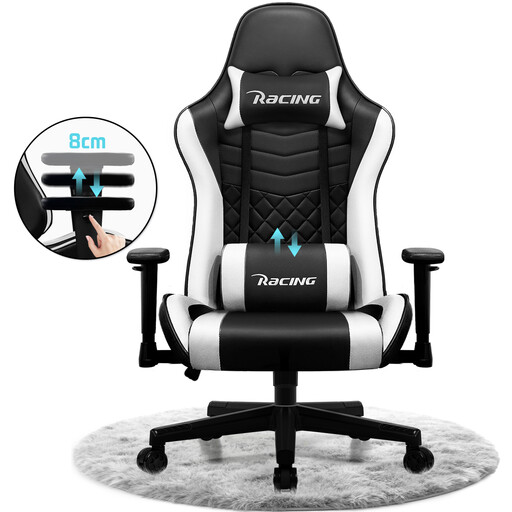
Why this product suits this profile: This model combines height-adjustable lumbar support and adjustable armrests with a stated weight capacity of 150 kg and the classic features of a gaming chair.
The product details specify adjustment ranges for the armrests and lumbar support. This makes it easier to tailor the support to different sitting positions than with fixed padding.
Steel frame, SGS-certified gas lift according to the product details, 150 kg maximum weight capacity according to the seller, and wipe-clean PVC/PU upholstery.
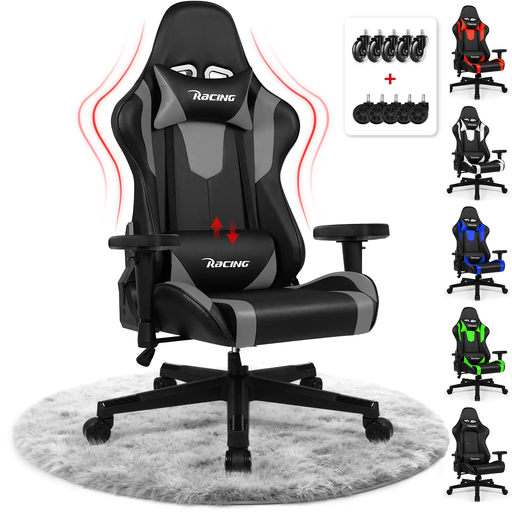
Why this product suits this profile: If you’re looking for precise details about adjustment and construction, this chair lists the backrest and seat height settings, armrest adjustment and the recommended user height range of 158 to 190 cm.
Rather than making general claims about comfort, the product description specifies a backrest range of 90° to 170°, up to 10 cm of height adjustment and 8 cm of armrest adjustment.
Metal frame, adjustable lumbar support and headrest, 2-year warranty according to the product details, and a stated weight capacity of 150 kg.
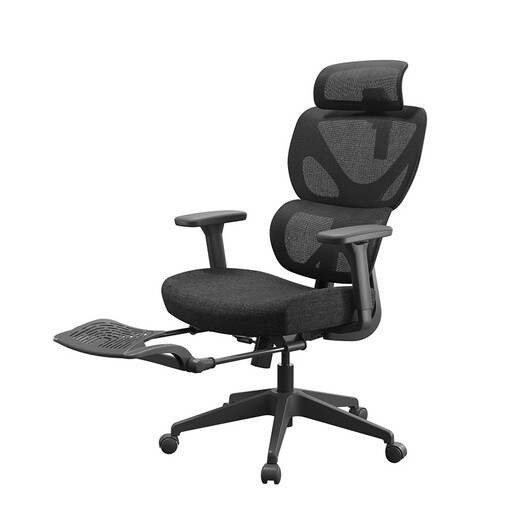
Why this product suits this profile: The integrated footrest and 132° recline are designed for anyone who wants to switch between focused work and leaning back for a break.
The recline angle and footrest are clearly specified. This makes it easier to check before buying whether the chair will fit in the space available at your desk.
Footrest, elastic lumbar support, rotating armrests and 10 cm-thick seat padding according to the product details.
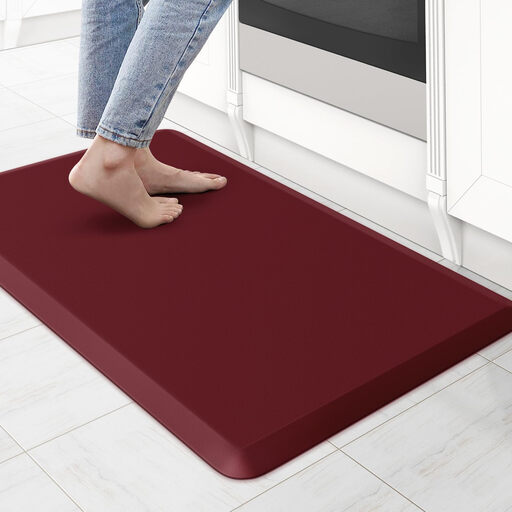
Why this product suits this profile: This mat complements a height-adjustable desk, or can be used in the kitchen, workshop or office when you expect to spend long periods working on your feet.
The dimensions of 28 × 17.3 inches and thickness of 0.47 inches are specified. This lets you check in advance whether you have enough standing space at your workstation.
High-density foam core, micro-textured non-slip surface, waterproof and wipe-clean according to the product description.
We’ve put together a complete, regularly updated list of products that meet these strict selection criteria and fully comply with the safety regulations in force in the EU.
The key things are a suitable seat height, enough seat width, a stable backrest and adjustable armrests. Lumbar support should suit your height and, ideally, be adjustable. Regular movement breaks and a correctly set-up computer workstation are important too.
Its lifespan depends on how it’s used, how it’s assembled, your body weight, the flooring and how well it’s maintained. Check the screw connections, castors and gas lift regularly. A stated weight capacity of 150 kg is the manufacturer’s maximum rating, not a guarantee of unlimited durability.
A gaming chair with a footrest can be useful if you sometimes recline the backrest and want extra support for your legs. Before buying, check how much room there is under your desk, and tuck the footrest away if it gets in the way during everyday work.