
Lieferung heute & morgen

Qualitätsgarantie

Willkommens-Angebote freischalten: KOSTENLOSE Lieferung | Bis zu 80 % RABATT | Kostenlose 30-Tage-JoyPlus-Testphase
App herunterladen
An ergonomic gaming chair should provide a suitable sitting position when you are gaming, streaming, working or studying. In practice, however, everyday usability depends less on eye-catching colours or a long list of extra features, and more on adjustable dimensions, sturdy components and suitable padding.
Three common buying misconceptions particularly often lead to poor decisions:
An adjustable-height gaming chair should be capable of being set so that your feet rest fully on the floor. Your knees should form an angle of approximately 90 degrees. Seat height alone is not enough: an adjustable backrest and suitable armrests help you reach the keyboard and mouse in a natural position.
Look for specific measurements rather than general terms such as “ergonomic”:
An ergonomic PC chair for users measuring between 158 and 190 cm may suit many adults, but it will not automatically be suitable for every body shape. Compare the measurements with your existing desk and your own sitting position.
A gaming chair with lumbar support either has integrated padding or a separate cushion. It is important that its position can be adjusted and that it does not constantly press against the back’s natural movement. A gaming chair with headrest can provide additional support when reclining; when working at a desk, however, the headrest is not needed all the time.
Product descriptions such as “3D lumbar support” generally refer to the movement or shape of the system. They are not proof of any medical effect. If you already experience discomfort, choosing a chair should not be viewed as a substitute for professional advice.
Fabric covers are often more breathable and can be comfortable during longer periods of sitting. Faux-leather and PU covers, on the other hand, can generally be cleaned with a damp cloth. Also check whether the product description distinguishes between maximum load capacity, recommended user weight and the actual seating area.
Other practical points include:
A footrest is intended only for resting your legs. You should not stand on it. A gaming chair with reclining function should not be used as a sleeping aid or to help you get up.
The following models meet different requirements. Technical details are based on the respective product descriptions and should be checked again on the product page before purchase.
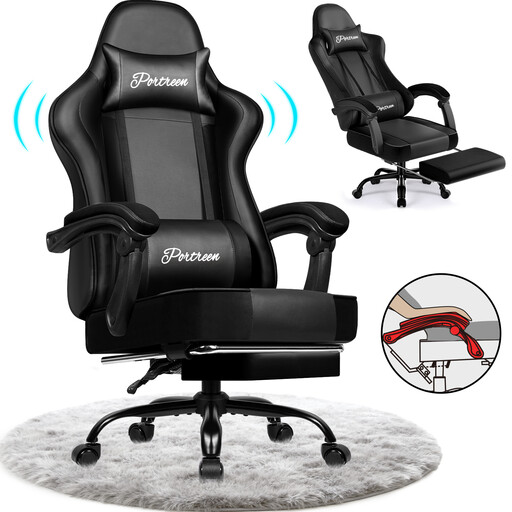
Why this product suits this profile: This chair combines adjustable seat height, head and lumbar cushions, and an extendable footrest. It is suitable for gaming and occasional office work, without being limited to a single use.
The product description specifies concrete values: a recline range of 90 to 170 degrees, 10 cm of seat-height adjustment and a load capacity of up to 150 kg. This makes it possible to check the key criteria before buying.
Extendable footrest, PU cover with a water-repellent surface, and BIFMA and SGS certifications stated in the product information.
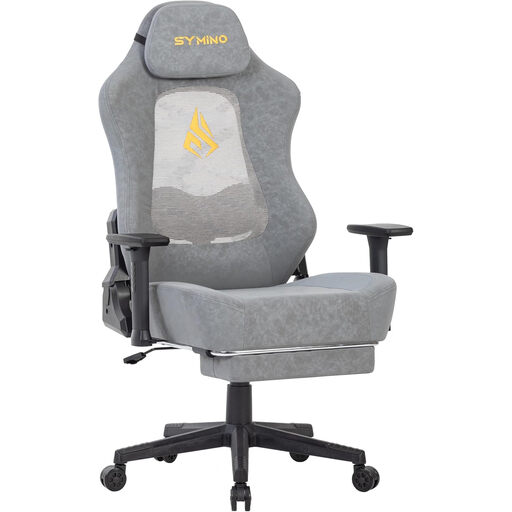
Why this product suits this profile: The open backrest with mesh insert, 3D lumbar support system and metal frame are designed for users who value adjustable support and air circulation during long periods at a computer.
Rather than simply promoting a reclining function, the description specifies a range of 90 to 155 degrees, a 12-degree rocking function and a maximum load capacity of 150 kg.
3D lumbar support, mesh backrest, vintage PU cover and class 3 gas lift, according to the product description.
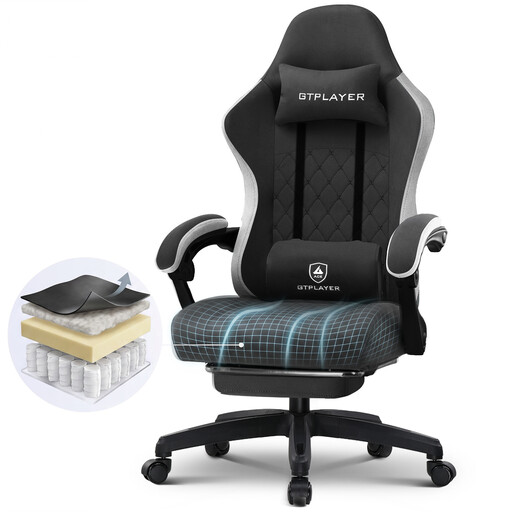
Why this product suits this profile: The combination of a fabric surface, spring seat cushion, synchronised armrests and extendable footrest is appealing to users who spend long periods at a desk or gaming.
The fabric cover offers an alternative to faux leather, while the product description specifically lists the spring construction of the seat cushion and the 10 cm-high gas lift.
Breathable fabric, individually described pocket springs in the seat, adjustable armrests and footrest.
We have put together a complete, regularly updated list of products that fully meet these strict selection criteria and the safety regulations applicable in the EU.
Start with the seat height: both feet should rest firmly on the floor. Then adjust the backrest so that you can view the screen without constantly pushing your head forwards. The armrests should support your forearms without raising your shoulders. Only extend the footrest once the backrest has been reclined and the construction is standing securely.
Its lifespan depends on daily usage, body weight, the mechanism, cover quality and care. Regularly check the screws, castors, gas lift and tilt mechanism. With faux leather, avoid cleaning products that may damage the surface. Without information about usage and the manufacturer’s terms, it is not possible to give a reliable specific lifespan.
A gaming chair with massage function may be an appealing extra comfort feature. However, it is not a substitute for the correct seat height, adjustable armrests or suitable lumbar support. Before buying, check that the massage pad’s power supply, controls and cleaning requirements suit your workspace. Technical extras should remain secondary to the fundamental seating dimensions.