
Lieferung heute & morgen

Qualitätsgarantie

Willkommens-Angebote freischalten: KOSTENLOSE Lieferung | Bis zu 80 % RABATT | Kostenlose 30-Tage-JoyPlus-Testphase
App herunterladen
An ergonomic gaming chair should provide a stable sitting position while you play, work and stream. In practice, however, models vary considerably in terms of backrest, padding, mechanism and weight capacity. An eye-catching design alone says little about actual seating comfort.
Three issues are particularly likely to lead to a disappointing purchase:
A 3D lumbar support should not simply be included as a decorative cushion. Ideally, it should be adjustable and able to accommodate different sitting positions. According to the product information, SYMINO models use an elastic 3D system. Buyers should still check whether the support height suits their own height.
The shape of the backrest also matters. A fully enclosed PU leather back can be easy to maintain. A gaming chair with a breathable backrest and mesh section, on the other hand, allows more air to reach your back. This is particularly useful for people who spend many hours at a desk or play in warm rooms.
A height-adjustable gaming chair should be capable of being set so that your feet rest completely on the floor and your forearms are as close to horizontal as possible on the desk surface. The following details are therefore important, not just the chair’s maximum overall height:
The SYMINO models described are listed with dimensions of approximately 58 × 54 × 135 cm. This is no substitute for trying a chair in person, but it provides a useful starting point when planning your space. Before buying, you should also check whether the chair will fit underneath your desk.
A gaming chair up to 150 kg should not be judged solely by its advertised maximum load. You should also look at the frame material, base, castors and gas lift. According to the supplier’s information, the SYMINO models feature a metal frame, Class-3 gas lift and a maximum load capacity of 150 kg. This figure is an upper limit, not a target weight for everyday use.
The following differences are important when it comes to the mechanism:
A PU leather gaming chair can usually be cleaned with a soft, damp cloth. However, the material should be protected from sharp objects, harsh cleaning products and prolonged exposure to intense heat. Mesh sections require less maintenance, but depending on their construction, they may be more susceptible to dust and snagging.
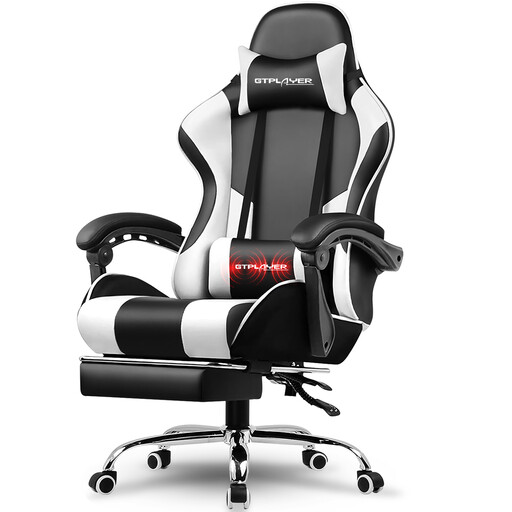
Why this product suits the profile: The combination of adjustable seat height, headrest, footrest and PU leather is suitable for users who want to combine gaming and working from home in one chair.
The product information lists specific features rather than relying solely on general ergonomic terms: a 135-degree backrest, adjustable height, synchronised armrests and a load capacity of up to 150 kg.
Metal frame and metal legs; extendable footrest; easy-to-wipe PU surface.
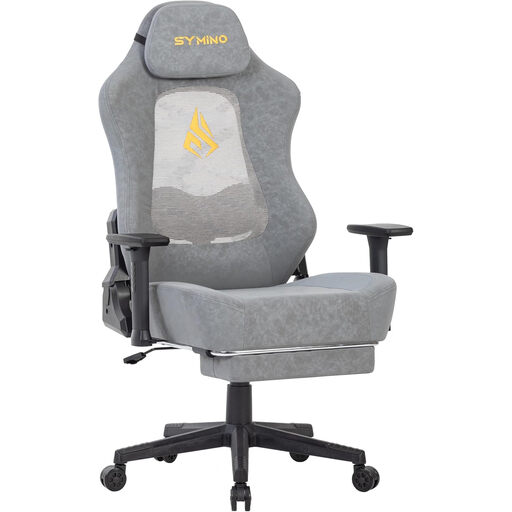
Why this product suits the profile: For people who value air circulation, flexible backrest angles and adjustable lumbar support during long gaming or working sessions.
The open backrest with improved mesh helps address the heat build-up typically associated with enclosed surfaces. The 90- to 155-degree reclining range and 12-degree rocking function are also clearly specified.
3D lumbar support; metal frame; Class-3 gas lift and specified maximum load capacity of 150 kg.
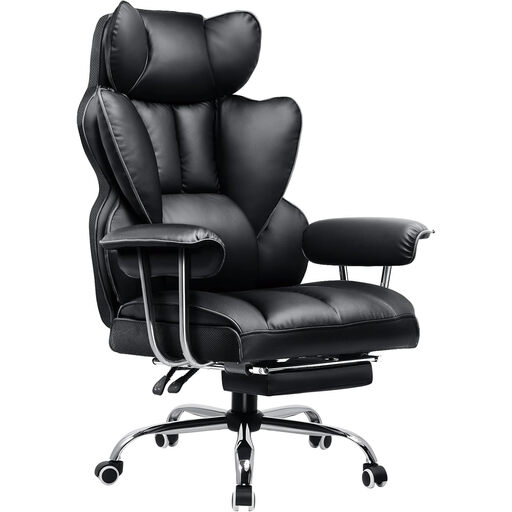
Why this product suits the profile: This model is aimed at users looking for an ergonomic office chair for gaming, working and reclining, and who prefer soft, high-capacity padding.
Rather than describing an unspecified reclining function, the product information states a backrest angle of up to 135 degrees, adjustable seat height and an extendable footrest. Assembly is estimated to take around 20 to 30 minutes.
High-density foam; 360-degree swivel function; PU leather and metal frame according to the product description.
We have put together a complete, regularly updated list of products that fully meet these strict selection criteria and the safety regulations applicable in the EU.
After assembly, check that all screws, armrests and castors are secure. On models with a gas lift, the mechanism must not be dismantled or modified yourself. Place the chair on a level surface and do not exceed the stated maximum load.
For everyday use, we recommend:
First, adjust the seat height so that your feet rest securely on the floor. Then adjust the armrests and desk height. The backrest should support your upper body without restricting your freedom of movement. Lumbar support should sit in the area of your natural lower-back curve and should not create uncomfortable pressure.
Service life depends on usage, care, room temperature and material quality. Regular cleaning with mild products and avoiding sharp objects can help protect the surface. A sturdy frame and correctly assembled mechanism also affect long-term use.
It can be useful if the backrest locks securely in an upright position and the seat height suits your desk. The reclined position is mainly intended for breaks. For focused work, use a stable, upright setting in which the screen, desk and armrests are correctly aligned.