
Lieferung heute & morgen

Qualitätsgarantie

Willkommens-Angebote freischalten: KOSTENLOSE Lieferung | Bis zu 80 % RABATT | Kostenlose 30-Tage-JoyPlus-Testphase
App herunterladen
An ergonomic gaming chair with footrest can make work, gaming and relaxation sessions more flexible. However, appearance alone does not determine how practical a chair is for everyday use. Large side bolsters, striking padding or a massage function say little about whether a chair suits your height, desk and length of time spent sitting.
As a Joybuy Product Recommendation Officer, I filter market information according to clear, verifiable product features. This helps you avoid common purchasing mistakes and choose suitable models for different situations.
A retractable footrest is practical for breaks, watching films or relaxed gaming sessions. For concentrated work, however, it should remain retracted. The leg support is primarily a place to rest your legs, not a guarantee of an ergonomic sitting posture. You should therefore also check:
The description ergonomic gaming chair does not automatically indicate any particular features. Specific details about backrest adjustment, seat height, armrests, headrest and lumbar support are more informative. A loose lumbar cushion may feel different from integrated or multi-adjustable support.
Pay attention to the actual adjustment range and whether each setting can be securely locked in place. An height-adjustable gaming chair with a suitable seat height is usually more versatile than a model that only offers a backrest which reclines a long way.
PU or faux leather can generally be wiped clean with ease. In warm rooms, however, the surface may feel different from a breathable mesh cover. A mesh chair promotes air circulation, while a padded gaming chair is more focused on cushioning and an enclosed seating feel.
Choose according to where you will use it: for many hours in a home office, an ergonomic office chair with a breathable cover may be a sensible choice. For changing uses in the living room, a gaming chair with footrest and reclining function may fit better with the space you already have.
First measure the height of your desk and compare it with the stated seat-height adjustment range. When using a keyboard and mouse, your forearms should rest as comfortably as possible on the armrests or desk surface.
With the backrest, it is not just the maximum angle that matters. A range of 90 to 170 degrees, for example, offers different positions for sitting upright while working, leaning back and taking breaks. The stated range for the ochama × J.ZAO Z5 Soft is 105 to 140 degrees. The backrest height can also be adjusted by 40 mm.
A gaming chair lumbar support should not merely be present; it should also be positionable to suit you. On some models, adjustment is made using a cushion, while others feature an integrated system. According to the product specifications, the Z5 Soft has a 4D swivel lumbar support and an adjustable headrest.
For your neck, the height of the headrest is crucial. It should not push your head forwards. With a gaming chair with headrest, it is therefore worth looking at the specific adjustment options rather than relying on general comfort claims.
The stated maximum load refers to the manufacturer’s recommendation and must not be exceeded. A 150 kg gaming chair is not automatically suitable for every body size. Seat width, seat depth, castors, base and gas lift also affect how practical the chair is to use.
For retractable footrests, the rule is simple: they are not designed to be stood on or to support your entire body weight. After assembly, check all screw connections and place the chair on a level, stable surface.
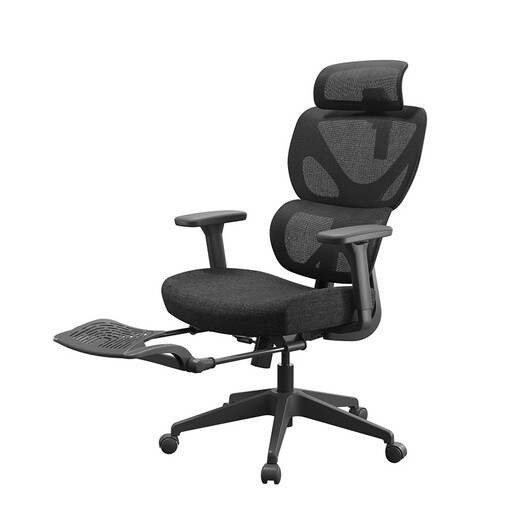
Why this product suits this profile: This chair combines a retractable footrest with essential adjustment options for office work and gaming.
The footrest is listed as a specific feature, while the stated 132° recline angle indicates use between an upright and a reclined position.
Retractable footrest, elastic lumbar support, swivel armrest and 10 cm thick seat padding, according to the product description.
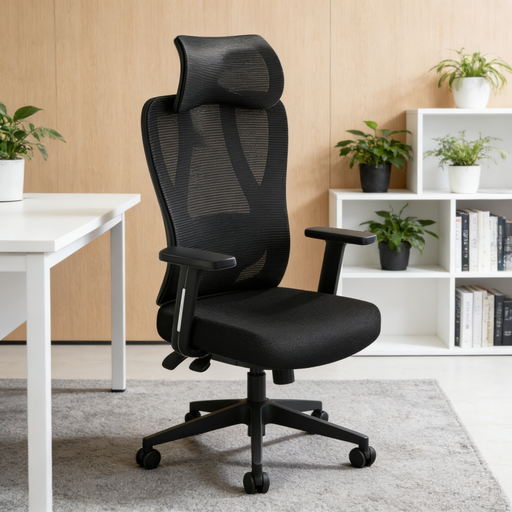
Why this product suits this profile: This model is designed for precise adjustment and switching between a PC workstation and a gaming setup.
The breathable 2-layer mesh cover addresses the typical heat issue associated with enclosed faux-leather surfaces. The backrest can be adjusted from 105° to 140°.
4D lumbar support, adjustable headrest, 40 mm backrest height adjustment and 10.5 cm seat padding, according to the product data.
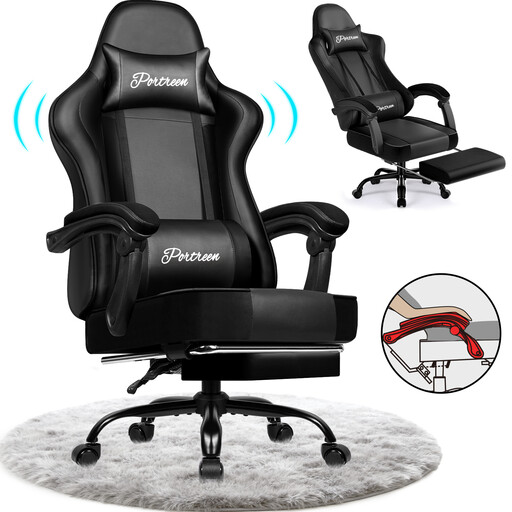
Why this product suits this profile: For users who need a backrest that reclines a long way, head and lumbar support, and a stated load capacity.
Instead of merely advertising a reclining function, the model specifies a concrete range of 90° to 170° and 10 cm of seat-height adjustment.
Stated load capacity of 150 kg, metal footrest frame, high-density foam, plus BIFMA and SGS certification details.
We have put together a complete, regularly updated list of products that fully meet these strict selection criteria and the safety regulations applicable in the EU.
Even a sturdy PC chair for the office and gaming requires regular checks. After assembly, inspect the screws, armrests, castors and gas lift. For PU leather, a soft, slightly damp cloth is usually sufficient. Mesh covers should be cleaned according to the care instructions.
Use the footrest only as a leg rest, not as a step. Also avoid sudden movements when the backrest is heavily reclined. The actual service life depends on body weight, daily usage time, floor condition, assembly and care. A blanket figure in years is therefore not meaningful without specific manufacturer conditions.
Yes, provided the seat height, seat depth, backrest and armrests are suitable for your desk. For longer periods of work, the backrest should allow you to sit upright. The footrest is mainly suitable for breaks and reclined sitting.
The price depends, among other things, on the cover, frame, adjustment mechanism, footrest and stated load capacity. Do not compare the price alone; also look at specific details such as the recline range, seat-height adjustment, armrests and type of lumbar support.
No. A massage function is an additional comfort feature and does not replace a suitable seat height or back support. With USB-powered massage cushions, you should also check whether a power source is available nearby and whether the function can be switched off separately.