
Lieferung heute & morgen

Qualitätsgarantie

Willkommens-Angebote freischalten: KOSTENLOSE Lieferung | Bis zu 80 % RABATT | Kostenlose 30-Tage-JoyPlus-Testphase
App herunterladen
An ergonomic gaming chair with a footrest needs to do several jobs while you play, work and relax. The seat must be stable, the backrest should adjust to suit you, and the footrest should be more than just a decorative extra. If you focus only on the design or a low price, you may not spot potential shortcomings until after assembly.
A reclining backrest isn’t automatically ergonomic. What matters is whether the seat height, backrest, armrests, headrest and lumbar support can be adjusted to suit your height. A reclining gaming office chair can be useful for breaks, but it won’t replace a suitable working posture at your desk.
Check the stated adjustment range, too. Several of the models featured here offer up to 10 cm of seat-height adjustment and a backrest that reclines between 90 and 170 degrees. These figures are more helpful than vague claims such as ‘suitable for everyone’.
A pull-out footrest is designed to support your legs. It shouldn’t be used as a step, or while you’re moving the chair. Before buying, check:
A gaming chair with a footrest is particularly useful for relaxing during breaks. When sitting actively at your desk, both feet should still be able to rest firmly on the floor.
A 150 kg gaming chair isn’t automatically the right fit for everyone up to that weight. As well as the maximum load capacity, check the seat width, seat height, backrest height and base construction. The manufacturer’s stated limit of 150 kg is a maximum and must not be exceeded.
For people around 158 to 190 cm tall, models with adjustable seat heights and height-adjustable armrests are usually easier to adapt to an individual sitting position. Still, check the product specifications before buying, as dimensions and features can vary between versions.
A gaming chair with lumbar support should offer adjustable support for the lower back, or at least support that’s positioned appropriately. If it comes with a cushion, check that you can adjust its height and that it won’t keep slipping out of place. A headrest can support your neck when you recline, but it isn’t a substitute for setting your monitor at the right height.
A backrest that reclines from 90 to 170 degrees can accommodate upright working as well as reading in a reclined position or taking a break. Only use the reclining function on a stable surface, and lock the mechanism as instructed.
With a gaming chair with armrests, your forearms should rest as close to horizontal as possible while your shoulders stay relaxed. Height-adjustable armrests give you more flexibility. The product specifications for several models featured here state that the armrests adjust by 8 cm.
Set an height-adjustable gaming chair so that your feet rest firmly on the floor and your knees aren’t consistently pointing too far up or down. Make sure there’s enough room under your desk, as armrests set too high may catch on the desk top.
High-density, resilient foam can retain its shape for longer with regular use than very soft padding with little support. PU or PVC-PU upholstery can be cleaned with a damp cloth. How it feels can vary depending on the room temperature, and it isn’t the same as breathable mesh.
If you sit for many hours in a warm room, you could consider an ergonomic office chair with mesh upholstery. For those who prefer a pull-out footrest and a more heavily padded gaming chair, faux leather models are an obvious alternative.
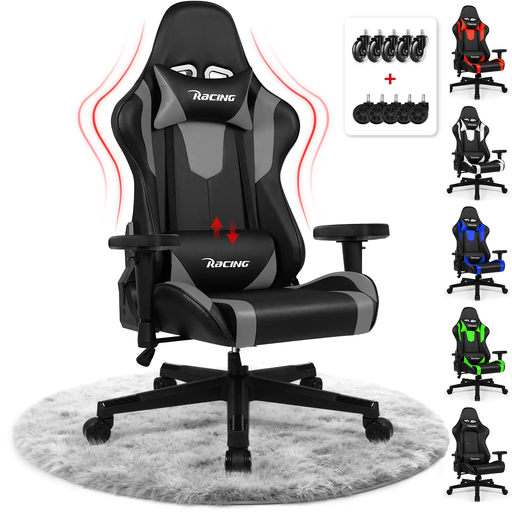
Why this product suits this type of buyer: This model combines a backrest that reclines from 90 to 170 degrees, up to 10 cm of seat-height adjustment and height-adjustable armrests. It’s suitable for gaming and working from home if a footrest isn’t essential.
The product specifications give precise adjustment ranges and recommend a height of 158 to 190 cm, rather than making an unqualified claim that it fits everyone.
Backrest reclines to 170 degrees, armrests adjust by 8 cm, and lumbar support and headrest are adjustable, according to the product description.
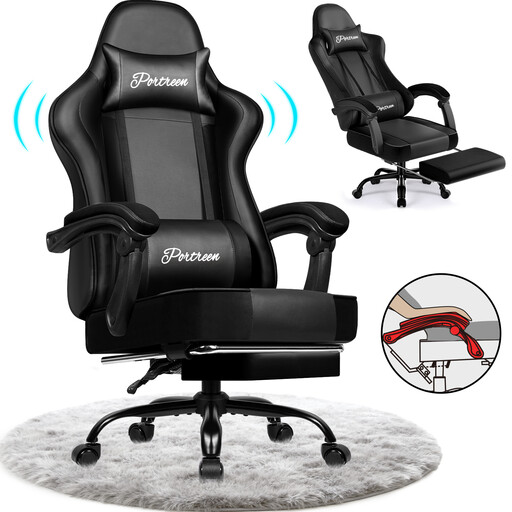
Why this product suits this type of buyer: This model is for anyone looking for a chair with a high weight capacity, a pull-out footrest and several support features. The supplier states a maximum load capacity of 150 kg, a metal footrest frame, and BIFMA and SGS certifications.
The footrest is described as having a metal frame and non-slip surface. The stated limit of 150 kg makes its load capacity easy to check.
Backrest reclines from 90 to 170 degrees, high-density resilient foam, and head and lumbar cushions included, according to the product specifications.
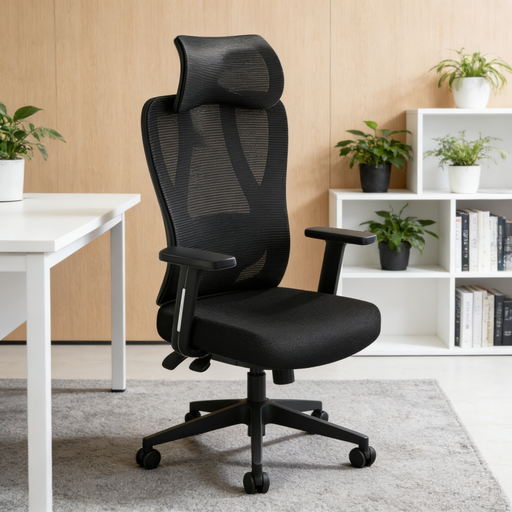
Why this product suits this type of buyer: The Z5 Soft is aimed at people who combine gaming with office work and prefer breathable upholstery. It features double-layer mesh, 4D lumbar support, an adjustable headrest and a backrest that reclines from 105 to 140 degrees.
Its design focuses on specific adjustment options and airflow through the mesh, rather than making a vague promise of comfort.
4D lumbar support, 40 mm of backrest height adjustment and a seat cushion with a stated height of 10.5 cm.
We’ve put together a complete, regularly updated list of products that meet these strict selection criteria and fully comply with the safety regulations in force in the EU.
First, adjust the seat height so that both feet rest firmly on the floor. Your knees should be positioned at roughly a right angle. Then adjust the backrest, lumbar support, headrest and armrests. Your forearms should rest comfortably, without your shoulders lifting. It’s best to use the footrest only when reclining or taking a break.
Lifespan depends on how many hours you use it each day, your body weight, the floor surface, material quality and maintenance. Regularly check the screws, castors, gas lift and tilt mechanism. Clean faux leather with a soft, damp cloth; harsh cleaning products can damage the surface. A stated load capacity of 150 kg doesn’t guarantee a particular lifespan.
No. The backrests, armrests and footrests on the models described here are adjusted mechanically. So there are no ongoing electricity costs. Instead, when choosing a chair, look at spare parts availability, the assembly instructions, the weight limit and how easy it is to check the moving joints regularly.