
Lieferung heute & morgen

Qualitätsgarantie

Willkommens-Angebote freischalten: KOSTENLOSE Lieferung | Bis zu 80 % RABATT | Kostenlose 30-Tage-JoyPlus-Testphase
App herunterladen
An ergonomic gaming chair with footrest should do more than look the part when you’re gaming, working or streaming. What matters is having the right seat height, an adjustable backrest, enough lower-back support and a design that suits your height and build. If you focus only on racing-inspired looks or extra-soft padding, you may overlook important details.
A pull-out footrest can support your legs when you’re reclining. However, it’s no substitute for correctly adjusted seat height and a stable backrest. If the seat is too high or too low, your knee and leg position can still be uncomfortable, even with a footrest.
So check the following:
The term doesn’t automatically refer to a specific standard or set level of comfort. An ergonomic office chair should offer practical adjustments, including seat height, backrest and armrests, and ideally an adjustable lumbar support. If you’re choosing a gaming chair with armrests, it’s also important to check whether the armrests are at the right height for your desk.
Look for measurable details rather than general marketing claims. These might include the backrest’s recline angle, armrest height, maximum weight capacity and seat dimensions.
A thick seat cushion can make a great first impression. But if you’ll be sitting for long periods, it also matters whether the padding holds its shape and whether the seat is wide and deep enough. Some listings give little or no detail about the type of padding. Before buying, check the product specifications, returns policy and assembly instructions.
A 132° adjustable backrest can offer a useful position for reading, taking a break or watching videos. A greater recline angle won’t necessarily suit everyone. Check that the backrest stays securely in the position you choose and that the adjustment mechanism is easy to use.
A gaming chair with a reclining function should also have a stable base and easy-to-reach controls. Only use the footrest in positions where the chair’s centre of gravity remains safely within the base.
An adjustable lumbar support can help you position your lower back to suit the way you sit. On a computer chair with a headrest, make sure the headrest isn’t too high or too far back. It’s most useful when you’re reclining.
With a gaming chair with armrests, check how adjustable they really are. Vertically adjustable armrests can help you get comfortable at desks of different heights. Also check that the armrests have enough surface area and won’t get in the way when you pull the chair up to your desk.
The stated maximum weight capacity should be suitable for you and your everyday use. It doesn’t guarantee that the chair will withstand every type of movement. A black gaming chair made from faux leather or PVC is usually easy to wipe clean, but the material may feel different from fabric depending on the room temperature.
These details are especially useful when choosing a chair:
For a height-adjustable desk chair, the lowest and highest seat positions should work with your desk and your height. A built-in footrest is particularly useful if you regularly want to recline.
The selection below groups products according to specific requirements. Product details are taken from the relevant listings; the actual fit and comfort will depend on your height, sitting position and workspace.
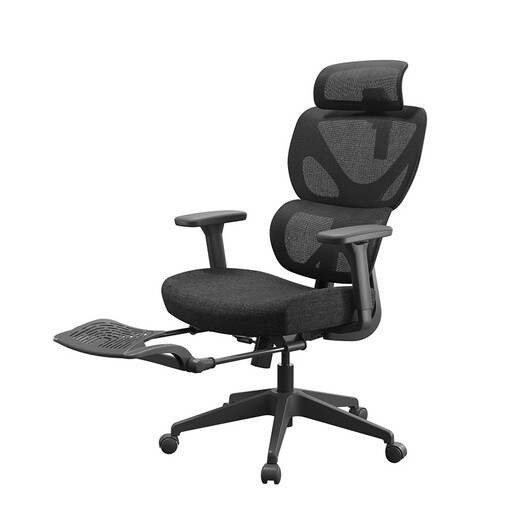
Why this product suits this profile: This model combines a footrest, headrest, swivel armrests, lumbar support and a backrest that’s adjustable to 132°, according to the product name. It’s a good option if you’re looking to combine gaming and home office features in one chair.
The key features are clearly listed: footrest, 10 cm-thick seat cushion, armrests, headrest and recline angle. Check the full dimensions before buying.
Footrest, 132° backrest, 10 cm seat cushion and adjustable or swivel armrests, according to the product details.
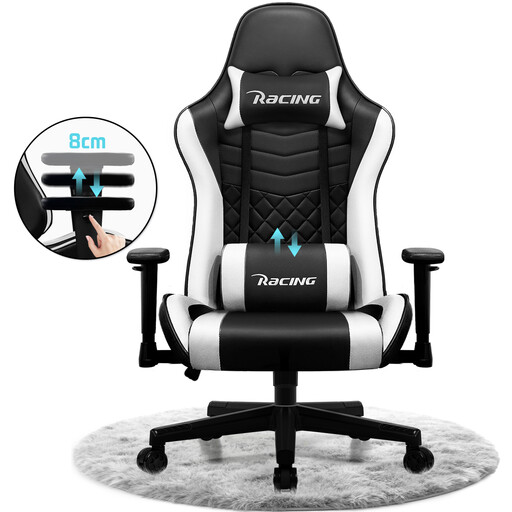
Why this product suits this profile: This chair is aimed at users who value practical adjustment options and a higher stated weight capacity. The listing mentions height-adjustable lumbar support, a headrest, armrests and a weight capacity of 150 kg.
Rather than simply highlighting soft padding, the listing gives adjustment ranges and the maximum weight capacity. You should still check the fit against your own measurements.
According to the listing: armrests adjustable vertically by 8 cm, height-adjustable lumbar support, headrest and maximum weight capacity of 150 kg.
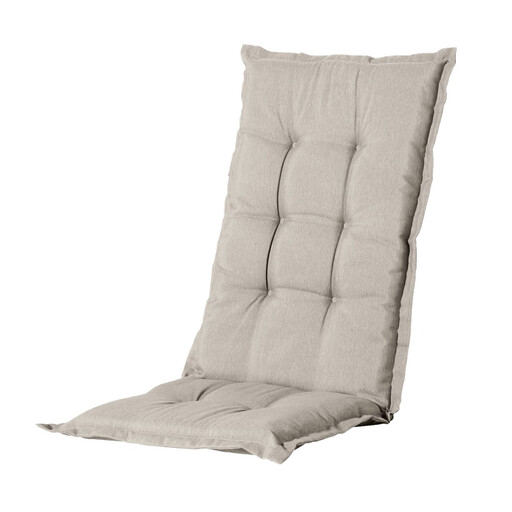
Why this product suits this profile: This back cushion isn’t a substitute for a complete gaming chair, but it could be useful if you already have a chair. It measures approximately 123 × 50 cm and attaches with adjustable straps.
The product description clearly states that the cushion isn’t waterproof. Use it only in a suitable location and make sure it’s securely fastened.
Approximately 123 × 50 cm, 5 cm thick, cover made from 50 % cotton and 45 % polyester, with an adjustable strap fastening, according to the product description.
We’ve put together a complete, regularly updated list of products that fully meet these strict selection criteria and the safety regulations in force in the EU.
It depends on the seat height and width, backrest and armrests. For everyday office work, the chair should support an upright sitting position and adjust to your desk height. The footrest is mainly an extra for reclining during breaks.
There’s no reliable way to give a general lifespan. It depends on how long you use the chair each day, your body weight, the type of floor, how well you maintain it and the quality of its mechanisms. Check the castors, screws, gas lift and recline mechanism regularly. If you notice any looseness or damaged parts, stop using the chair.
No. The reclining function and pull-out footrest are usually operated mechanically and don’t need a power supply. Ongoing costs mainly come from maintenance and replacing castors or worn parts if needed.