
Lieferung heute & morgen

Qualitätsgarantie

Willkommens-Angebote freischalten: KOSTENLOSE Lieferung | Bis zu 80 % RABATT | Kostenlose 30-Tage-JoyPlus-Testphase
App herunterladen
An ergonomic gaming chair should help you find a suitable sitting position for gaming, working and streaming. In practice, though, a striking design doesn’t automatically make a chair the right choice. What matters is clear product information: seat height, backrest adjustment, materials, weight capacity and the quality of the adjustment mechanisms.
A gaming chair may be advertised with a rocking function, footrest and adjustable backrest. That alone doesn’t tell you much about how practical it is for everyday use. Check how far the backrest reclines and whether the seat height is right for your desk. For example, a recline range of 90 to 155 degrees offers noticeably more positions than a model with only a slight rocking movement.
A PU leather gaming chair can usually be cleaned with a damp cloth. However, when it’s warm for long periods, its surface may feel hotter than the backrest of a breathable gaming chair with mesh. If you sit for many hours every day, consider airflow and care instructions as well as appearance.
The stated maximum weight capacity applies to the product and must not be exceeded. When choosing a gaming chair with a capacity of up to 150 kg, consider your body weight, clothing and any additional forces caused by movement. It can be sensible to leave a safety margin below the stated limit. The castors, gas lift, screw connections and floor surface also need to work well together.
When seated, your feet should rest as flat as possible on the floor, while the seat height should put you in a comfortable position in relation to your desk and monitor. Check:
A 360-degree swivel chair makes it easier to turn between your desk, storage and monitor. However, the swivel function is no substitute for the right seat height.
An adjustable backrest can support different activities: an upright position is generally suited to focused work, while a greater recline may be more comfortable for breaks. On a gaming chair with a recline function, the mechanism should be easy to reach and feel stable in every position.
A lumbar support can help you adjust the chair to suit you. Check whether it’s built in, adjustable or supplied as a separate cushion. Product information alone cannot substantiate claims about health or therapeutic benefits. Your sitting posture, desk height and monitor position also matter.
Mesh backrests can promote airflow, while PU leather offers a smooth surface that’s easy to wipe clean. With both materials, the quality of the finish and the care instructions matter. The product details should also specify:
The following SYMINO models are listed in their product descriptions as having a Class 3 gas lift. This refers to a technical component of the product and is not a promise of unlimited service life.
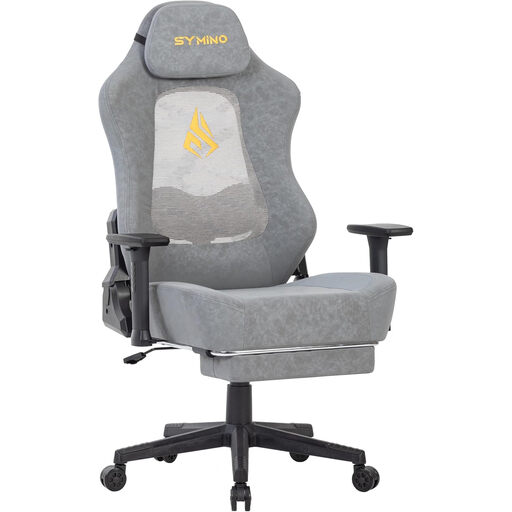
Why this chair suits this type of user: A mesh backrest, 3D lumbar support and 90- to 155-degree recline cover the typical needs of gaming and working from home.
The product description gives specific adjustment ranges and highlights its open-back design, rather than relying solely on general claims about comfort.
Polyester mesh backrest, 3D lumbar support, 12-degree rocking function and a stated weight capacity of up to 150 kg.
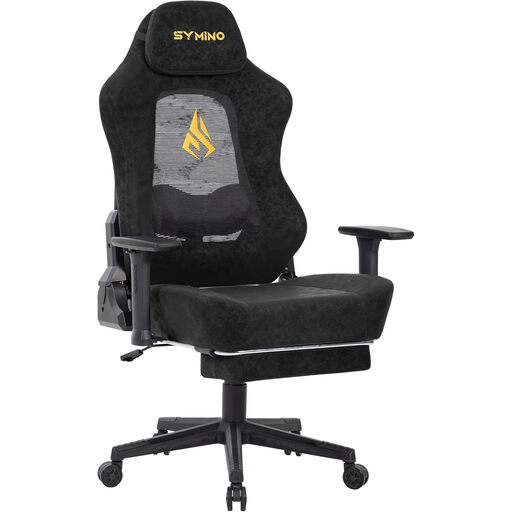
Why this chair suits this type of user: For anyone comparing materials and a wide range of seating positions, this model combines a metal frame, PU leather and a mesh backrest.
The product details distinguish between vintage PU leather, polyester mesh, a metal frame and a nylon base, making it easier to assess both appearance and function.
90- to 155-degree reclining backrest, 12-degree rocking function, 3D lumbar support and a stated weight capacity of up to 150 kg.
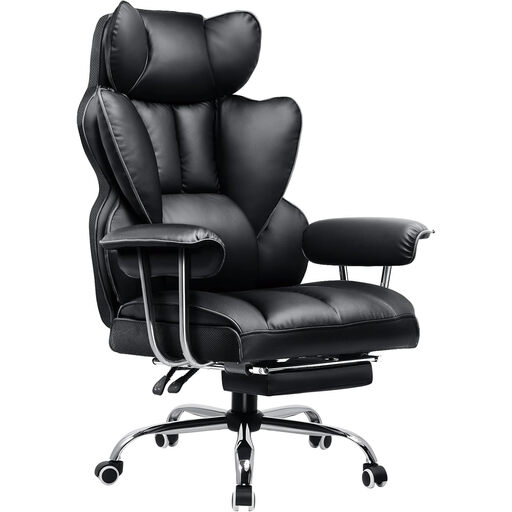
Why this chair suits this type of user: This model is for anyone who wants to combine gaming, working from home and taking breaks, and prefers an integrated footrest.
Alongside the footrest, the product details explicitly list backrest recline of up to 135 degrees, seat-height adjustment and the materials used.
Retractable footrest, 360-degree swivel function, adjustable backrest and seat height, and a PU leather surface.
We’ve put together a complete, regularly updated list of products that meet these strict selection criteria and fully comply with the safety regulations in force in the EU.
Start with the seat height: your feet should rest firmly on the floor. Then adjust the backrest so you can see your monitor without having to lean forwards constantly. The armrests shouldn’t push your shoulders upwards. Finally, make small adjustments to the lumbar support, recline and rocking resistance.
Lifespan depends on how the chair is used, your body weight, the materials, assembly and care. Check the screws, castors, gas lift and connections regularly. Clean PU leather with a soft, slightly damp cloth; harsh cleaners can damage the surface. Check mesh for dust and loose stitching before they become a problem.
A footrest can be handy during breaks or when you’re leaning back. However, it’s no substitute for the right seat height and shouldn’t be seen as a complete ergonomic solution on its own. For long periods of sitting, the backrest, adequate seat width and regular changes of position also matter.