
Lieferung heute & morgen

Qualitätsgarantie

Willkommens-Angebote freischalten: KOSTENLOSE Lieferung | Bis zu 80 % RABATT | Kostenlose 30-Tage-JoyPlus-Testphase
App herunterladen
If you spend a lot of time at your computer, you’ll often want more than eye-catching design. An ergonomic gaming chair should suit your body, how long you sit for and what you’ll use it for. Whether you’re gaming, working from home, doing office work or reading, adjustable features, clearly stated weight limits and suitable materials all matter.
Choosing the right chair isn’t always straightforward, though. Product descriptions can use terms such as ‘ergonomic’, ‘breathable’ and ‘especially sturdy’ rather freely. What matters are specific details you can compare before buying.
Pronounced side bolsters on the seat and backrest may suit the gaming look, but they can restrict your freedom of movement. If you regularly change position or also use the chair as an office chair for long periods, look for a seat that’s wide enough and a backrest that moves with you.
A so-called wingless design – a backrest without pronounced side wings – can offer more freedom of movement for different body shapes. Even so, the word ‘ergonomic’ is no substitute for checking the seat height, seat depth, armrests and backrest adjustment.
A cushion or fixed contour in the lower back is often promoted as a gaming chair with lumbar support. That alone doesn’t tell you much about how well it will fit. Check whether the support is height-adjustable, flexible or built in. According to the product description, 3D lumbar support can adapt more dynamically to your sitting position; it should still be adjusted so it doesn’t create uncomfortable pressure.
A headrest also needs to suit your height. With a gaming chair with headrest, its height, tilt and width matter more than simply having an extra cushion.
A gaming chair with footrest is useful for breaks or sitting in a reclined position. However, the footrest doesn’t replace the need for a suitable seat height, and you shouldn’t stand on it or use it as a step. Similarly, a backrest with a wide recline angle isn’t automatically comfortable for everyone.
Ideally, your feet should rest firmly on the floor when you’re working normally. Height adjustment makes it easier to match the chair to your desk and your height. With a height-adjustable gaming chair, check the stated height range too.
Armrests only help relieve pressure on your shoulders if they’re at the right height for your desk and let you rest your forearms as horizontally as possible. Models with adjustable armrests offer more flexibility. Also check the seat depth: there should be enough space between the front edge of the seat and the backs of your knees.
A backrest with clearly defined adjustment is more practical for switching between activities than a fixed design. Depending on the model, the recline range may be 90 to 155 degrees or 90 to 170 degrees, for example. A rocking function can make it easier to change position.
For a gaming chair with lumbar support, the type and position of the support should be clearly described. For a headrest, adjustable height and tilt are useful details to look for. The support shouldn’t push your head forwards.
The 150 kg gaming chair rating describes the manufacturer’s stated maximum weight capacity. It isn’t a promise of comfort, and you shouldn’t rely on it being reached all the time. A sturdy base, correctly fitted castors and a suitable gas lift are important too.
A breathable gaming chair with mesh panels may improve airflow around the backrest. Faux leather, on the other hand, is usually easier to clean with a damp cloth. If you’ll be using the chair for long periods, consider the material, room temperature and your personal sitting habits.
BIFMA or SGS claims should ideally be verifiable directly in the product information. They don’t replace checking the specific product details, but they can offer extra guidance on construction and safety.
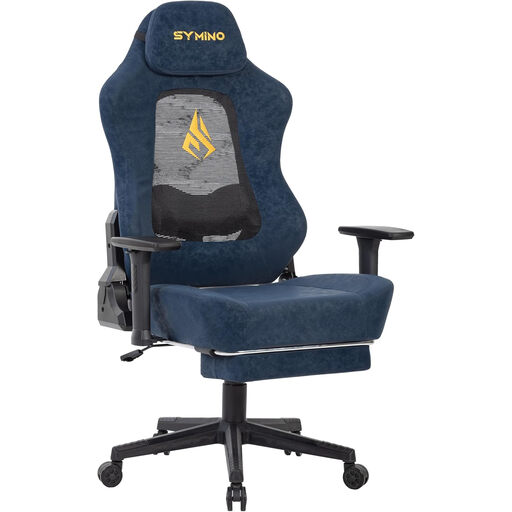
Why this product suits this profile: This model combines an open backrest with mesh panels, 3D lumbar support and a recline range of 90 to 155 degrees. It’s designed for gaming and general computer use.
The product details give specific adjustment ranges and describe 3D lumbar support and an open backrest, rather than relying solely on general comfort claims.
Stated maximum weight capacity of 150 kg, 12-degree rocking function and mesh backrest.
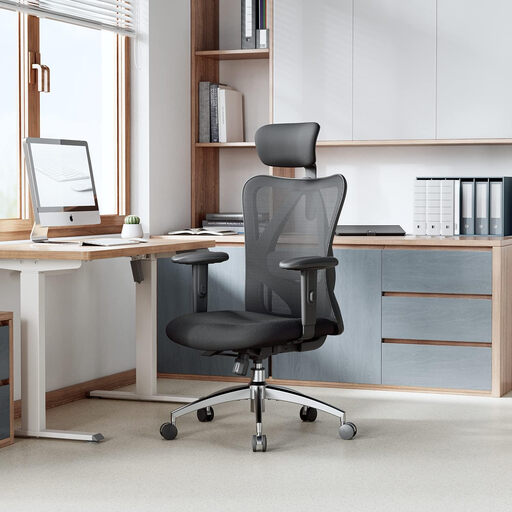
Why this product suits this profile: This office chair is aimed at people who combine gaming with working from home and value an adjustable headrest, lumbar support, armrests and seat height.
The product details specify an 8 cm height adjustment range, a 126-degree backrest recline and a seat height of 43 to 51 cm.
BIFMA and SGS claims according to the product description, maximum weight capacity of 150 kg and W-shaped seat.
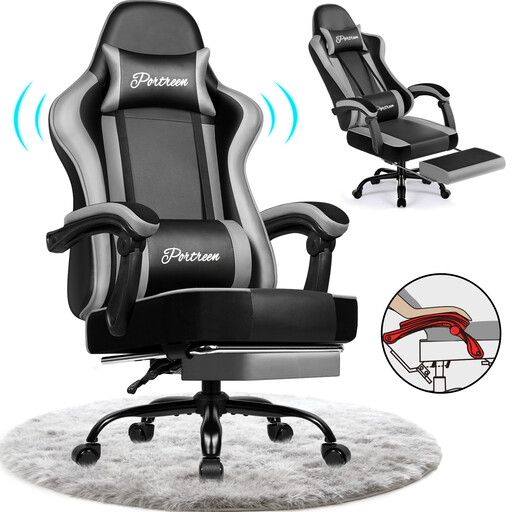
Why this product suits this profile: If you’d like to read or relax in a reclined position as well as game and work, this model has a footrest, headrest and a recline range of 90 to 170 degrees.
The footrest is described as an extendable feature with a metal frame, designed to support your legs rather than serve as a step.
10 cm height adjustment, maximum weight capacity of 150 kg, plus headrest and lumbar support according to the product details.
We’ve put together a complete, regularly updated list of products that meet these strict selection criteria and fully comply with the safety regulations in force in the EU.
Once assembled, place the chair on a level surface. Adjust the seat height so your feet rest firmly on the floor. Then adjust the backrest, lumbar support and armrests. The backrest should support your upper body without forcing you into a rigid posture.
If your gaming chair reclines, check the lock and recline mechanism without putting them under heavy pressure first. Only extend the footrest when the chair is stationary. Check the screw connections and castors regularly.
Its lifespan depends on how many hours you use it each day, your body weight, the mechanism, the materials and how well you look after it. A stated weight capacity of 150 kg doesn’t indicate a guaranteed lifespan. Regularly tightening the screws and cleaning the chair as instructed by the manufacturer can help keep it in good condition.
That depends on the seat height and depth, the armrests and the backrest adjustment. The footrest is mainly intended for breaks or sitting in a reclined position. For focused screen work, the right desk height and a stable foot position remain essential.
Compare the price against the features: adjustment options, material, weight capacity, mechanism, warranty and assembly requirements. A cheaper model may be enough if the measurements are right for you. If you use the chair for long periods every day, adjustable lumbar support, a headrest and armrests may matter more than extra design features.