
Lieferung heute & morgen

Qualitätsgarantie

Willkommens-Angebote freischalten: KOSTENLOSE Lieferung | Bis zu 80 % RABATT | Kostenlose 30-Tage-JoyPlus-Testphase
App herunterladen
An ergonomic gaming chair with footrest should offer more than eye-catching looks. During long gaming sessions, when working from home or at your desk, adjustable support, sturdy mechanisms and suitable dimensions all matter. However, many products are advertised with terms such as “ergonomic”, “extra-sturdy” or “for long periods of sitting” without clearly stating the relevant details.
An extendable footrest can relieve pressure on your legs when reclining. However, it cannot replace the correct seat height, sufficient seat depth or a backrest with a suitable angle. If the footrest is short or unstable, it is often suitable only for occasional periods of relaxation.
You should therefore check:
A gaming chair with lumbar support, headrest and armrests can be adjusted to suit the individual user. What matters, however, is whether each component can actually be positioned correctly. A lumbar support that is simply attached or cannot be adjusted in height will not suit every body size.
Look for specific information about:
“High-quality padding” is not a technical specification. More useful details cover the upholstery, padding and frame. PVC or PU faux leather is easy to clean with a damp cloth, but it can feel different in warm conditions compared with fabric upholstery. Likewise, shape-retaining foam should not be taken to indicate a specific service life.
If you are looking for a gaming chair up to 150 kg, do not equate the permitted maximum load with the recommended continuous use. Load capacity refers to the total weight and should not be exceeded. A metal frame may be structurally sturdy, but the castors, base, gas lift and screw connections are also important.
Place the computer chair on a level, stable surface. Do not use it as a step and check the connecting elements regularly.
Adjusting an ergonomic office chair correctly begins with ensuring that both feet rest securely on the floor and that your knees can form an angle of roughly 90 degrees. There should be a little space between the backs of your knees and the front edge of the seat. The backrest must support your back without unnecessarily restricting your freedom of movement.
A specific size recommendation is more useful than the description “suitable for everyone”. According to the product details, the second model presented below is designed for people between 158 and 190 cm tall.
A reclining function is useful for breaks and relaxed use. It should lock securely at the desired angle and should not be confused with a suitable working position. A backrest range of 90° to 170° provides various angles for sitting and reclining, but this does not automatically make the chair ergonomically suitable for everyone.
Height-adjustable armrests should be positioned so that your shoulders remain relaxed and your forearms rest as horizontally as possible. During longer periods of sitting, an adjustable headrest can also be helpful, provided it is suitable for your body height.
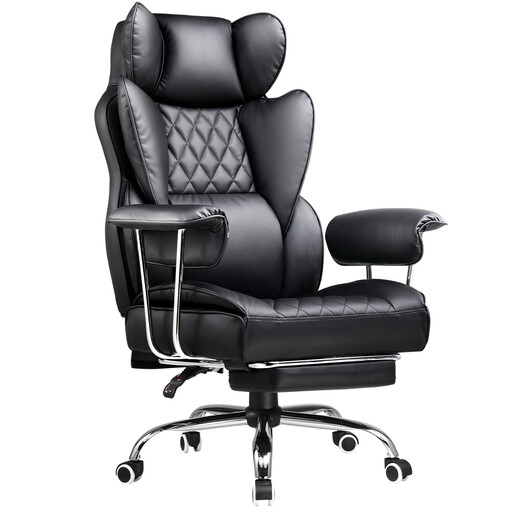
Why this product suits this profile: According to its product name, this model combines a high backrest, lumbar support, footrest and reclining design. It is aimed at users looking for a gaming chair for their desk and occasional breaks.
The footrest and reclining design are explicitly mentioned in the product name. Before buying, check the current listing details for the load capacity, dimensions and adjustment ranges.
Footrest, high backrest and lumbar support according to the product name; swivel design for use at a desk.
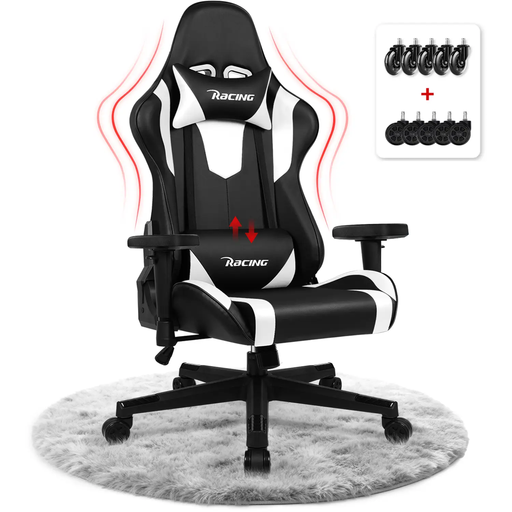
Why this product suits this profile: This model is aimed at users who prefer clearly documented features for gaming and home working. According to the product details, it is suitable for people between 158 and 190 cm tall and supports up to 150 kg.
Specific details replace vague marketing claims: a backrest from 90° to 170°, a 30° tilt function, armrests adjustable by 8 cm and height adjustment of up to 10 cm. A footrest is not mentioned in the product information provided.
Adjustable lumbar support and headrest, armrests adjustable by 8 cm in height, metal frame, shape-retaining foam and a 2-year guarantee according to the product details.
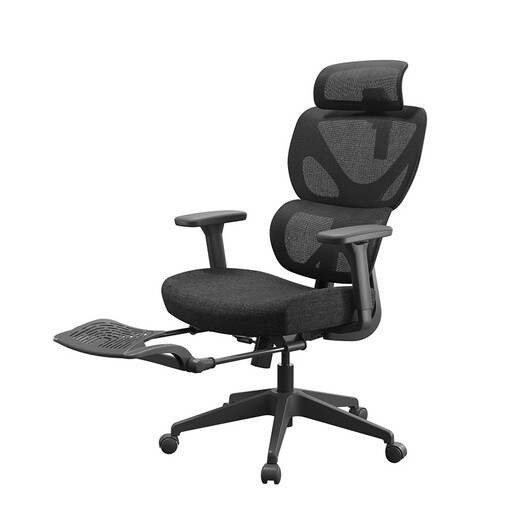
Why this product suits this profile: According to the product name, this model combines a footrest, elastic lumbar support, swivel armrests and a 132° backrest. It is well suited to users who switch between working, gaming and reclining.
The details provide specific measurements rather than simply saying “adjustable”: 10 cm-thick seat padding and a 132° reclining angle. Before ordering, you should also compare the seat dimensions and maximum load with your own requirements.
Footrest, elastic lumbar support, swivel armrests, headrest and 10 cm-thick seat padding according to the product name.
We have put together a complete, regularly updated list of products that fully meet these strict selection criteria and the safety regulations applicable in the EU.
After assembly, adjust the desk chair step by step:
PVC and PU upholstery can be cleaned with a soft, slightly damp cloth. Abrasive cleaning products should be avoided. You should also regularly check the gas lift, castors, screws and reclining mechanism.
Yes, provided the seat height, backrest and armrests suit your workstation. During work, the backrest should allow you to sit upright. The footrest is intended primarily for breaks and reclining.
It is not possible to give a reliable general service-life estimate. Factors include the load, daily usage time, materials, assembly and care. A stated guarantee period describes the scope of the guarantee and does not automatically indicate the chair’s entire service life.
Choose a model whose stated maximum load is comfortably above your body weight. With a gaming chair up to 150 kg, this limit must not be exceeded. Also make sure the chair is placed on a stable surface and check the mechanism regularly.