
Lieferung heute & morgen

Qualitätsgarantie

Willkommens-Angebote freischalten: KOSTENLOSE Lieferung | Bis zu 80 % RABATT | Kostenlose 30-Tage-JoyPlus-Testphase
App herunterladen
An ergonomic gaming chair should help you maintain a stable sitting position while gaming, working and streaming. Many models advertise lumbar cushions, a rocking mechanism and extra-soft padding. But looks aren’t what matter most. The key is whether the chair can be adjusted to suit your height, posture and daily use.
That’s why the Joybuy Product Recommendation Officer’s selection focuses on clear product details and common buying pitfalls, rather than relying on marketing claims alone.
A fixed-position cushion may suit one person but sit in the wrong place for someone else. When choosing a gaming chair with lumbar support, check whether the support is height-adjustable or simply rests loose on the seat. The armrests should also be adjustable, so your forearms aren’t left bent upwards or downwards for long periods.
The stated load capacity, such as that of a gaming chair up to 150 kg, is an important technical specification. However, it doesn’t tell you everything about how stable the chair will be in everyday use. Also check:
Never exceed the maximum load capacity. It also doesn’t automatically mean the chair is suitable for every body shape.
A thick seat may feel comfortable at first. But for long periods of sitting, seat height, backrest shape and lumbar support also matter. An office chair for long hours of sitting should let you sit upright while also offering controlled recline. A rocking function is no substitute for an individually suitable adjustment.
A height-adjustable gaming chair should be adjustable so that both feet rest flat on the floor, with your knees at roughly a right angle. The backrest shouldn’t restrict your shoulders. When comparing chairs, specific measurements are more useful than vague terms such as ‘ergonomic’.
Useful details to look for include:
A gaming chair with armrests should support your elbows in a relaxed position. Models with height-adjustable armrests make it easier to find a position that suits your desk and height.
A gaming chair with a headrest can support your neck when you lean back. However, when sitting actively at your desk, the headrest shouldn’t push your head forwards. For lumbar support, check whether its height and position can be adjusted.
Product descriptions should clearly distinguish between built-in padding, a removable cushion and genuinely adjustable support. Claims about relieving pressure won’t necessarily apply to everyone.
PVC and PU upholstery can usually be cleaned with a soft, damp cloth. However, they may feel different from fabric surfaces in warm conditions. On a gaming chair with a rocking function, the mechanism should move smoothly and offer a locking position, if this is specified in the product details.
A gaming chair with a footrest may be useful for breaks or reclining. For focused work, however, keeping your feet firmly on the floor is usually the better starting position. Treat the footrest as an extra feature, not a substitute for setting the seat to the right height.
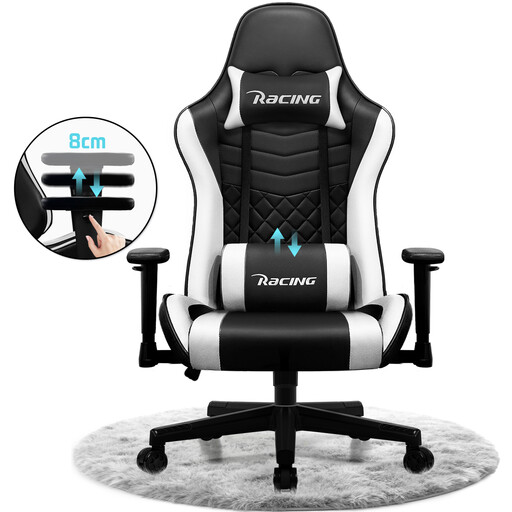
Why this product suits this profile: This model combines key adjustment options with a stated load capacity of 150 kg, making it a versatile entry-level choice for gaming and working from home.
According to the product details, the lumbar support and armrests are adjustable. This means you’re not relying solely on the shape of fixed padding to get a suitable fit.
Armrests adjust vertically by 8 cm, adjustable lumbar cushion, 360-degree swivel and a stated load capacity of 150 kg.
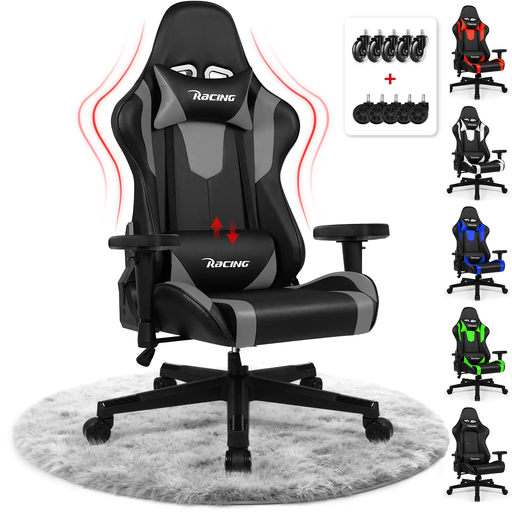
Why this product suits this profile: If you want to compare a range of adjustment measurements, this chair provides details on the backrest, seat height, armrests and recommended user height.
The product details give a backrest recline range of 90 to 170 degrees, up to 10 cm of height adjustment and 8 cm of armrest adjustment, rather than relying on general claims about comfort.
Steel frame, PVC and PU upholstery, height-adjustable features and a stated suitability for people between 158 and 190 cm tall.
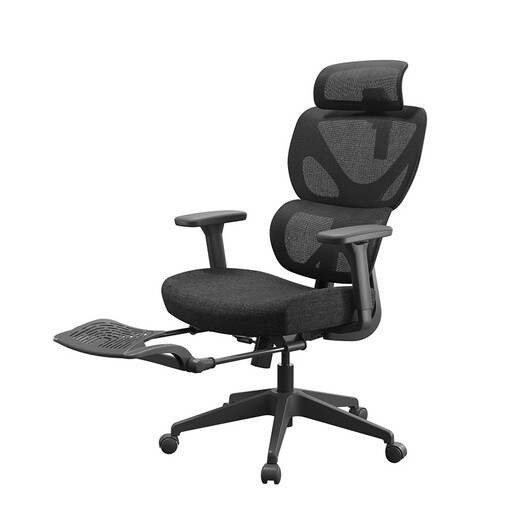
Why this product suits this profile: If you like to switch between sitting upright to focus and leaning back for a break, this model has a footrest and a stated recline angle of 132 degrees.
The extra footrest and rotating armrests give you more ways to adjust the chair. For your everyday working position, though, you should still set the seat height separately to suit you.
Footrest, elastic lumbar support, rotating armrests and 10 cm-thick seat padding, according to the product description.
We’ve put together a complete, regularly updated list of products that meet these strict selection criteria and fully comply with the safety regulations in force in the EU.
Before using the chair for the first time, assemble and check all screws, castors and connecting parts according to the instructions. Place the chair on a level surface and make sure your feet can reach the floor when you adjust the seat height.
For longer periods of sitting, it’s also a good idea to:
Start with the seat height: both feet should rest flat on the floor. Then adjust the lumbar support to follow the natural curve of your lower back. Set the armrests so that your forearms rest as horizontally as possible. Finally, choose a recline angle that suits what you’re doing.
Its lifespan depends on how long you use it each day, your body weight, the materials, the mechanism and how well you care for it. A stated warranty period is a useful point of comparison, but it doesn’t guarantee a particular overall lifespan. Check the castors, gas lift, seams and screw connections regularly.
A gaming chair can be used for working from home if its seat height, backrest and armrests suit your desk. If you’ll be working for many hours, specific adjustment options matter more than the gaming look. Choose based on the seat measurements and recommended user height, not just the design.