
Lieferung heute & morgen

Qualitätsgarantie

Willkommens-Angebote freischalten: KOSTENLOSE Lieferung | Bis zu 80 % RABATT | Kostenlose 30-Tage-JoyPlus-Testphase
App herunterladen
An ergonomic gaming mouse should feel comfortable in your hand during long gaming or working sessions and allow for precise input. In practice, however, an eye-catching design, high DPI figures or colourful lighting alone won’t help you make the right choice. What matters is the shape, sensor, connection, cable and features the mouse actually offers.
This buying guide explains which details to check before buying a wired gaming mouse, and which features may suit different types of users. It also considers a mountain bike helmet for adults, as fit, materials and clear safety information are important when choosing one, too.
A high DPI setting initially tells you only how quickly the pointer moves in response to a particular movement of the mouse. It isn’t proof of precise control on its own. For many users, having several selectable levels is more practical, as you can adjust the sensitivity for games, office applications or photo editing.
An LED gaming mouse may complement your setup visually. But lighting says little about sensor quality, button durability or ergonomics. Check the connection, shape, button layout and cable routing first. Treat LED lighting as an extra, not a deciding factor.
An ergonomic shape can reduce pressure points if it suits your hand size and grip style. However, palm, claw and fingertip grips call for different contours. Weight and the position of the side buttons also affect how easy the mouse is to use. So a mouse described as ergonomic won’t automatically suit every hand.
An optical sensor tracks movement across a surface and is widely used in modern USB mice. When choosing a mouse, look beyond the sensor description: check whether it responds consistently to both slow and fast movements, and whether it offers several sensitivity levels.
A mouse with adjustable DPI gives you more flexibility. Four clearly defined levels may be enough if you switch between desktop work, strategy games and fast camera movements. The right setting depends on your screen resolution, the game you’re playing and how you prefer to move the mouse.
The 1000 Hz polling rate tells you how often the mouse reports its position to your computer. In theory, that means one report every 1 millisecond. This can help provide consistent input, but you’ll need a compatible USB port and suitable system settings. The figure alone doesn’t guarantee a completely lag-free gaming experience.
A USB mouse usually doesn’t need separate software installation and can be plugged in straight away. Wired models also do away with charging or changing batteries. Check that the cable is long enough, flexible and covered with a material that won’t twist easily.
If your hands tend to get warm or you use your mouse for long periods, a sweat-resistant mouse made from a material described as such may be practical. This description should refer to the surface or coating; it doesn’t mean the whole device is waterproof. Keep liquids away from the USB port and electronic components.
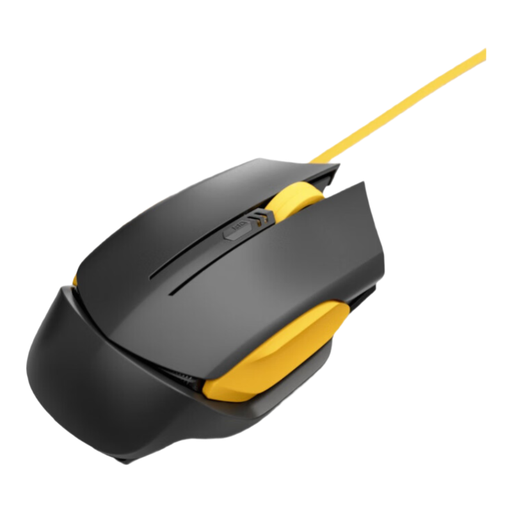
Why this product suits this profile: With a wired USB connection and four DPI settings, this mouse offers a straightforward set of features for PC users looking for something for everyday use and occasional gaming.
The product description lists specific features, including an optical sensor, a 1000 Hz polling rate, four DPI settings and a tangle-resistant cable, rather than relying on design or lighting alone.
Optical sensor, 1000 Hz polling rate, four adjustable DPI settings and, according to the product description, sweat-resistant material.
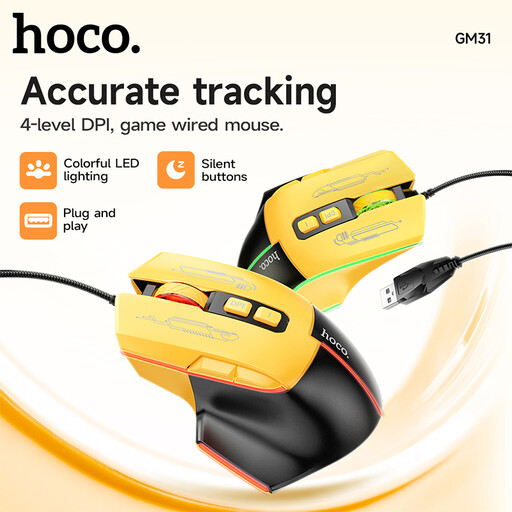
Why this product suits this profile: This model combines a shape described as ergonomic with optical tracking, a tactile scroll wheel, responsive buttons and LED lighting to create a coordinated PC setup.
LED lighting isn’t the only focus. The product description also mentions the cable, USB plug-and-play connection, optical tracking and controls.
Optical sensor, flexible cable described as braided, USB plug-and-play and a black and yellow gaming mouse design with LED effects.
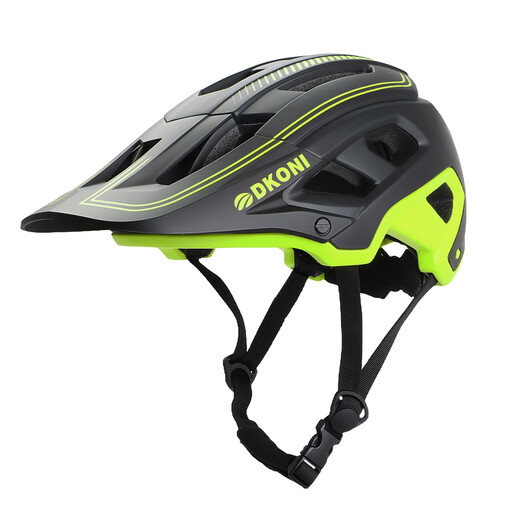
Why this product suits this profile: Size L is clearly specified for adult mountain bikers with a head circumference of 56 to 61 cm. The features are designed for longer rides, with ventilation and an adjustable fit.
The size is given in centimetres. The product description also states that the helmet has a PC outer shell, EPS inner material, an adjustable dial fastening and a chin strap.
Size L for 56–61 cm, 17 ventilation openings, a removable ABS visor and, according to the product description, certifications to US and European standards.
We’ve put together a complete, regularly updated list of products that meet these strict selection criteria and fully comply with the safety regulations in force in the EU.
It can be, if the shape, weight and button position suit your hand. A USB connection provides a continuous link, and there’s no battery to charge. Make sure the cable can move freely and there’s enough space beside your mouse mat.
There’s no single setting that works for everyone. Lower values often allow for broader, more controlled movements, while higher values require less movement across the mouse mat. Several adjustable DPI settings make it easier to switch between applications and games.
Its lifespan depends on the quality of the switches, how often you use it, how you transport it and how well you look after it. Dust, liquids and pulling hard on the cable can affect how it works. Clean the surface carefully and store the mouse so the cable isn’t left bent for long periods.