People who write a lot of reviews
If you edit longer passages, you could consider a split or curved design. It’s one possible layout, but not a proven remedy. Perixx notes that you may need time to get used to the PERIBOARD-512.


For longer writing sessions, a fixed split keyboard could be a good fit; if you need more room for your mouse, consider a compact wave-shaped design. A split keyboard with adjustable halves is worth considering if you want to set the distance between them yourself. Also check for a German key layout, the navigation and function keys you need, connectivity and space for your mouse. Having two screens alone doesn’t determine which design is right for you.
If you edit longer passages, you could consider a split or curved design. It’s one possible layout, but not a proven remedy. Perixx notes that you may need time to get used to the PERIBOARD-512.
If you work with your review and source material on two screens and also need room for your mouse, compare how much space the keyboard and wrist rest take up. The Federal Institute for Occupational Safety and Health recommends coordinating your desk space, keyboard and screen.
If you often move between passages or use writing commands, check whether the navigation and function keys you need are easy to reach. Make sure any custom shortcuts work with your operating system and writing software.
When editing a book review across two screens, the key considerations are your writing routine, the desk space available and the key layout you prefer. The number of screens alone won’t tell you which keyboard is right for you.
| What matters | What to check when buying | Who is this especially important for? |
|---|---|---|
| Hand and arm position | Compare fixed and split designs, the keyboard’s angle, wrist rest and mouse position at your desk. | If I edit long passages, I want to find a key layout that suits the position of my hands and arms. Around 29% of consumers put posture first when working on text for long periods. |
| Correction and navigation keys | Check whether your most-used commands are easy to reach or require software customisation. | If I often move between passages, I want quick access to my most-used correction and navigation commands. Around 23% of consumers look first for these keys and commands. |
| Desk space and mouse | Measure the space available for the keyboard and wrist rest, and check that your mouse will still be easy to reach. | If there’s little room beside my keyboard and papers, I still want to be able to use my mouse comfortably. Around 18% of consumers put available desk space first. |
| Layout and connectivity | Check the exact QWERTZ layout, operating system requirements and any ports or receivers you need. | If I write in German, the selected key layout needs to suit the way I work and connect to my computer. Around 18% of consumers look first at the layout and connectivity. |
| Typing noise and key feel | Check the exact switch option. The switch type alone doesn’t tell you how noisy a keyboard will be. | If I work in a shared space, I want to take the feel and noise of the specific option into account. Around 12% of consumers put these features first. |
The number of screens doesn’t determine which keyboard design you need. What matters is how the keyboard, mouse and the rest of your desk space work together.
Measure the space available and consider your keyboard and mouse as part of the same setup.
The layouts offered can vary by model. CHERRY lists the German version of the KC-4500-ERGO separately as the JK-4500DE-2.
Before buying, check which version you’ve selected and the key layout actually printed on it.
The F.A.Z. Kaufkompass notes that the Dygma Raise 2 doesn’t have separate arrow and F keys.
Check the key layout against the correction commands you use most often.
The Verbraucherzentrale distinguishes the seller’s responsibility for statutory rights relating to faulty goods from any additional manufacturer’s warranty.
Keep your proof of purchase and check the warranty terms separately from your statutory rights.
The ERGO K860 is a fixed split keyboard, while the Wave Keys has a more compact wave-shaped design and wireless connectivity.
The PERIBOARD-512 is a fixed, wired split keyboard with a number pad; the PERIBOARD-335 is a more compact mechanical option.
The KC 4500 ERGO is a curved, wired, full-size keyboard designed for a fixed workstation.
The Freestyle2 International lets you adjust the distance between its two keyboard halves.
The Raise 2 is a mechanical split keyboard with a customisable key layout.
The models below offer different options for longer writing sessions, including full-size, compact and split keyboards. Check the layout, connectivity and keys you need for each specific version.
 No image available
An option if you’re looking for a full-size, wired layout for a fixed workstation.
104 keys; wired USB connection.
 No image available
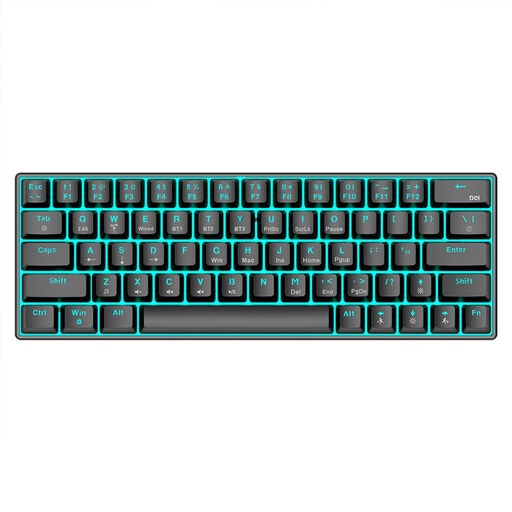
A compact option if you want to save space next to your keyboard and choose from several connection types.
63 keys; Bluetooth 5.0, 2.4 GHz and USB cable; mechanical keys; RGB backlighting.
 No image available
An option if you’d like to choose a keyboard with a German layout and a matching mouse together.
Full-size with number pad; QWERTZ; 2.4 GHz USB connection; quiet keys; removable wrist rest; listed as compatible with Windows and Mac.
 No image available
An option if you’re looking for a fixed split layout with an integrated wrist rest.
Split keyboard layout; QWERTZ; Bluetooth and USB receiver; integrated wrist rest.
 No image available
An option if you’re looking for a wired, full-size keyboard and the listed US QWERTY layout suits your needs.
104 keys; US QWERTY; wired USB connection; listed as compatible with Windows and Mac. If you’re typing in German, check that the specific key layout works for you.
No. The number of screens doesn’t determine which keyboard design you need. The Institute for Occupational Safety and Health of the German Social Accident Insurance found no evidence of additional risks at the two-screen office workstations it studied. What matters is how your keyboard, mouse and screens are arranged for the task at hand.
Give yourself time to adjust gradually. Perixx notes this for the PERIBOARD-512; for the Freestyle2, Kinesis recommends starting with the halves close together and set low, then adjusting the setup little by little. These are manufacturer recommendations, not general medical guidance.
Check the specific model version and your computer’s requirements. CHERRY lists USB-A and Windows for the KC 4500 ERGO; Logitech lists Bluetooth or a Logi Bolt receiver for the Wave Keys. According to Perixx, the downloadable software for the PERIBOARD-335 is Windows-only. Also compare the printed layout with the keys you need when editing.
For faulty goods, the seller is generally responsible for your statutory rights. The Verbraucherzentrale gives a two-year period for these rights; for cancelling an online purchase, it says you usually have 14 days from receiving the goods. Cancellation rights and rights relating to faulty goods are different, and a voluntary manufacturer’s warranty has its own terms.
The specific switch option matters, not just the word ‘mechanical’. Perixx offers different switch options for the PERIBOARD-335. Check their exact names and, if possible, try the feel of the keys rather than assuming that every version has the same noise level.