
Lieferung heute & morgen

Qualitätsgarantie

Willkommens-Angebote freischalten: KOSTENLOSE Lieferung | Bis zu 80 % RABATT | Kostenlose 30-Tage-JoyPlus-Testphase
App herunterladen
By Joybuy Product Recommendation Officer, July 28, 2026
Long days at a desk often lead to neck tension, wrist pain, or tingling fingers. An ergonomic keyboard is frequently touted as the solution, but the market is confusing. Many products are labelled "ergonomic" without possessing the key features that actually provide relief.
This guide will help you separate the wheat from the chaff. We'll show you the most common purchasing pitfalls and what objective criteria truly matter to find a keyboard that will noticeably improve your workday and contribute to a more ergonomic workspace.
Before you invest, you should be aware of the typical marketing traps that often lead to disappointment and, in the worst case, no relief from your discomfort.
To make an informed decision, you should carefully examine three technical aspects. These determine whether a keyboard will provide long-term comfort.
The design is the heart of any ergonomic keyboard. It aims to reduce pronation (the inward rotation of your forearms) and ulnar deviation (the outward bending of your wrists).
A keyboard with a wrist rest is crucial for keeping your wrists in a neutral position and reducing pressure on sensitive nerve pathways. Pay attention to the following points:
A wireless ergonomic keyboard offers more flexibility in desk placement and avoids cable clutter. Check the connection options (Bluetooth, 2.4 GHz USB receiver) and ensure the keyboard is fully compatible with your operating system (Windows, macOS). Some models offer software for key customisation, which can be an added benefit.
Based on the criteria above, we have identified several models suitable for different needs and workflows.
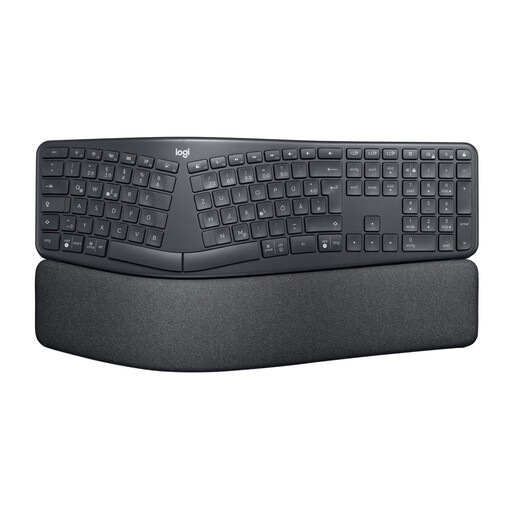
Why This Fits Their Persona: Ideal for users who type for many hours daily and are looking for a preventative or remedial solution for wrist strain. The standard QWERTY layout is perfect for the English-speaking market.
This model is more than just an "ergonomic shape." It combines a true split keyboard with a curved structure and adjustable feet for a negative tilt to actively relieve wrist pressure.
According to Logitech, the integrated, three-layer wrist rest provides 54% more wrist support. The wireless connection via Bluetooth or a USB receiver ensures a tidy workspace.
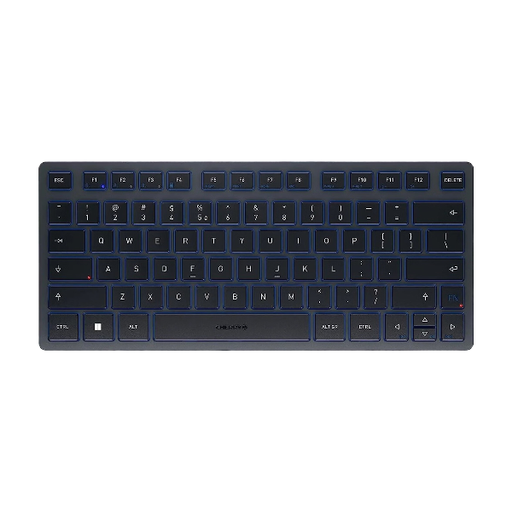
Why This Fits Their Persona: Perfect for users who frequently switch between the office, home, and on-the-go, and need a single, comfortable keyboard for their laptop, tablet, and smartphone.
Instead of imitating a bulky, pseudo-ergonomic shape, this model focuses on proven typing comfort with the CHERRY SX scissor mechanism in a compact format that doesn't compromise mobility.
Seamlessly switch between up to 3 devices via Bluetooth. The ultra-compact design and included carrying case made from recycled plastic highlight its portability.
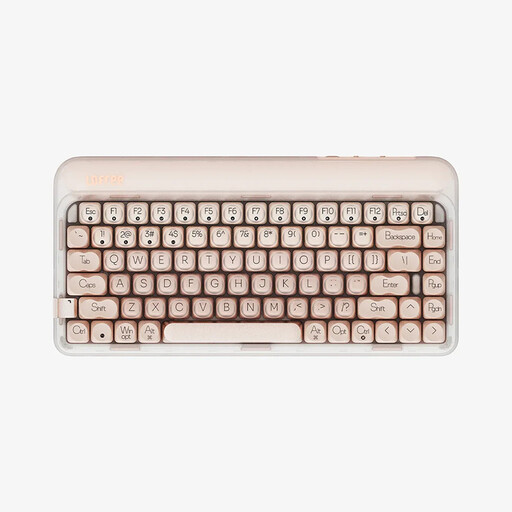
Why This Fits Their Persona: For prolific writers who appreciate the tactile feedback of mechanical keys but want a more comfortable, softer, and quieter typing experience for long work sessions.
This model forgoes a misleading "ergonomics" label and instead focuses on a verifiable comfort feature: a gasket-mount structure that dampens vibrations and noise, thereby reducing finger fatigue.
The combination of hot-swappable, factory-lubed linear switches and multi-layer sound dampening (PORON, IXPE) provides an exceptionally soft and quiet typing feel.
We have compiled a complete, up-to-date list of products that fully meet these strict selection criteria and UK/US safety regulations.
The adjustment period varies from person to person, but it typically takes anywhere from a few days to two weeks. Initially, your typing speed may decrease as your muscle memory adapts to the new hand position. It helps to plan shorter typing sessions at the beginning and consciously focus on maintaining a relaxed posture.
An ergonomic keyboard can help promote a more neutral posture for your wrists and forearms. This can reduce the strain on tendons and nerves caused by unnatural positions. However, it's important to emphasize that a keyboard is not a medical device. For existing conditions, using a keyboard for tendinitis or carpal tunnel syndrome should be considered a supportive measure and ideally discussed with a doctor or physical therapist.
Most wireless ergonomic keyboards work via plug-and-play as soon as they are connected via Bluetooth or the included USB receiver. Special software is not required for basic functions. However, manufacturers like Logitech offer optional software (e.g., Logitech Options) that allows you to customise keys, create app-specific profiles, and monitor battery status. This can enhance functionality but is not essential for the ergonomic benefits.