
Lieferung heute & morgen

Qualitätsgarantie

Willkommens-Angebote freischalten: KOSTENLOSE Lieferung | Bis zu 80 % RABATT | Kostenlose 30-Tage-JoyPlus-Testphase
App herunterladen
Long workdays at the computer lead to tension and pain in the hands, wrists, and arms for many people. An ergonomic keyboard is often touted as the solution, but the market is overwhelming. Many products don't live up to their marketing promises. This guide will help you identify the critical features and avoid common purchasing traps.
Before you invest, you should be aware of the typical problems that can lead to a bad purchase. Often, it's the seemingly minor flaws that make a product unusable in the long run.
Trap 1: "Ergonomic" as a Pure Marketing Buzzword. Many keyboards advertised as ergonomic offer little more than a slight curve or a simple, hard plastic wrist rest. However, true ergonomic benefits only come from a thoughtful overall design that promotes a natural posture for your hands and arms. A mere marketing label without verifiable design features is a red flag.
Trap 2: Lacking or Insufficient Adjustability. Every body is different. A keyboard that doesn't allow you to adjust the tilt angle may force your wrists into an unnatural position. Particularly critical is the absence of a negative tilt, where the front of the keyboard is raised to prevent the wrists from bending upward.
Trap 3: Poor Compatibility and Connectivity. A wireless ergonomic keyboard offers more flexibility on your desk. But issues with Bluetooth pairing, short battery life, or a lack of driver support for your operating system (e.g., an ergonomic keyboard for Mac) can quickly make daily use frustrating.
To make an informed decision, focus on objective, technical parameters. These three aspects are crucial for long-term comfort and utility.
The most striking feature of many high-end ergonomic models is the split keyframe. A split keyboard allows you to position your hands in a straight line with your forearms. This reduces lateral wrist deviation (ulnar deviation), a common cause of discomfort. Models like the Logitech ERGO K860 combine this split layout with a vertical curve to bring the hands into an even more natural, handshake-like position. Make sure the layout corresponds to the standard English QWERTY format.
A good keyboard with a wrist rest is essential. It should not only be present but also functional.
A modern ergonomic keyboard should integrate flawlessly into your existing tech setup. Check the connection options before buying. Dual connectivity via Bluetooth Low Energy and a 2.4 GHz USB receiver offers maximum flexibility for various devices like laptops, desktops, or tablets. Ensure the keyboard is explicitly compatible with your operating system (Windows and/or macOS) and ideally allows for easy switching between multiple paired devices.
Based on the criteria above, we have selected products for different needs and user groups.
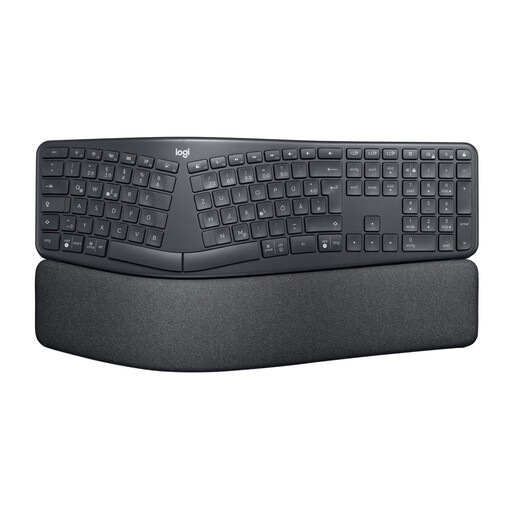
Why This Fits Their Persona: For individuals who type for many hours a day, advanced ergonomic support is essential. This model is aimed at programmers, writers, and office professionals who want to invest in their health and productivity.
The design is more than just a marketing label. It combines a split and curved keyframe with a three-layer, cushioned palm rest and adjustable tilt angles (-4°/-7°) to demonstrably improve posture.
Promotes a natural posture and, according to the manufacturer, can reduce muscle activity in the upper trapezius by 21%. Dual connectivity for Windows and Mac.

Why This Fits Their Persona: For users who are feeling the first signs of strain but aren't ready to invest in an expensive keyboard. This wrist support offers a targeted and cost-effective first step.
Instead of spending money on an ineffective "pseudo-ergo" keyboard, this product addresses the symptom of instability directly. It's an honest, focused solution without false promises.
Provides stabilization for the wrist during repetitive tasks. The one-size-fits-all design and semi-open construction allow for flexible use during work or other activities.
We have compiled a complete, up-to-date list of products that fully meet these strict selection criteria and safety regulations.
1. How long does it take to get used to a split keyboard?
The adjustment period for a split or curved keyboard layout typically lasts between one and two weeks. It's normal for your typing speed to decrease slightly at first. Start with shorter typing sessions and gradually increase the duration of use. The short-term effort is often offset by the long-term gain in comfort.
2. Is an ergonomic keyboard helpful for tendonitis or carpal tunnel syndrome?
An ergonomic keyboard can help reduce the strain on tendons and nerves by promoting a more neutral posture for the wrist and forearm. This can be a supportive measure for individuals with conditions looking for a keyboard for tendonitis. However, it's important to emphasize that a keyboard is not a medical cure. For persistent or severe pain, consulting a doctor for diagnosis and treatment is essential.
3. Does the Logitech ERGO K860 work with a Mac?
Yes, the Logitech ERGO K860 is fully compatible with macOS and Windows. It can be connected via either Bluetooth or the included Logi Bolt USB receiver. The keys are often labeled for both operating systems (e.g., with cmd/alt and opt/start), which makes usage seamless for Mac users.