
Lieferung heute & morgen

Qualitätsgarantie

Willkommens-Angebote freischalten: KOSTENLOSE Lieferung | Bis zu 80 % RABATT | Kostenlose 30-Tage-JoyPlus-Testphase
App herunterladen
Anyone who spends many hours at a desk each day knows the strain it puts on hands and wrists. An ergonomic keyboard is often touted as the solution, but the market is flooded with products of questionable benefit. Before making a purchase, it's crucial to understand the most common pitfalls to avoid falling into a marketing trap and buying a keyboard that does more harm than good.
As your Joybuy Product Recommendation Officer, I'll help you define objective criteria for your selection and show you what truly matters in a keyboard like the Logitech ERGO K860.
Many keyboards marketed as "ergonomic" don't meet the basic requirements for promoting healthy posture. Watch out for these three common flaws:
To avoid a bad purchase, you should focus on verifiable technical features rather than trusting marketing promises. Here are the three most important criteria for a functional wireless ergonomic keyboard.
The defining feature of a true ergonomic keyboard is the split keyframe (split design). This construction allows your hands and forearms to rest on the keyboard in a straight, natural line. This reduces pronation—the unhealthy inward rotation of the wrists.
Additionally, the option for a negative tilt angle is important. While conventional keyboards slope upwards, bending the wrists back, a keyboard with negative tilt allows you to lift the front edge. This lets the wrists drop slightly downwards, promoting a neutral and relaxed posture that can help make it a great keyboard for wrist pain.
The palm rest is not an optional accessory but an integral part of the ergonomic design. A high-quality rest consists of several layers:
A firmly integrated rest ensures that the distance and height relative to the keyboard are perfectly aligned.
In modern work environments, seamlessly switching between different devices is essential. A good ergonomic keyboard should offer both a stable wireless connection (e.g., via a USB receiver) and Bluetooth. Ensure the keyboard is explicitly designated as a keyboard for Mac and Windows and allows for easy switching between devices at the touch of a button.
Based on the objective criteria mentioned above, we have curated a selection of products suitable for different needs and user profiles.
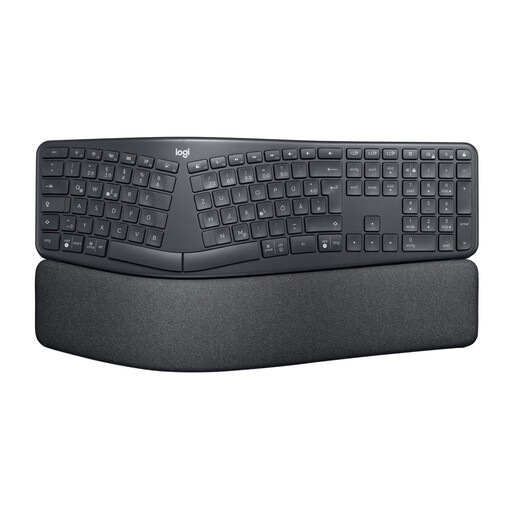
Why This Fits Their Persona: Ideal for programmers, writers, and office professionals who type for hours daily and are looking for a sustainable solution to improve comfort and posture. The keyboard is designed for durability and intensive use.
The Logitech K860 QWERTY features a true split and curved keyframe, a three-layer cushioned palm rest, and adjustable feet for a negative tilt (0°, -4°, -7°). It successfully addresses all the common pitfalls mentioned.
According to Logitech, the design reduces muscle activity in the upper trapezius by 21% and provides 54% more wrist support. Seamlessly switch between up to 3 devices (Mac/Windows).

Why This Fits Their Persona: For individuals who require targeted wrist stabilisation beyond ergonomic equipment, whether for computer work or other activities that strain the joint.
This product avoids the fallacy that a keyboard alone can solve all discomfort. It offers direct, mechanical support, complementing an ergonomic workspace rather than replacing it.
Provides targeted compression and stabilisation for the wrist. The one-size-fits-most design allows for flexible adjustment to individual needs.
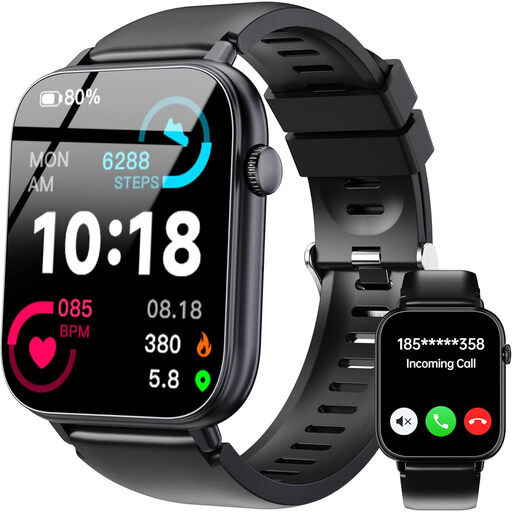
Why This Fits Their Persona: For users who take a holistic approach to their health. This smartwatch complements an ergonomic workstation by encouraging more movement and tracking key health metrics.
It shifts the focus from reactive pain avoidance to proactive health promotion. It serves as a reminder that ergonomics extends beyond the desk to include regular breaks and movement.
Features like the inactivity alert motivate regular breaks. Continuous heart rate and SpO2 monitoring provide valuable insights into your well-being throughout the workday.
In addition to an ergonomic keyboard, other tools can help alleviate wrist strain. We've compiled a list of products that meet our strict selection criteria.
Switching from a conventional to a split keyboard requires a short adjustment period. Most users report getting comfortable with the new layout within a few days to a week. It's recommended to type more slowly at first to help your muscles adapt to the new, more relaxed hand posture.
Yes, the Logitech ERGO K860 is designed for use with multiple devices and operating systems. It can be connected to up to three devices simultaneously via the Logi Bolt USB receiver or Bluetooth. The Easy-Switch buttons allow you to seamlessly switch between a Windows PC, a MacBook, and a tablet, for example.
The keyboard is powered by two AAA batteries, which are included in the box. According to Logitech, the battery life is up to two years, depending on usage. The Logitech Options software includes a battery level indicator that notifies you in advance when a change is needed.