
Lieferung heute & morgen

Qualitätsgarantie

Willkommens-Angebote freischalten: KOSTENLOSE Lieferung | Bis zu 80 % RABATT | Kostenlose 30-Tage-JoyPlus-Testphase
App herunterladen
Published on August 29, 2026 by Joybuy Product Recommendation Officer
Anyone who spends many hours at a desk every day is familiar with the typical complaints: neck tension, wrist pain, or a tingling sensation in the fingers. An ergonomic keyboard is often touted as the solution, but the market is overwhelming. Many products promise comfort but fail to deliver. Before you make a decision, you should be aware of the most common pitfalls that can lead to a purchase you'll regret.
To make an informed choice, you should focus on objective criteria rather than marketing buzzwords. The following three aspects are decisive for a keyboard's comfort and functionality.
The shape of the keyboard is the most important factor in promoting a neutral hand and arm posture. There are three main designs:
A good wrist rest is more than just a piece of plastic. It should be cushioned and keep the wrists in a straight, unstrained position. Even more important is the tilt angle:
A wireless ergonomic keyboard offers more flexibility in positioning on your desk. Pay attention to the connection technology (a stable 2.4 GHz receiver or Bluetooth) and battery life. For Apple device users, it's also important to check compatibility, as not all keyboards and software features are optimised for an ergonomic keyboard for Mac.
Based on the criteria above, we have identified a few models that are well-suited for different user profiles and requirements.
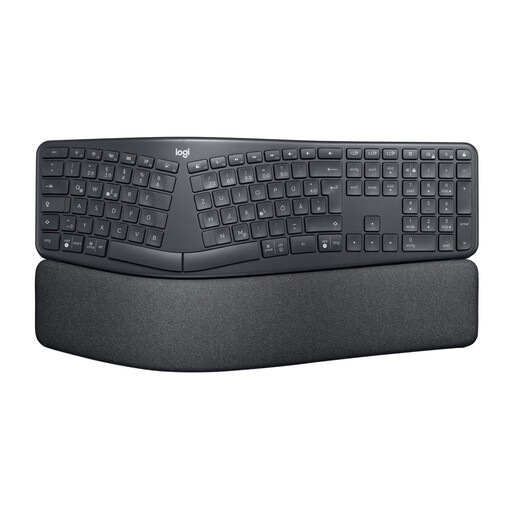
Why This Fits Their Persona: Ideal for professionals like programmers or writers who type for many hours daily and are looking for a comprehensive solution to reduce strain on their wrists and forearms.
This model goes beyond a mere marketing label. The curved, split keyframe and adjustable tilt angles (including negative tilt) are concrete design features that promote a more natural posture.
The three-layer, cushioned wrist rest provides comprehensive support. Connectivity via Bluetooth or USB receiver ensures flexibility and compatibility with both Windows and Mac.
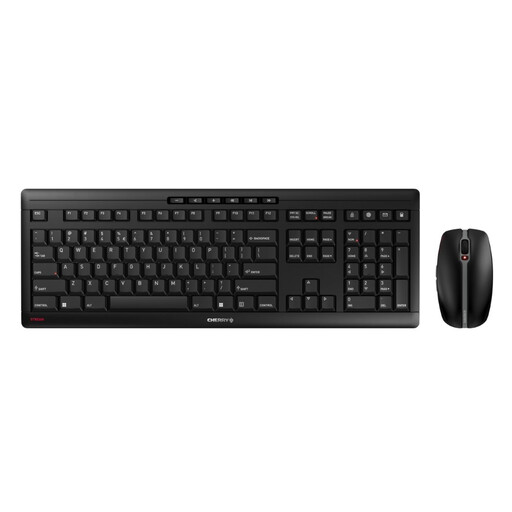
Why This Fits Their Persona: A great choice for office or home office users who want to improve typing comfort without having to adapt to a completely new layout. The set offers excellent value for money.
This set relies on proven quality instead of exaggerated ergonomic claims. The focus is on a high-quality, quiet, and precise typing experience through the CHERRY SX scissor mechanism, which reduces finger fatigue.
The keyboard is very stable and non-slip thanks to an integrated metal plate. Rechargeability via USB-C is convenient and eco-friendly. The quiet keys are ideal for open-plan offices.
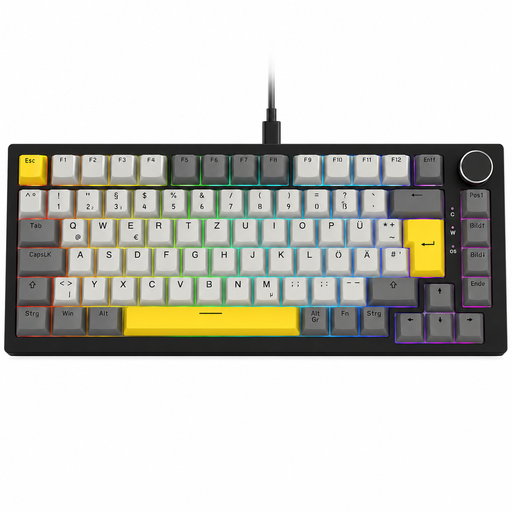
Why This Fits Their Persona: Perfect for users who prefer a mechanical typing feel and value a tidy desk. The compact 75% layout saves space without sacrificing essential function keys.
This keyboard avoids the "one-size-fits-all" trap by focusing on a specific user group. Comfort here comes from the tactile feedback of the mechanical switches and the gasket-mount structure, which dampens vibrations.
The hot-swappable design allows mechanical switches to be replaced without soldering, so the typing feel can be customized. The practical volume knob is a useful detail for everyday use.
We've compiled a complete, up-to-date list of products that fully meet these strict selection criteria.
The adjustment period is different for everyone, but it typically ranges from a few days to two weeks. Your typing speed may decrease at first as your muscle memory adapts to the new hand position. It's helpful to start with short typing sessions and gradually increase their duration.
An ergonomic keyboard is not a medical device and cannot cure medical conditions. Its design aims to position the wrists and arms in a more neutral, less strenuous posture. This can help reduce the strain that may lead to conditions like tendinitis, making it a good choice for a keyboard for tendinitis prevention. However, if you have existing or persistent pain, it is essential to consult a doctor or physical therapist.
Most modern wireless keyboards are compatible with both Windows and macOS. Models like the Logitech ERGO K860 offer dedicated support for both systems, often with keys labeled for both operating systems. Nevertheless, it is advisable to check the product description for explicit Mac compatibility before purchasing, especially if you plan to use special software for key customisation.