What should you look for when buying?
First, compare the design with your available desk space and preferred hand position. Then consider the connection, layout and any adjustment period to decide whether the model suits your writing routine.
Compact wave keyboard
A good fit if: You have limited desk space and prefer a more familiar keyboard layout. Logitech describes the Wave Keys as compact and lists Bluetooth or the included receiver as connection options.
Consider: The wave design doesn’t let you position the keyboard halves independently. Check the layout of the specific model.
Fixed split keyboard
A good fit if: You want to try a split layout and have enough desk space for it. The Logitech ERGO K860 offers Bluetooth or a USB receiver, according to the manufacturer. The Perixx PERIBOARD-512 B is a wired alternative available in a selected German QWERTZ version.
Consider: Perixx says the PERIBOARD-512 B takes time to get used to. The right hand position also depends on more than just the keyboard’s design.
Curved full-size wired keyboard
A good fit if: You have a compatible USB-A port and don’t need a wireless connection. The CHERRY KC 4500 ERGO has a 1.8 m cable and is available in a DE version.
Consider: At 456 × 217 mm, it needs desk space. CHERRY lists Windows and USB-A as requirements.
| Priority |
What to check before buying |
Who is it important to? |
| Hand and forearm position |
Consider the keyboard, support and possible positions for your hands and forearms at your own desk. |
If I write for long periods, I want to be able to position my hands and forearms comfortably. Around 33% of consumers put a comfortable hand position first. |
| Desk space |
Measure the free space on your desk and compare it with the dimensions of the specific model. |
If I need to leave room for a mouse and notes beside the keyboard, the actual amount of desk space it takes up matters most to me. Around 27% of consumers are likely to place particular importance on this. |
| Layout and connection |
Check that DE/QWERTZ and USB-A, Bluetooth or a receiver are compatible with your device. |
If I want to type in German straight away and connect the keyboard to my existing device, both need to be right. Around 20% of consumers prioritise layout and connection. |
| Adjustment period |
If possible, try an unfamiliar keyboard layout before a long writing session, and check the return terms for the specific offer. |
If a deadline is coming up, I don’t want to be getting used to a new keyboard while I’m writing. For around 20% of consumers, the adjustment required is a key consideration. |
Joybuy products for longer writing sessions
These Joybuy products offer a range of keyboard sizes and connection types for longer writing sessions. For each specific model, check that the layout and connection are right for your device.
 No image available
Ergonomic USB keyboard with 104 keys
This keyboard is described as suitable for longer typing sessions and could work well with a wired setup.
104 keys; USB connection with a 1.35 m cable; dimensions: 445 × 145 × 20 mm. Check that the layout of the specific model meets your needs.
View at Joybuy
 No image available
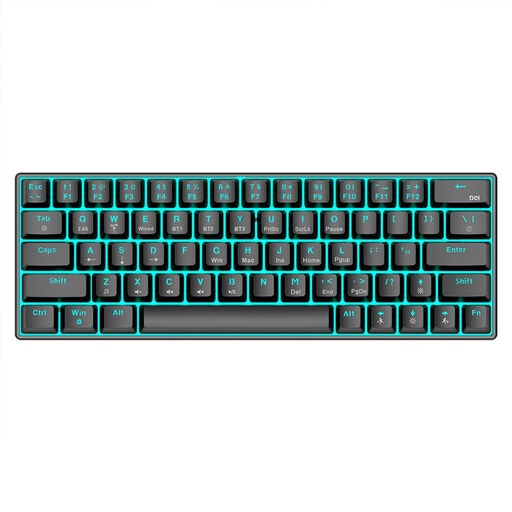
KINSI Compact Mechanical Gaming Keyboard, 63 keys
The compact 63-key design is an option if you have limited space for a keyboard.
Bluetooth 5.0, 2.4 GHz wireless and a USB cable are listed as connection options. Check the layout of the specific model if you’ll be typing in German.
View at Joybuy
 No image available
Wireless QWERTZ keyboard and mouse set with wrist rest
The explicitly stated QWERTZ layout may be useful if you’re typing in German.
Full-size design with number pad, detachable wrist rest and 2.4 GHz USB receiver. The set is described as compatible with Windows and Mac.
View at Joybuy
 No image available
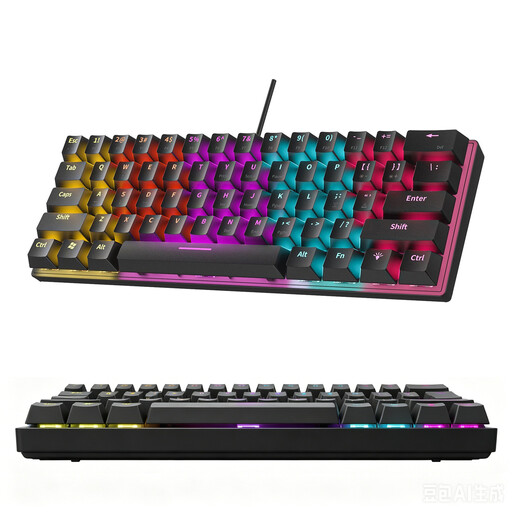
KINSI 60% Mechanical Gaming Keyboard, 61 keys
The compact design may suit a student-room desk where you want the keyboard to take up as little space as possible.
61 keys and 12 lighting modes. The product details state that a German layout is not available, so bear this in mind if you want to type using a German QWERTZ layout.
View at Joybuy
 No image available
Siukie Wired Mechanical Keyboard, 108 keys
This wired keyboard is a full-size option if you want 108 keys and an adjustable tilt.
The title specifies a US layout. Before buying, check that it suits your typing needs.
View at Joybuy
Frequently asked questions
How should I set up a keyboard and mouse on a small desk?
Allow space to arrange your keyboard and mouse flexibly, as well as for hand-and-arm support. The BAuA also recommends avoiding prolonged static postures. This is no guarantee that a particular keyboard model will resolve discomfort.
Do I need special software for an ergonomic keyboard?
Not necessarily. According to the manufacturer, the CHERRY KC 4500 ERGO uses USB-A; CHERRY KEYS is optional and lets you configure keys. Available connections vary by model: Logitech lists Bluetooth or the included receiver for the Wave Keys.
What are my options if an online keyboard order in Germany doesn’t feel right?
Online purchases generally come with a 14-day right of withdrawal. You have to notify the seller that you’re withdrawing from the purchase; simply sending the goods back without explanation isn’t enough. This is separate from your statutory warranty rights if the goods are faulty. The German federal government states that the warranty period is two years; check the terms of the specific offer.
Do workplace rules apply to personal writing in a student room?
ASR A6 covers screen work in workplaces and teleworking settings. Its stated exceptions include use in private spaces outside such workplaces. It is therefore not a blanket legal requirement for a student room set up for personal use, although ergonomic advice can still be useful when arranging it.
How should I dispose of a keyboard and batteries in Germany?
Electrical waste must not be put in household rubbish. The German Environment Agency lists local collection points and take-back options at retailers. Removable batteries should be taken out and disposed of separately at battery collection points.


