Prolific script writers
If you write long passages at a time, consider the hand position, palm rest and typing feel of the specific keyboard. A keyboard is no substitute for getting existing symptoms assessed.


When writing long radio scripts across two screens, your keyboard should suit the way you position your hands, the keys you need for editing text and the space available for your mouse. A fixed split or wave-shaped design can feel more familiar to start with, while two independently positionable halves offer greater flexibility but call for closer checks of the layout and controls. According to the German Social Accident Insurance Institution for Occupational Safety and Health (IFA), the usual recommendations for ergonomic screen-based work largely apply to workstations with two screens.
If you write long passages at a time, consider the hand position, palm rest and typing feel of the specific keyboard. A keyboard is no substitute for getting existing symptoms assessed.
If you often revise wording and select text, look for navigation and function keys that are easy to reach. The exact key layout varies by model.
If you often switch between your script, research and the mouse, take into account the space beside the keyboard and how far away the mouse is. BG BAU notes that a compact keyboard may be beneficial if you use the mouse with your right hand.
According to the German Social Accident Insurance Institution for Occupational Safety and Health (IFA), the usual recommendations for ergonomic screen-based work largely apply to a two-screen setup. BG BAU notes that a compact keyboard can bring the mouse closer if you use it with your right hand.
A good fit if: You write long passages and want a split hand position without having to position two separate halves.
Consider: The shape cannot be adjusted independently to suit your shoulder width and arm position; a full-size model with a number pad may take up more room for your mouse.
A good fit if: Frequent switches to the mouse and a familiar feel are more important than having a fully split keyboard.
Consider: Unlike a split keyboard, the two halves cannot be positioned separately.
A good fit if: You want to set the distance and angle of each hand precisely and are happy to get used to the layout.
Consider: Check the key layout and German legends carefully. For the Dygma Raise 2, the manufacturer lists English US or English UK as the standard options; German ISO keycaps are available separately.
| Priority | What to check before buying | Who is this important to? |
|---|---|---|
| Hand position and typing feel | Check the split keyboard layout, palm rest and tilt on the specific model. | When I write long passages of a script, I want to find a hand position that feels comfortable at my own desk. Around 33% of consumers put typing comfort first. |
| Text navigation and layout | Check how easy the arrow and function keys are to reach, as well as the legends on the version you are ordering. | When editing German text, I want to access characters and navigation commands without taking a detour. Around 25% of consumers prioritise text navigation and a German layout. |
| Mouse space and positioning | Compare the keyboard’s width, including the number pad and palm rest, with the space available on your desk. | If I often switch between my keyboard and mouse, I want the mouse to remain within easy reach beside the keyboard. Around 25% of consumers prioritise mouse space and positioning. |
| Connectivity and compatibility | For wired models, check the connection; for wireless models, check Bluetooth or the receiver, as well as which devices are supported. | At my regular desk, I want to connect the keyboard to my work devices without extra setup steps. Around 17% of consumers put connection compatibility first. |
Fixed split, wave-shaped and independently split keyboards can all be positioned differently. A split keyboard may also take time to get used to; Perixx notes this for its corresponding model.
Check the key positions and setup at your desk. If you already have symptoms, don’t assume a keyboard will treat them.
An unfamiliar layout may take time to get used to and could mean switching to a different model later.
A wide, full-size keyboard with a number pad can make the mouse harder to reach if you use it frequently with your right hand.
Measure the space available, including the palm rest, and compare it with the keyboard’s dimensions.
The legends depend on the specific version. For the Dygma Raise 2, the manufacturer lists English US or English UK as the standard options; German ISO keycaps are available separately. CHERRY clearly identifies its German version as JK-4500DE-2.
Before buying, check the version name and which keycaps are actually included.
Some configurations may require additional keycaps.
The ERGO K860 is a fixed-split, full-size keyboard, while the Wave Keys offers a more compact wave-shaped design.
The KC 4500 ERGO is a wired, full-size option for a permanent workstation.
The PERIBOARD-512 B is a fixed-split, wired, full-size option.
The Raise 2 is aimed at buyers who want to make deliberate use of two keyboard halves and configurable keys.
The Freestyle2 is another split design, with the distance and angle adjustable to suit your preferences.
This selection ranges from compact models that leave more space beside the keyboard to a split keyboard. In particular, check whether versions explicitly labelled as having a US layout have legends that suit German scripts.
 No image available
Its compact design may suit a workstation where you often switch to the mouse.
QWERTZ layout; Bluetooth connection with switching between up to three devices.
 No image available
This compact format is an option if you need room for frequent mouse movements at your desk.
63 keys; Bluetooth 5.0, 2.4 GHz wireless and USB cable connection options.
 No image available
The fixed split, curved design is made for longer typing sessions; check that its full width suits the space available for your mouse.
QWERTZ layout, padded palm rest and adjustable tilt feet; 456 mm wide. Connects via Bluetooth or USB receiver.
 No image available
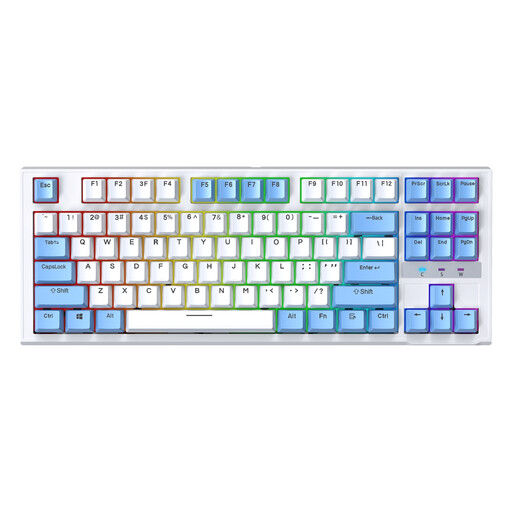
The compact TKL format may suit you if you want to leave more room for your mouse beside the keyboard.
87 keys; wired model explicitly listed with a US layout. It is not identified as a German version.
 No image available
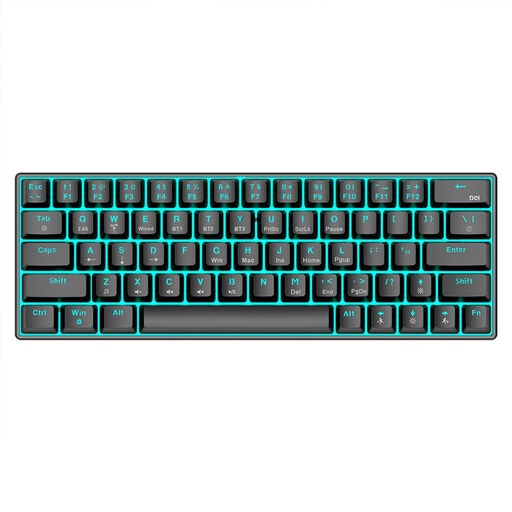
The 61-key format is a compact option for a workstation where you often move the mouse.
61 keys; wired model with US QWERTY layout. It is not identified as a German version.
No, not simply because you use two screens. The German Social Accident Insurance Institution for Occupational Safety and Health (IFA) considers the usual recommendations for ergonomic office screen work to be largely applicable. Your typing needs, mouse movements and available space are what matter when choosing a keyboard.
Position them so that the mouse is easy to reach. BG BAU recommends leaving space to rest your hands between the edge of the desk and the keyboard, and notes that a compact keyboard may be beneficial if you use the mouse with your right hand. Check your hand position and palm rest with your actual desk and screen setup.
Check the instructions for your specific model before cleaning it. In its review of the ERGO K860, F.A.Z. Kaufkompass notes that the gap between the palm rest and keyboard is difficult to clean; this does not automatically apply to every palm rest.
No. For a consumer purchase in Germany, statutory consumer rights are enforceable against the seller; a guarantee is an additional voluntary promise subject to its own terms and conditions. Check the specific offer to see who the seller is and what guarantee terms apply. Verbraucherzentrale explains the difference.
No. The German Environment Agency advises that waste electrical equipment must not be put in household rubbish in Germany. Take your old keyboard to an appropriate collection or take-back point.