First, measure the usable desk space, including room for your mouse and script notes. Then decide whether you’d prefer a familiar wave-shaped design or a keyboard with a fixed split layout. For longer writing sessions, it’s also worth considering a comfortable hand and arm position, the German typing and navigation keys you need, and a connection that works with your computer. No keyboard design is guaranteed to relieve discomfort.
Which keyboard considerations matter to you?
For frequent typists focused on hand position
If you write long passages of script, compare the key shape and hand position with your workspace rather than expecting a keyboard to improve your health. The German Federal Institute for Occupational Safety and Health (BAuA) stresses the importance of having enough space to position the mouse and keyboard flexibly, as well as to rest your hands and arms.
For writers with a small desk
If you need room for both a mouse and script notes alongside your keyboard, compare the actual dimensions with the space available. BAuA recommends considering your workstation layout; CHERRY, for example, lists dimensions of 456 × 217 × 35 mm for the KC 4500 ERGO.
For writers with an established typing routine
If you rely on specific characters, arrow keys or function keys when writing and editing, check the layout of the exact model variant and make sure it connects to your computer. CHERRY offers a German full-size variant, while Kensington lists a German layout for the KB675 EQ TKL.
What to look for when buying
Compact wave-shaped design
A good fit if: You prefer a less pronounced split in the key layout and want to leave room for your mouse and script notes.
The trade-off: A wave-shaped design doesn’t let you position the two halves independently. For wireless models, check the connection type and exact device variant.
Fixed split keyboard
A good fit if: You’d like to try a different position for each hand while typing and have enough space for the keyboard.
The trade-off: A split layout may take some getting used to; Perixx makes this clear.
| What matters |
What to check before buying |
Who might find this important? |
| Hand and arm position |
Compare wave-shaped and split key layouts; allow time to get used to an unfamiliar split design. |
If you write long passages of script, consider how the key layout and hand position feel at your own desk. Around 29% of consumers put hand position first when typing. |
| Desk space |
Measure the usable width and depth; check the keyboard’s dimensions and number pad against your workflow. |
If your desk also needs to accommodate a mouse and papers, you’ll want to leave enough room for them. Around 29% of consumers prioritise the space a keyboard takes up. |
| Typing in German |
Check the full model number and German layout, and make sure the keys you need are included. |
If you regularly use German characters and specific navigation or function keys, the layout should suit the way you work. Around 21% of consumers prioritise the layout and keys they need. |
| Connection and setup |
Check whether your computer uses USB-A, Bluetooth or a compatible wireless receiver; confirm the exact device variant. |
If you want to use the keyboard with your computer without a complicated setup, the right connection is essential. Around 21% of consumers check the connection and ease of use first. |
How to avoid common buying mistakes
-
Focusing only on the word “ergonomic”
The label alone won’t tell you whether the key shape and wrist rest will suit your desk space, mouse position and typing posture. It doesn’t guarantee any particular relief from discomfort.
Measure your workspace and check the position of your hands, arms and mouse as you type. Don’t treat manufacturers’ claims about comfort as a promise of a cure.
-
Assuming compact and split models are interchangeable
A TKL model has no built-in number pad, while a larger split keyboard needs different amounts of desk space and may take longer to get used to.
Choose based on whether you need a number pad, your desk dimensions and the hand position you prefer.
-
Ordering a similarly named variant without checking it
German, Mac and other variants can differ in layout and connection type. A matching model name alone doesn’t confirm that the keyboard will work with your computer.
Compare the full model number, layout, operating system and connection type with your computer and the specific product listing.
Key brands to consider
Logitech
Wave Keys has a compact, wave-shaped design, while the ERGO K860 is aimed at typists who prefer a fixed, curved split layout.
- Logitech lists Bluetooth or the included Logi Bolt receiver as connection options for Wave Keys. Check which one works with your computer.
- The F.A.Z. Kaufkompass review praised the ERGO K860 for typing, but noted the lack of backlit keys and wired connectivity as drawbacks. These findings don’t automatically apply to Wave Keys or other variants.
CHERRY
The KC 4500 ERGO, variant JK-4500DE-2, is a wired option with a German full-size layout for computers with USB-A.
- CHERRY lists a curved key layout, a wrist rest and a 1.8 m cable.
- Check the listed dimensions of 456 × 217 × 35 mm against the space available on your desk. The design doesn’t prove that it will relieve discomfort for you personally.
Perixx
The PERIBOARD-512 B has a wired split layout; the manufacturer says you can also choose a German QWERTZ version.
- Perixx lists USB-A connectivity and an integrated wrist rest.
- The manufacturer notes that it may take time to get used to the keyboard. Before buying, also check whether its dimensions of 485 × 236 × 44 mm will fit your desk.
Kensington
The KB675 EQ TKL has a German layout and no built-in number pad; the larger Pro Fit Ergo K75401DE has a split design.
- Kensington lists two Bluetooth connections and a USB-A wireless receiver for the KB675, and says it is designed for small to medium-sized hands.
- According to Kensington, Windows computers with ARM processors are not currently supported with this model. This limitation applies to the KB675 EQ TKL, not the whole brand.
Keyboards for different writing habits
These Joybuy products vary in size, layout and connection type. Before buying, check that the specific variant suits the way you write, your desk and your computer.
 No image available
Wired USB keyboard with 104 keys
An option if you prefer a wired layout with plenty of keys.
104 keys and a USB connection; the product description mentions an ergonomic shape and X-Architecture key technology.
The listed dimensions are 445 × 145 × 20 mm; according to the description, the cable is 1.35 m long.
View at Joybuy
 No image available
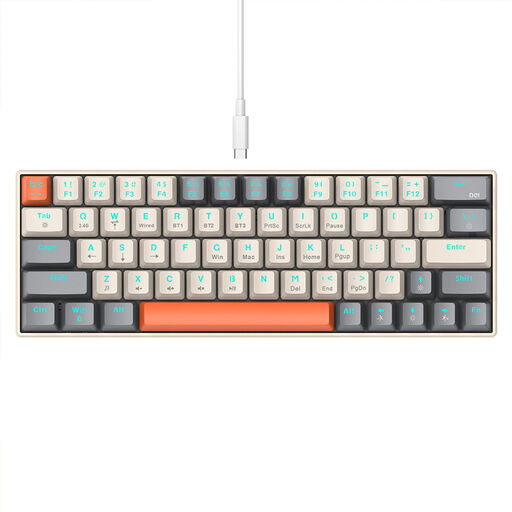
KINSI compact keyboard with 63 keys
This compact layout is worth considering if you want to use less desk space for your keyboard and are happy working with fewer keys.
63 keys; Bluetooth 5.0, 2.4 GHz wireless and a USB-C cable are listed.
The description mentions a stepped key profile. Check that the specific key layout suits the work you do.
View at Joybuy
 No image available
Wireless keyboard and mouse set with QWERTZ layout
A possible choice if you’re looking for a German layout and a keyboard with a number pad, and need a mouse too.
Full-size layout with a number pad, detachable wrist rest and 2.4 GHz USB receiver.
The product name indicates that the set includes a mouse. Check that the listed operating systems match your computer.
View at Joybuy
 No image available
Logitech ERGO K860
This fixed split layout is worth considering if you’d like to try this arrangement and have enough room on your desk.
Split QWERTZ key layout with a wrist rest; Bluetooth and a USB receiver are listed as connection options.
The listed dimensions are 456 × 233 mm. Check that the keyboard and wrist rest will fit on your desk.
View at Joybuy
 No image available
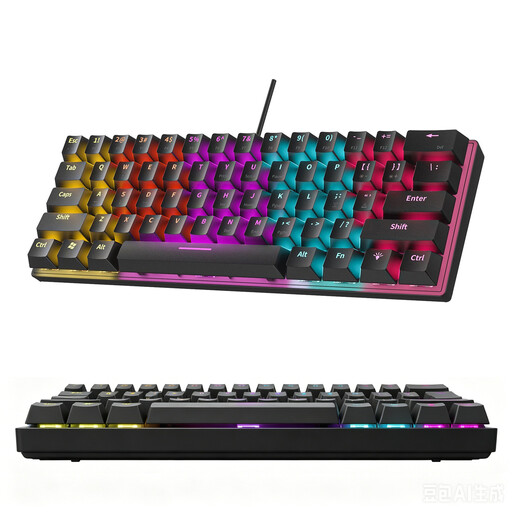
KINSI compact mechanical keyboard with 61 keys
This compact format may suit you if you want to use less desk space for your keyboard.
61 keys and RGB lighting; the product description explicitly states that it does not have a German layout.
Before buying, check that the layout suits your German text and the programme keys you need.
View at Joybuy
Frequently asked questions
Does a keyboard on a student desk need to be set at a particular angle?
For fixed computer workstations, the German Federal Institute for Occupational Safety and Health (BAuA) recommends a keyboard tilt of no more than 15 degrees to limit the angle of the wrists. This is guidance for setting up a workstation, not a blanket legal requirement for every student’s room used at home.
What should I set up before my first writing session?
Check the connection to the computer you’re using, then test German characters and the keys you need in your writing software. Logitech lists Bluetooth and an included Logi Bolt receiver for Wave Keys; CHERRY lists USB-A for the KC 4500 ERGO.
What are my rights when buying a keyboard online from a trader?
For a typical online purchase, you generally have 14 days from delivery to cancel; exceptions and possible conditions on return costs should be checked. If goods are faulty, you have at least two years of statutory rights against the seller. Your Europe, the European Union’s consumer portal, explains these rights; an additional manufacturer’s guarantee does not replace them.


