What to look for when buying
First, consider which keyboard shape suits the way you type. Then check that its size, noise level and connection are right for your shared workspace. The German Federal Institute for Occupational Safety and Health highlights the need for enough room for your keyboard, mouse and support for your hands and arms.
| What matters |
What to check before buying |
Who it matters most to |
| Hand and arm position |
Fixed or adjustable split, tilt and wrist rest; consider your posture while typing. |
If I write long passages, I want a keyboard shape that lets me position my hands and arms comfortably. Around 33% of consumers who prioritise hand and arm position look for this. |
| Desk space and switching between devices |
Compare the keyboard’s dimensions and number pad with the room available for your mouse; check Bluetooth or receiver compatibility with your devices. |
If I share a desk, I want to be able to set up and put away my keyboard without losing space for my mouse. Around 25% of consumers who prioritise desk space and switching between devices take this into account. |
| Typing noise |
If possible, listen to the specific model under similar conditions; don’t treat a switch description as a measure of volume. |
If other people are working in the room, I want to assess the typing noise before deciding. Around 25% of consumers who prioritise quiet typing take it into account when choosing. |
| Key layout and set-up |
Check that the German QWERTZ version, operating system details and available connections are right for your device. |
If I write in German, I want to find the characters I need on the version I choose and be able to set up the keyboard with my device. Around 17% of consumers who prioritise key layout and set-up look for this. |
Joybuy keyboards for a shared desk
This selection includes compact, wave-shaped and fixed split keyboards, as well as wired and wireless models. Compare the key layout and footprint of each version with the way you write.
 No image available
Inateck N0153BK Foldable Mini Keyboard with Touchpad, QWERTZ
The foldable design and built-in touchpad may suit a shared workspace where you don’t always want to leave a separate mouse on the desk.
A QWERTZ layout and three Bluetooth channels are listed. The product details specify a key height of 15 mm and key travel of 1.5 mm.
View at Joybuy
 No image available
Logitech 920-012404 Ergonomic Wave Keyboard, QWERTZ
The wave-shaped key layout is an option if you’re looking for a shaped keyboard rather than halves you can position independently.
This version is listed with a German QWERTZ layout, Bluetooth, a memory foam wrist rest and quiet membrane keys. The description of the sound is not a comparable measurement.
View at Joybuy
 No image available
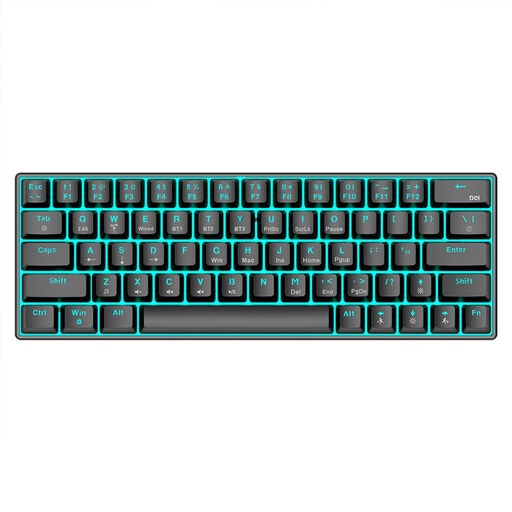
KINSI Compact Mechanical Gaming Keyboard, 63 keys
The compact 63-key layout may be a good fit if there’s limited room for a keyboard on your shared desk.
Connections listed include Bluetooth 5.0, 2.4 GHz wireless and a USB cable. The product name also specifies a stepped key profile and RGB backlighting.
View at Joybuy
 No image available
Logitech ERGO K860, QWERTZ
The fixed split key layout and wrist rest are worth considering if you’re looking for a set ergonomic shape for longer writing sessions. The full-size design needs plenty of room alongside your mouse.
This version is listed as measuring 456 × 233 mm, with three tilt options, Bluetooth and a USB receiver. Logitech says the ERGO K860 can switch between up to three devices.
View at Joybuy
 No image available
Rapoo E9050L 75% Wireless Membrane Keyboard, US QWERTY
The compact design and wireless device switching may be useful if you often rearrange your desk. Note that this version is listed with a US QWERTY layout, not German QWERTZ.
The product details specify 78 keys, Bluetooth and a 2.4 GHz connection. Check that the layout works for the German text you write.
View at Joybuy
Frequently asked questions
Does an ergonomic keyboard for long writing sessions have to have two separate halves?
No. What matters is whether you can position your hands, arms, keyboard and mouse comfortably in your particular workspace. Fixed split, independently positionable and wave-shaped keyboards all offer different options.
How should I set up a keyboard at a shared desk?
Leave room for your keyboard, mouse and somewhere to rest your hands and arms. Position the keyboard to suit your writing session, and if it’s a wired model, check that the cable can reach comfortably.
What can I do if a keyboard I bought online isn’t right for me?
In Germany, consumers generally have a 14-day right to cancel an online purchase contract, and must notify the retailer if they wish to cancel. The consumer advice centre also distinguishes statutory rights for faulty goods from a voluntary guarantee.
Does German workplace law require a particular keyboard for personal essay writing?
The requirements of ASR A6 for employees’ screen-based workstations do not imply a general requirement to use a particular keyboard for personal writing. If the desk is used as a workplace, the applicable requirements should be considered separately.
What should I look for to check the safety of a wireless keyboard?
The German Federal Network Agency recommends checking electronic products for things such as correct CE marking and clear product and manufacturer details. A CE mark shown in a product listing is not, by itself, independent confirmation that the individual device complies with the requirements.


