For writing at length, choose a design based on whether you prefer a fixed split, two independently positionable halves or, above all, a compact keyboard. At a shared desk, you’ll also need to consider the space available, how the keyboard connects to each computer and how to clean it. Logitech and Perixx describe different designs and connection types, but none is automatically right for every workspace.
Which design might suit you?
For frequent typists who want to adjust their hand position
If you write long passages for a book proposal, compare a fixed split with a design that has two separately positionable halves rather than relying on the word “ergonomic” alone. Logitech and R-Go Tools describe different split designs.
For people who move between workstations
If you switch desks and possibly computers too, compatible connections and straightforward setup are important things to consider. Logitech describes Bluetooth and receiver connections for selected models.
For people short on space or mindful of others
If your manuscript, notes and mouse all need to fit on the desk, or other people are working alongside you, check the keyboard’s width and how the manufacturer describes its typing noise. CHERRY calls its TKL design space-saving; that does not amount to an independent noise measurement.
What to look for when buying
First, decide which constraint matters most at your desk: hand position, typing noise, switching between computers, or space for your documents and mouse.
| Buying priority |
What to check |
Who will find this especially important |
| Hand position during long writing sessions |
Check that the letter keys are comfortable to reach and whether the split is fixed or adjustable in two halves. |
When I’m writing long passages for a book proposal, I want to find a hand position that feels natural to me. Around 31% of consumers put hand position first. |
| Quiet typing |
Check the key mechanism, and don’t treat the manufacturer’s noise claims as an independent comparative test. |
When other people are working at the desk, I want to keep disruption to a minimum while I type. Around 25% of consumers put quiet typing first. |
| Connection when changing desks |
Check Bluetooth availability, USB ports and receiver type on each computer; if extra software is needed, check whether you’re allowed to install it. |
When I set up the keyboard at different workstations, I want to know which connection will work there. Around 25% of consumers prioritise an easy change of workstation. |
| Clear desk space |
Measure the space with your documents laid out, and check whether you need a number pad. |
When I need room for my manuscript, notes and mouse side by side, I don’t want to take up more space than necessary. Around 19% of consumers put clear desk space first. |
What to watch out for at a shared desk
-
Assuming “ergonomic” means the split is fully adjustable
A keyboard with a fixed split doesn’t automatically have two independently positionable halves. According to R-Go Tools, the R-Go Split Break Version 2 comes in separate parts; other models have a fixed shape.
Before buying, decide whether a set angle will suit you or whether you want to adjust the distance between the halves yourself.
An unfamiliar layout may take some getting used to. Switching designs may also mean having to find a key layout that suits you all over again.
-
Mistaking a US layout for a German QWERTZ keyboard
A model range name doesn’t necessarily tell you which layout a specific variant has. A Joybuy product listing for the CHERRY STREAM KEYBOARD TKL explicitly specifies a US layout with a euro symbol.
Check the layout and full variant code on the specific listing before placing your order.
An unsuitable layout can make typing more difficult and create extra hassle, for example if you need to arrange a return.
-
Assuming a wireless connection or extra feature will work without checking your workstation
The models described use different connections, including Bluetooth, USB receivers and USB-A cables. A software-controlled break reminder may also depend on the rules for the shared computer.
Before buying, check the available ports and find out whether you’re allowed to use any required software on the computer in question.
Depending on the model, you may need a compatible connection or permission to install the software.
Brands to consider
Logitech
The ERGO K860 and Wave Keys offer different designs: a fixed split keyboard and a more compact wave-shaped model.
- For the ERGO K860, Logitech lists Bluetooth, a USB receiver and switching between devices. For the Wave Keys, it describes Bluetooth, Logi Bolt and Easy-Switch.
- The designs differ, and neither replaces the need to adjust the rest of your workstation. The manufacturer’s claims about ergonomic benefits do not prove that the keyboard will have a particular effect for you.
Perixx
The PERIBOARD-512 B is a wired, fixed-split keyboard with a number pad.
- Perixx lists USB-A, membrane switches and dimensions of 485 × 236 × 44 mm.
- Make sure its dimensions fit the space available. Perixx notes that it may take time to get used to the split keyboard; claims about preventing discomfort are not confirmed evidence of an effect.
R-Go Tools
The Split Break Version 2 is designed for people who want to position the two halves of the keyboard separately.
- R-Go Tools describes two halves that connect magnetically, along with a software-controlled break reminder.
- You’ll need to set up the two halves again when you change workstations. If you use a managed computer, check whether the necessary software is permitted.
CHERRY
The STREAM KEYBOARD TKL is a low-profile, wired keyboard without a number pad or split letter keys.
- CHERRY lists SX scissor keys and a German product variant with the code JK-8600DE-2.
- One Joybuy variant is listed with a US layout and euro symbol, so it should not be confused with the German-layout version.
Keyboard options at Joybuy
These Joybuy keyboard options range from foldable compact models to ergonomically shaped designs for different workstations.
 No product image available
Inateck Foldable Mini Keyboard with touchpad, QWERTZ, N0153BK
The foldable design with an integrated touchpad is worth considering if there’s little room for a separate mouse at your shared desk.
The product name lists 3 Bluetooth channels and compatibility with iPadOS, Android and Windows.
Joybuy
 No product image available
Logitech 920-012404 Ergonomic Wave Keyboard, German QWERTZ layout
The wave-shaped design is an option if you’re looking for a different key layout from that of a fixed-split keyboard.
The product name lists Bluetooth, multi-device connectivity, quiet membrane keys and a memory foam palm rest. This model is described as grey-white with a German QWERTZ layout.
Joybuy
 No product image available
NAXSIR foldable Bluetooth keyboard with magnetic stand, black
The foldable design and stand are an option if you use a mobile writing setup and want to put the keyboard away after work.
The product name lists Bluetooth, a rechargeable battery, quiet keys and a magnetic stand for a mobile phone or tablet.
Joybuy
 No product image available
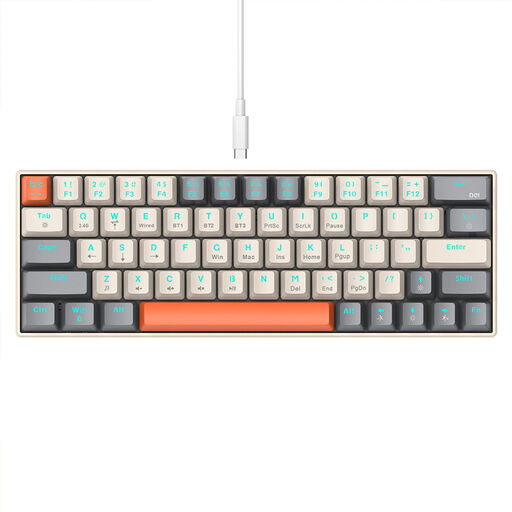
KINSI Compact Gaming Keyboard, 63 keys
The compact 63-key design may suit you if there’s little room beside the keyboard for your manuscript and mouse.
The product name lists mechanical keys, Bluetooth and a 2.4 GHz wireless connection.
Joybuy
 No product image available
Logitech ERGO K860, graphite, QWERTZ
This fixed-split keyboard may suit you if you want to try a set split layout rather than separately positionable halves.
Logitech lists Bluetooth, a USB receiver and device switching for the ERGO K860. The product description specifies a QWERTZ layout.
Joybuy
Frequently asked questions
How do I set up a split keyboard at a desk I use at different times?
Position the keyboard and screen to suit your seated posture, leaving room for your mouse and documents. Logitech recommends aligning the split on the ERGO K860 with the centre of your body and screen; this is a manufacturer recommendation for that specific model. The German Social Accident Insurance (DGUV) treats suitable equipment and setup for desk sharing as part of workstation design.
Do I need to install software for the break reminder on the R-Go Split Break?
R-Go Tools says the LED indicator is controlled by R-Go Break software. If the shared computer is managed, check before buying whether you’re allowed to use the software on it. The two separately positionable keyboard parts are a design feature in their own right.
How should I clean shared input devices?
Check the cleaning routine at your workplace and follow the care instructions for the specific model. A cleaning test described by Logitech for selected education products doesn’t prove that the ERGO K860 or Wave Keys can be cleaned with the same products or as frequently.
What are my rights in Germany if I don’t get on with a keyboard bought online or it’s faulty?
For online purchases by consumers, you generally have a 14-day right to cancel from the date you receive the goods; exceptions and the specific contract should be taken into account. The Verbraucherzentrale distinguishes this right from the statutory rights you have against the seller if goods are faulty. These are not the same as a voluntary guarantee. For new goods, it generally specifies a period of two years from delivery.
Does German health and safety law require a particular ergonomic keyboard for this desk?
Simply describing a desk as “shared” does not mean a specific model is required. For employees using display screen equipment at a workplace, the German Social Accident Insurance (DGUV) says that the requirements of the Workplace Ordinance generally apply; they also apply to display screen workstations used for desk sharing. The ASR A6 sets out its scope and, according to the Federal Institute for Occupational Safety and Health, allows other solutions if they provide at least equivalent protection. These duties towards employees cannot simply be applied to private writing work.


